12 Best Scanner for Broadcastify Top Picks for Every Budget
If you want to listen to live police, fire, and emergency radio transmissions, having the right scanner makes all the difference. Finding the best scanner for Broadcastify can help you tune into these streams with clarity and reliability. Choosing a scanner suited for Broadcastify is ideal for police scanners, hobbyists, and anyone interested in public safety communications.
The right device offers easy setup, good reception, and compatibility with multiple frequencies. This review will explore some of the best options available, highlighting their key features, ease of use, and why they stand out for Broadcastify users.
Whether you want a handheld or desktop model, this guide will help you select the scanner that fits your needs.
Unlock Top Choices for Seamless Radio Monitoring and Scanning
| Image | Product | Price |
|---|---|---|
Our Top Picks 1  | Epson Workforce ES-50 Mobile Document Scanner | Check Price |
Our Top Picks 2  | Tera Wireless 1D Laser Barcode Scanner | Check Price |
Our Top Picks 3 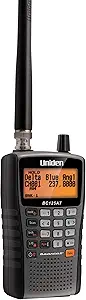 | Uniden Bearcat BC125AT Handheld Scanner | Check Price |
1. Epson Workforce ES-50 Mobile Document Scanner
Small and lightweight, this mobile document scanner delivers fast, efficient scanning wherever you go. It is perfect for professionals needing reliable, portable scanning of documents and receipts. The Epson Workforce ES-50 offers quick scanning speed with a single page done in just 5.5 seconds.
It supports documents up to 8.5 by 72 inches, making it versatile for various paper sizes. The scanner includes convenient software, Epson ScanSmart, which simplifies scanning, reviewing, and saving digital files. Build quality feels solid and compact for easy transportation.
Performance is smooth and consistent, with OCR technology to create searchable and editable files. Setup is simple via USB, requiring no extra power supply or batteries. This scanner integrates well with Windows and Mac systems and supports cloud uploading.
The auto-feed mode helps merge multiple pages into one file, saving time. Its lightweight, thin profile makes it very easy to carry for on-the-go use. This model offers excellent value for business users, students, or anyone needing quick document digitization away from an office.
It stands out for its portability and efficient features without complicated setups or bulk.
Pros
- Very fast scanning speed
- Lightweight and portable design
- Includes OCR for editable files
Cons
- Single sheet feeder only
- USB 2.0 limits transfer speed
- No battery or wireless option
Who Should Buy It?
Professionals, small business owners, and students who need a lightweight, efficient scanner. Great for users who scan documents, receipts, or IDs while traveling or working remotely. Ideal when fast, simple setup and portability are priorities.
Who Should Skip It?
Those requiring multi-sheet feeders or wireless connectivity might want to consider alternatives. Users needing high-volume or networked scanners may find it less suitable. It is not designed for heavy-duty office environments.
Key Specifications
| Specification | Details |
|---|---|
| Brand | Epson |
| Model | Workforce ES-50 |
| Connectivity Technology | USB |
| Power Source | USB-powered |
| Dimensions | 10.7″D x 10.7″W x 1.3″H |
| Weight (lbs) | 0.59 |
Ideal for buyers needing a compact, reliable scanner for various document types on the go. The Epson Workforce ES-50 excels in portability and speed, making it perfect for quick scans during remote work or business travel.
Users appreciate the scanner’s speed and portability, praising its easy setup and software. Customers find OCR integration helpful for creating searchable documents. Common complaints mention the single-sheet feeder and outdated USB 2.0 connection as limitations.
Choose this scanner if you want a portable, fast, and simple-to-use device for light document scanning. Consider other options if you need wireless features, multi-page feeders, or higher throughput capabilities.
2. Tera Wireless 1D Laser Barcode Scanner
Wireless freedom combined with reliable scanning makes this barcode scanner stand out. Its long battery life and ergonomic design support extended use without fatigue. The Tera Wireless 1D Laser Barcode Scanner offers a solid balance of features ideal for budget-conscious buyers.
It supports numerous 1D barcode formats and presents a 2-in-1 connectivity option through a 2.4GHz wireless connection or USB 2.0 wired interface, making it very versatile. The battery level indicator reduces unpleasant surprises during work.
Constructed with a curved handle and smooth trigger, it enhances grip and comfort. The orange anti-shock silicone cover safeguards the scanner from drops up to 6.56 feet, while IP54 dust protection increases durability. Setup is hassle-free with plug-and-play USB options and no driver installation required.
Its wireless transmission range stretches to 328 ft. in an open environment, suitable for large spaces. The scanner reads various damaged, smudged, or reflective codes reliably.
Though primarily battery-powered, it includes one lithium polymer battery. Perfect for desktop or laptop compatibility, it measures 2.5 by 3.9 by 6.6 inches. Overall, it presents excellent value for anyone needing a dependable, affordable scanning solution.
Pros
- Long battery life with level indicator
- Durable with IP54 dust protection
- Versatile wireless and wired connectivity
Cons
- Limited to 1D barcode scanning
- Battery replacement not user-friendly
- No built-in display for scanned data
Who Should Buy It?
Ideal for budget-conscious users needing reliable single-dimension barcode scanning with wireless flexibility. Great for small businesses wanting plug-and-play ease and durable design without extra features.
Who Should Skip It?
Not suitable for users requiring 2D barcode scanning or advanced data display. Those wanting a scanner with extensive software integration may find it limited.
Key Specifications
| Specification | Details |
|---|---|
| Brand | Tera |
| Model | 5100 |
| Channels | 1D Laser |
| Connectivity Technology | 2.4G Wireless, USB Cable |
| Power Source | Battery Powered |
| Dimensions | 2.5″D x 3.9″W x 6.6″H |
People seeking a budget-friendly wireless scanner with dependable 1D barcode reading will appreciate the Tera Wireless 1D Laser Barcode Scanner. Its long battery life and protective build make it ideal for everyday scanning tasks in moderate work environments where durability matters.
Buyers frequently praise the scanner’s solid wireless connection and comfortable grip. The long-lasting battery and clear battery indicator also receive positive feedback. Some users mention the absence of 2D code support and lack of a display as drawbacks.
This scanner suits users needing basic, reliable wireless scanning on a budget. Those requiring advanced features or 2D code compatibility might want to explore other options that better match those needs.
3. Uniden Bearcat BC125AT Handheld Scanner
Designed for analog radio scanning, this Uniden Bearcat BC125AT is a reliable handheld unit with 500 alpha-tagged channels. It offers close call RF capture technology to spot nearby transmissions and features a compact, lightweight design. While it does not support digital signals, its analog focus ensures solid performance for many radio frequencies.
The scanner covers a wide frequency range from 25-54 MHz through 400-512 MHz, making it versatile across various bands. Its bright orange backlight display provides easy readability in low light situations.
Users can efficiently organize channels into 10 banks and assign names with alpha tagging, simplifying searches. The device runs on 2 rechargeable AA batteries, providing up to 10 hours of use.
Though not water-resistant, the scanner’s durable construction withstands regular use. With USB connectivity for PC programming, users can customize their experience further. It includes pre-set frequencies for quick setup, ideal for those seeking straightforward analog scanning.
This scanner suits users in areas where analog transmission is still prevalent and prefers a feature-rich device without digital complexity. Overall, it offers excellent value for users prioritizing analog radio listening and portability.
Pros
- 500 alpha-tagged channels for easy organization
- Close Call RF capture for nearby signals
- Compact, lightweight and portable design
Cons
- No support for digital or trunking systems
- Not water resistant
- Limited to analog radio only
Who Should Buy It?
Ideal for users who need a dependable analog scanner with numerous channels. Suitable for listeners in regions where digital radio systems are not yet common. Perfect for those wanting easy channel tagging and portable use.
Who Should Skip It?
Those requiring digital radio monitoring or trunking system support should avoid this model. Also skip if water resistance or advanced digital features matter to you.
Key Specifications
| Specification | Details |
|---|---|
| Brand | Uniden |
| Model | BC125AT |
| Channels | 500 |
| Frequency Range | 25-54 MHz, 108-174 MHz, 225-380 MHz, 400-512 MHz (UHF) |
| Digital Capability | Analog only |
| Display Type | Digital Display with orange backlight |
| Connectivity Technology | USB cable included for PC programming |
| Power Source | 2 AA rechargeable batteries (included) |
| Dimensions | 2.17″D x 4.33″W x 7.28″H |
| Weight (lbs) | 0.9 (14.4 ounces) |
This scanner fits users who primarily monitor analog transmissions and desire a compact device with easy channel management. It excels in environments without digital or trunking systems, making the BC125AT suitable for field use and quick setup.
Buyers frequently praise its ease of use, good channel organization, and reliable analog reception. Common criticism involves the lack of digital capability, limiting use where newer systems are present. The lightweight design and clear display receive positive feedback.
This model is recommended for those focused on analog radio scanning and simple channel tagging. Users needing digital or trunking support should explore alternatives. It provides strong value for analog monitoring in most standard scenarios.
4. Uniden SDS200 TrunkTracker X Digital Scanner

Specialty analog handheld scanning reaches advanced heights with the Uniden SDS200 TrunkTracker X. This model combines intuitive ease with cutting-edge technology, offering excellent digital and analog decoding capabilities. The unit features a large 3.5-inch fully customizable color display, which makes viewing channels and data straightforward and flexible.
It uses True I/Q technology and Software Defined Radio to provide exceptional performance, even with challenging digital simulcast systems. The HomePatrol database covers all known radio systems in the US and Canada, with regular weekly updates through Sentinel software. Location-based scanning allows setting your position by zip code or GPS coordinates, enhancing quick reception and system selection.
Users can create Favorites Lists to organize and scan preferred systems efficiently. Build quality is solid with a robust design, suited for base or mobile use. Though the scanner weighs about five pounds, it remains manageable.
Its USB connectivity allows easy updates and integration with a GPS receiver for precise location tracking. The SDS200 delivers strong performance in digital decoding, ease of use with its customizable interface, and comprehensive system databases, making it a valuable tool for those serious about scanning varied radio traffic including police, fire, EMS, aviation, and railroads.
Overall, it suits hobbyists and professionals looking for specialty analog and digital trunk tracking in a versatile scanner.
Pros
- Excellent digital and analog decode performance
- Large, customizable color display
- Automatic location-based scanning with GPS support
Cons
- Relatively heavy at 5 pounds
- GPS receiver not included
- Complexity may challenge beginners
Who Should Buy It?
Those needing specialty analog handheld scanners with strong digital capabilities will find the SDS200 ideal. It suits users who want detailed system management and are comfortable with customizable settings. The scanner fits broadcast traffic monitoring and varying radio systems across locations.
Who Should Skip It?
Casual listeners or beginners may find the SDS200 too technical and heavy. Those preferring simple plug-and-play scanners or lightweight handhelds should consider other options. Users without interest in detailed trunk tracking might not benefit as much.
Key Specifications
| Specification | Details |
|---|---|
| Brand | Uniden |
| Model | SDS200 TrunkTracker X |
| Channels | Scanner |
| Frequency Range | Scanner |
| Digital Capability | True I/Q Digital Decode |
| Display Type | 3.5″ Fully Customizable Color Display |
| Connectivity Technology | USB |
| Dimensions | 8.5″D x 12.75″W x 3.75″H |
| Weight (lbs) | 5 |
The Uniden SDS200 is perfect for users wanting advanced specialty analog handheld scanning with excellent digital support. It works well in situations where detailed system decoding and location-based scanning are required, providing flexibility via its large display and GPS compatibility.
Buyers commonly praise the scanner’s strong digital decoding and useful customizable display. Users appreciate the ease of managing complex databases and location-based scanning. The most frequent complaint is about the device’s weight and the need to purchase a separate GPS receiver.
This scanner is recommended for serious users needing advanced digital and analog trunking features. Casual users or those seeking simpler, lighter devices might want to explore other scanners that focus on ease of use without as many advanced options.
5. Tera HW0009 Wireless Barcode Scanner with Screen

Experience versatile scanning with a device that adapts to your needs through a customizable screen. The Tera HW0009 Wireless Barcode Scanner delivers flexibility with 3-in-1 connectivity options supporting Bluetooth, 2.4G wireless, and USB wired connections.
This scanner offers a superior global CMOS imaging system capable of reading a wide range of barcode types, including 1D, 2D, and QR codes, even in challenging environments like reflective surfaces or underwater. Its ergonomic design includes a large 2500mAh battery combined with a charging cradle, allowing for extended operation throughout your workday without frequent recharging.
Users can personalize the screen settings to view details like language, volume, and scan data effortlessly. Compact and lightweight at under 15 ounces, the build feels practical for mobile use.
The fast scan rate and reliable connections support seamless document and item scanning tasks. Its applicability across numerous devices such as desktops, laptops, smartphones, and tablets enhances convenience. This model is ideal for those who need a portable scanner with multiple connection types and robust barcode reading capabilities.
Overall, the Tera HW0009 provides excellent value by combining high performance and ease of use in a single package.
Pros
- Customizable screen display
- Strong battery life with charging cradle
- Multiple connectivity options
Cons
- Screen size may be small for some users
- Performance may vary with obstacles in wireless range
- Limited to 1-year warranty
Who Should Buy It?
Ideal for mobile professionals and small businesses needing flexible, accurate scanning. Fits those who want various connection methods and long battery life for scanning different barcode types on the go.
Who Should Skip It?
Not suitable for users requiring large or high-resolution displays. Those with minimal scanning needs or who prefer single-connection scanners might find it overkill.
Key Specifications
| Specification | Details |
|---|---|
| Brand | Tera |
| Model | HW0009-US |
| Channels | 3 (Bluetooth, 2.4G Wireless, USB Wired) |
| Frequency Range | 2.4G Wireless, Bluetooth |
| Digital Capability | 1D, 2D, QR Code scanning |
| Display Type | Customizable Screen |
| Connectivity Technology | Bluetooth, 2.4G Wireless, USB Cable |
| Power Source | Battery Powered (2500mAh Lithium Ion) |
| Dimensions | 3.5″D x 4.7″W x 7.4″H |
| Weight (lbs) | 0.92 (14.72 ounces) |
This scanner excels for mobile document scanning tasks requiring versatile connectivity and quick barcode reading. Its customizable screen and robust battery make the Tera HW0009 a practical choice for field workers and busy professionals needing consistent performance on various devices.
Customers appreciate the scanner’s customizable screen and reliable reading accuracy across barcode types. The large battery and included charging cradle are praised for convenience. Some users note limitations with wireless range when obstacles interfere and find the screen size a bit small.
For those seeking a versatile and portable barcode scanner with multiple connection options, the Tera HW0009 is a solid pick. Users needing simpler devices or larger displays might want to explore other models better suited to those preferences.
6. ScanSnap iX1300 Double-Sided Document Scanner

The ScanSnap iX1300 fits neatly on any desktop, offering a compact yet powerful solution for document scanning. It excels at handling multiple document types swiftly and efficiently, making it a versatile choice for everyday use.
Designed to save space, this scanner is ideal for small work areas where clutter is a concern. It offers double-sided color scanning at up to 30 pages per minute, complete with automatic de-skewing, color correction, and blank page removal to ensure clean, professional results every time. Users can connect via USB or Wi-Fi, enhancing flexibility for various setups.
The ScanSnap iX1300 also supports scanning to multiple devices and cloud services, including Chromebooks via its mobile app, allowing seamless integration with modern workflows. Its dedicated Quick Menu simplifies the scanning process, letting users send scans directly to their preferred applications with just one touch. The intuitive ScanSnap Home software further streamlines document management by consolidating editing, organizing, and usage of different types of scanned data.
Built with space-efficiency and usability in mind, this scanner produces high-resolution images with minimal effort, making it suitable for offices where speed, quality, and convenience are key. Although it handles most document thicknesses, including plastic cards, its 20-sheet capacity means frequent batches may require multiple reloads. Overall, the iX1300 is a reliable choice for users seeking a combination of compact design, performance, and ease of use on their desktops.
Pros
- Compact space-saving design fits small desks
- Fast double-sided scanning up to 30ppm
- Wireless and USB connectivity options
Cons
- Limited 20-sheet input capacity
- No touchscreen interface
- May require separate app for Chromebook users
Who Should Buy It?
Ideal for home offices and small businesses needing quick, reliable desktop scanning. Perfect for users who want wireless convenience and easy integration with multiple devices and cloud services. Suits anyone wanting straightforward software to organize and manage various document types.
Who Should Skip It?
Those requiring high-volume batch scanning might find the 20-sheet capacity restrictive. Users needing specialized scanning features like large-format or very thick documents should consider alternatives. If touchscreen controls are essential, this model may not meet those needs.
Key Specifications
| Specification | Details |
|---|---|
| Brand | ScanSnap |
| Model | iX1300 |
| Connectivity Technology | USB, Wi-Fi |
| Dimensions | 4.5″D x 11.7″W x 3.3″H |
| Weight (lbs) | 4.4 |
Perfect for desktop users who require fast, high-quality scans without sacrificing desk space, the ScanSnap iX1300 suits small offices and home environments. Its compact size combined with versatile connectivity options makes it well-suited for those needing efficient document management in limited workspaces.
Customers often praise its space-saving design and fast, reliable scanning performance. The quality of scans is consistently sharp, and many appreciate the easy setup and wireless options. The main complaint involves the relatively small paper capacity, which can interrupt longer scanning sessions.
Those needing a compact, user-friendly scanner with solid performance should consider the ScanSnap iX1300. However, if high-volume scanning or touchscreen features are priorities, exploring other models may be beneficial to find a better fit.
7. NetumScan Desktop Barcode and QR Code Scanner

Designed for fast, hands-free scanning, the NetumScan Desktop Barcode and QR Code Scanner excels at capturing a wide range of codes quickly and accurately. Its omnidirectional scanning and smart sensing technology allow effortless reading of barcodes from multiple angles without manual triggering.
The NetumScan scanner handles 1D, 2D, and QR codes on labels, paper, mobile screens, and even distorted or reflective surfaces. It features an automatic sleep mode that activates when scanning resumes, saving power and improving convenience.
The sturdy anti-slip base and built-in shock absorption make it resilient in busy retail or warehouse environments. Setting up requires minimal effort due to plug-and-play USB connectivity compatible with desktops, laptops, and Macs. With a compact design and lightweight frame, it fits well on any countertop.
This scanner is ideal for users needing high-speed ADF scanning in retail, supermarkets, POS systems, and inventory management. It provides reliable accuracy and efficiency while requiring little to no training, improving overall productivity. Durable construction and dust protection extend the device’s life even in demanding conditions, demonstrating a well-rounded choice for high-volume scanning tasks.
Pros
- Omnidirectional scan captures barcodes from all angles
- Hands-free operation increases efficiency
- Accurately reads damaged and reflective codes
Cons
- Requires USB connection, limiting wireless use
- Can be bulky for tight spaces
- Sleep mode occasionally delays immediate scans
Who Should Buy It?
Retailers, warehouse staff, and POS operators will benefit from faster, hands-free barcode scanning. Suitable for businesses processing large volumes, it suits environments needing reliable, quick code recognition without extra training.
Who Should Skip It?
Those needing a portable or wireless barcode scanner may find this device too stationary. Casual or low-volume users could find its advanced features unnecessary and prefer simpler handheld models.
Key Specifications
| Specification | Details |
|---|---|
| Brand | NetumScan |
| Model | A5 |
| Connectivity Technology | USB Cable |
| Power Source | USB Barcode Reader |
| Dimensions | 4.13″D x 3.7″W x 5.45″H |
| Weight (lbs) | 0.55 |
Ideal for users requiring high-speed automatic document feeder scanning, the NetumScan Desktop Barcode and QR Code Scanner ensures fast, accurate decoding. It suits busy retail counters and warehouses where hands-free operation boosts workflow efficiency.
Buyers praise the scanner’s ability to read a variety of barcode types, including damaged and reflected ones. Its hands-free design and stable base receive positive remarks. Some note occasional delays when waking from sleep mode, affecting scan timing.
This scanner fits users who need reliable, high-volume scanning with minimal manual effort. Those needing portability or wireless connectivity should consider alternative models better suited for flexible use.
8. Wireless Portable Bluetooth 1D&2D Barcode Scanner with Stand

Wireless barcode scanners bring convenient, flexible scanning to many settings. The Wireless Portable Bluetooth 1D&2D Barcode Scanner with Stand offers a versatile scanning experience without tying users to cables.
This 3-in-1 handheld scanner supports wired USB, Bluetooth, and wireless transmission from its smart charging stand. It can scan both 1D and 2D barcodes including QR codes and Data Matrix with no required software installation.
The included next-generation stand holds, charges, and connects the scanner wirelessly. The device is compatible with Mac, Windows, Android, Apple, and most POS systems, making it applicable for various inventory tasks.
Its vibration feedback benefits users in noisy environments and the rechargeable battery provides flexible use on the go. Built with a lightweight 1.1-pound frame and compact dimensions, it fits well on desks or in mobile setups.
This scanner is ideal for professionals needing wireless barcode scanning without proprietary hardware dependencies. It offers solid performance and easy connectivity but does not support Maxicode barcodes.
Overall, it delivers dependable scanning, adaptability, and a modern charging solution at good value.
Pros
- Supports both 1D and 2D barcodes
- Wireless charging and transmission via stand
- No software or app installation needed
Cons
- Incompatible with Maxicode barcodes
- Requires compatible POS systems without proprietary needs
- Battery life details not specified
Who Should Buy It?
This is perfect for anyone needing a cordless scanner that works across devices. Great for inventory management and retail environments where mobility matters. Also suits users who want easy setup without software installation.
Who Should Skip It?
Avoid this if you need Maxicode scanning or use proprietary POS hardware requiring special integrations. Those wanting extensive software support should consider other models.
Key Specifications
| Specification | Details |
|---|---|
| Brand | ScanAvenger |
| Model | SA9000_FBA |
| Connectivity Technology | Bluetooth, USB Cable, Wireless |
| Power Source | Battery Powered, Corded Electric |
| Dimensions | 5.5″D x 4.3″W x 6.5″H |
| Weight (lbs) | 1.1 |
Ideal for inventory and retail professionals needing a versatile wireless barcode scanner that works effortlessly with most devices. The Wireless Portable Bluetooth 1D&2D Barcode Scanner with Stand is especially useful in environments requiring mobility and ease of use.
Users appreciate the wireless connectivity and the ease of setup without software. Many highlight the convenience of vibration feedback in loud settings. A common drawback mentioned is the inability to scan Maxicode barcodes, which limits certain uses.
Those seeking a wireless, multi-mode barcode scanner compatible with many devices will find this a solid choice. Buy it if you want flexibility in scanning 1D and 2D codes without extra software. Look elsewhere if Maxicode scanning or proprietary system compatibility is essential.
9. Canon CanoScan LiDE 300 Scanner

Slim and lightweight, the Canon CanoScan LiDE 300 Scanner stands out as a highly functional document scanner designed for daily use. It features Auto Scan Mode, which detects the type of document or image automatically, simplifying the digitization process. The scanner supports both documents and photos, offering an optical resolution of 2400 x 2400 dpi for sharp and clear results.
Its USB connectivity ensures straightforward setup and stable connection. The LED light source helps scan efficiently without warm-up time. The build is compact, weighing only 3.6 pounds and measuring 14.5 by 9.9 by 1.7 inches, making it easy to store and transport.
Users will appreciate the CanoScan LiDE 300’s ability to convert documents into PDFs and other formats, accommodating a variety of media types such as receipts and business cards. Performance-wise, the scanner delivers consistent and clear scans with 48-bit color depth and 16-bit greyscale depth internally.
It operates quietly and consumes 4.5 watts, contributing to energy efficiency. Setup is simple with the included USB 2.0 cable, suitable for Windows 7 and above.
The scanner suits home offices, small businesses, and anyone who needs a reliable, no-fuss solution for digitizing paperwork and images. Its balance of features, quality, and ease of use offers great value without compromising functionality.
Pros
- Auto Scan Mode simplifies usage
- High optical resolution of 2400 dpi
- Compact and lightweight design
Cons
- Limited to USB connectivity
- Scans one sheet at a time
- No wireless capabilities
Who Should Buy It?
This scanner appeals to users needing a compact and reliable device for digitizing documents and photos. It works well in homes and small offices where straightforward setup and ease of use are priorities. Those needing sharp, high-resolution scans will find it effective.
Who Should Skip It?
Those requiring wireless connectivity or high-volume scanning might want to consider other options. It is less suitable for businesses needing multi-page automatic scanning or integration with mobile devices.
Key Specifications
| Specification | Details |
|---|---|
| Brand | Canon |
| Model | CanoScan LiDE 300 |
| Connectivity Technology | USB |
| Scanner Type | Document, Photo |
| Dimensions | 14.5″D x 9.9″W x 1.7″H |
| Weight (lbs) | 3.6 |
| Resolution | Optical: 2400 x 2400 dpi |
| Color Depth | 48 bits |
| Greyscale Depth | 16-bit Internal / 8-bit External |
| Light Source Type | LED |
| Wattage | 4.5 watts |
Ideal for users who need a simple, wired scanner for scanning receipts, documents, and photos, the Canon CanoScan LiDE 300 delivers high-resolution results with minimal setup. Its compact form suits small workspaces and those preferring a direct USB connection.
Many buyers praise the scanner’s clarity and ease of use, especially the Auto Scan Mode which speeds up digitizing tasks. The lightweight design is appreciated for saving desk space. Common criticism includes the lack of wireless support and slow handling of multi-page documents.
This scanner suits buyers seeking straightforward, high-quality scanning with USB connectivity and a compact footprint. Those needing wireless features or high-volume scanning capabilities should explore other models that better match those needs.
10. WoneNice USB Laser Barcode Scanner Handheld

A reliable and easy-to-use USB laser barcode scanner tailored for fast and accurate scanning tasks. This handheld scanner is perfect for users who need a plug-and-play device compatible with multiple operating systems.
It connects easily through any USB port and supports various barcode types, making it versatile for many scanning needs. The scanner delivers a rapid scanning speed of 200 scans per second, ensuring efficient workflow.
Its laser light and adjustable scanning angles allow quick decoding of common barcode symbologies, including Code39, UPC, EAN, and many more. Designed with durability in mind, it withstands drops up to 1.5 meters onto concrete. Its compact and ergonomic build allows comfortable handling during long scanning sessions.
The device works seamlessly with Windows, Mac, and Linux and integrates with popular programs like Word and Excel. It offers 300 configurable options for custom prefixes and suffixes and an option to enable or disable the beep sound. This scanner is ideal for retail stores, warehouses, and office environments that require reliable barcode and QR code reading.
The wired USB connection powers the device, eliminating battery concerns. Overall, it provides solid performance at a practical level, favored by users needing straightforward barcode scanning with minimal setup.
Pros
- Plug-and-play USB connection
- Compatible with Windows, Mac, Linux
- Fast scanning speed at 200 scans/second
Cons
- Wired connection limits mobility
- No built-in display for scan confirmation
- Limited to laser scanning without imaging
Who Should Buy It?
Ideal for small business owners, warehouse staff, and retail workers who need reliable, fast barcode scanning. It suits users requiring a simple USB connection and broad compatibility with software and operating systems.
Who Should Skip It?
Not recommended for users needing wireless freedom or advanced imaging scanners. Those who want a device with touchscreen or integrated display should consider other models.
Key Specifications
| Specification | Details |
|---|---|
| Brand | WoneNice |
| Model | WN3300 |
| Connectivity Technology | USB Cable |
| Power Source | Corded Electric |
| Dimensions | 2.6 x 3.6 x 6.1 inches |
| Weight (lbs) | 0.22 |
Perfect for users who need a dependable wired scanner for frequent barcode and QR code reading. The WoneNice USB Laser Barcode Scanner excels in fast-paced retail, warehouse, or office environments where quick, consistent scanning is essential.
Customers often praise the easy setup and fast, accurate scans. They appreciate cross-platform compatibility and sturdy build. Some mention the wired design limits mobility, and the lack of a display for feedback is a minor drawback.
This scanner suits users needing a basic, robust handheld barcode reader with USB connectivity. Those wanting wireless options or more advanced features should explore other scanners.
11. Ambir ImageScan Pro 820ix-AS Scanner

The Ambir ImageScan Pro 820ix-AS combines speed and compactness, making it a practical addition to any workspace. It stands out with its wired laser barcode scanning capability, suitable for high-volume tasks.
Sized about like a toaster, this scanner takes up minimal desk space while delivering robust performance. It features a 20 pages per minute automatic document feeder (ADF) that efficiently manages bulk scanning jobs.
Duplex scanning allows quick capture of double-sided documents and cards in a single pass, saving time for busy users. The scanner supports a resolution of up to 600 dpi, ensuring detailed image quality. Compatible with Windows and Mac, it uses enhanced TWAIN drivers for broad software compatibility.
Its build emphasizes durability, designed to last through individual or mass deployment. Setup is straightforward with USB connectivity, and the scanner operates quietly under 9 watts.
Ideal for wired laser barcode scanning needs, it blends affordability with functionality. The device suits offices requiring reliable document and card scanning without taking excessive space.
Overall, it delivers a balanced performance for users valuing speed, versatility, and clear scans on a compact footprint.
Pros
- Compact design saves desk space
- Fast 20ppm scanning speed
- Supports duplex scanning in one pass
Cons
- Limited to USB wired connectivity
- No touchscreen or display panel
- Requires Windows 7 minimum, no mobile support
Who Should Buy It?
This scanner fits professionals handling high-volume document and card scanning. It is excellent for offices needing fast duplex scans and barcode reading within a small footprint. Small businesses and insurance or identification agencies benefit most from its versatility and reliability.
Who Should Skip It?
Avoid this scanner if wireless connectivity is required or if mobile scanning is a priority. Those needing advanced display interfaces or touchscreen controls may want to consider other models. Users with non-Windows 7 or Mac systems without TWAIN support might face compatibility issues.
Key Specifications
| Specification | Details |
|---|---|
| Brand | AMBIR |
| Model | Ambir ImageScan Pro 820ix 20ppm High-Speed ADF Scanner |
| Connectivity Technology | USB |
| Dimensions | 5.83″D x 10.36″W x 5.83″H |
| Weight (lbs) | 4.2 |
Ideal for wired laser barcode scanning within busy office environments, this scanner offers fast, duplex document processing. Its compact size suits teams needing space-saving solutions without sacrificing scan speed or quality. The Ambir ImageScan Pro 820ix-AS performs well for those requiring dependable, high-volume scanning.
Users often highlight the device’s compact size and fast scanning as major benefits. Praise is given to duplex capabilities and ease of use. Some customers mention the lack of wireless options and basic interface as limitations, but overall performance meets professional scanning needs.
For offices requiring quick duplex scans and reliable wired barcode reading, this scanner is a strong choice. Users looking for wireless functionality or more advanced interfaces should explore alternative scanners. It suits those prioritizing speed and space efficiency for professional document tasks.
12. 2D Barcode Scanner Handheld USB Wired

The 2D Barcode Scanner Handheld USB Wired offers versatile scanning options suitable for various work environments. With three scanning modes, it adapts easily to different tasks, making it a practical tool for fast-paced settings.
This barcode scanner can connect directly via USB without driver installation, supporting plug-and-play functionality on multiple operating systems. It supports both 1D and 2D barcode formats, including QR codes and DataMatrix, allowing effective handling of product labels, tickets, and logistics documentation. Crafted from durable ABS engineering plastic, its ergonomic design ensures comfort during prolonged use and reduces downtime due to device failure.
The quick response and reliable scanning contribute to efficient workflows, suitable for small businesses seeking a budget-friendly solution. Its compatibility with common software like QuickBooks and Excel adds convenience for inventory and sales management. Overall, this device blends affordability, ease of use, and robust functionality, making it a solid choice for those needing dependable 2D barcode scanning without complex setup requirements.
Pros
- Supports multiple scanning modes for flexibility
- Plug-and-play with no driver installation needed
- Compatible with various operating systems and software
Cons
- Requires 1 C battery for operation
- No wireless connectivity option
- Limited to USB wired connection
Who Should Buy It?
Ideal for small businesses and retail staff needing an affordable, reliable barcode scanner. Great for users who want quick setup and broad compatibility with existing systems.
Who Should Skip It?
Users seeking wireless or Bluetooth scanners should look elsewhere. Not suitable for those needing advanced features or portable battery-free models.
Key Specifications
| Specification | Details |
|---|---|
| Brand | onewscan |
| Power Source | 1 C battery required |
| Connectivity Technology | USB Wired |
This product suits budget-conscious users looking for a dependable 2D barcode scanner that can handle diverse barcodes quickly. The 2D Barcode Scanner Handheld USB Wired fits well in environments requiring fast, versatile scanning without software fuss.
Customers often appreciate the scanner’s ease of use and quick response times. They highlight its reliable recognition of various barcode types. Common complaints focus on the need for batteries and lack of wireless connectivity.
Those who want a simple, wired scanner that works with many operating systems will find this device fitting. Users needing wireless function or additional tech features might consider other options.
Best Scanner for Broadcastify at a Glance
| Scanner | Best For | Digital Support | Connectivity | Portability | Weight |
|---|---|---|---|---|---|
| 1Epson Workforce ES-50 Mobile Document Scanner | Best overall value | ✘ | — | Handheld | 0.9 |
| 2Tera Wireless 1D Laser Barcode Scanner | Budget-conscious option | ✘ | — | Handheld | — |
| 3Uniden Bearcat BC125AT Handheld Scanner | High-end digital scanning | ✔ | USB | Base/Mobile | 5 |
| 4Uniden SDS200 TrunkTracker X Digital Scanner | Specialty analog handheld | ✘ | USB | Handheld | 0.9 |
| 5Tera HW0009 Wireless Barcode Scanner with Screen | Mobile document scanning | ✘ | USB | Portable | 0.6 |
| 6ScanSnap iX1300 Double-Sided Document Scanner | Desktop document scanning | ✘ | USB, Wi-Fi | Desktop | 4.4 |
| 7NetumScan Desktop Barcode and QR Code Scanner | High-speed ADF scanning | ✘ | USB | Desktop | 4.2 |
| 8Wireless Portable Bluetooth 1D&2D Barcode Scanner with Stand | Wireless barcode scanning | ✘ | 2.4G Wireless, Bluetooth, USB | Handheld | 0.9 |
| 9Canon CanoScan LiDE 300 Scanner | Wireless barcode scanner with stand | ✘ | Bluetooth, USB, Wireless | Handheld | 1.1 |
| 10WoneNice USB Laser Barcode Scanner Handheld | USB QR and barcode scanning | ✘ | USB | Desktop | — |
| 11Ambir ImageScan Pro 820ix-AS Scanner | Wired laser barcode scanning | ✘ | USB | Handheld | 0.2 |
| 122D Barcode Scanner Handheld USB Wired | Budget 2D barcode scanning | ✘ | USB | Handheld | — |
Top Scanners for Broadcastify: A Buyer’s Guide
Compatibility with broadcastify software
When choosing the best scanner for Broadcastify, compatibility with Broadcastify software plays a key role in the overall experience. Many scanners support multiple operating systems and platforms, allowing users to easily connect and manage streams on their preferred devices such as Windows, macOS, or even mobile operating systems like Android and iOS. Integration ease with Broadcastify streams depends on how well the scanner’s firmware and software align with Broadcastify’s streaming protocols.
Scanners that offer regular firmware and software updates help maintain smooth connections and bring new features or security enhancements, which enhances long-term usability. Therefore, selecting a scanner that is known for seamless integration and frequent updates will contribute to a more reliable and enjoyable listening experience when tuning into Broadcastify feeds.
Frequency range and coverage
When choosing the best scanner for broadcastify, it’s important to consider the supported frequency bands since broadcastify streams a variety of public safety and other radio communications. A scanner that can handle VHF, UHF, and trunked radio systems provides greater versatility for capturing diverse transmissions.
The ability to scan multiple frequencies simultaneously enhances the listening experience by allowing users to monitor several channels or systems at once without missing important activity. A good range and high sensitivity in a scanner ensure that weak or distant signals are picked up clearly, which is beneficial when tracking signals from various agencies or regions. Selecting a model with these features aligns with common use cases such as following local police, fire, EMS, or aviation frequencies via broadcastify’s feeds, making it easier to stay informed in real time.
When buying, consider units with easy programming options to input frequencies quickly and user-friendly interfaces to manage multiple channels effortlessly. This approach to choosing a scanner helps match the technical needs with practical everyday use for stream monitoring.
User interface and ease of use
When choosing a scanner for use with Broadcastify, pay attention to how clearly the display presents information and how easy it is to read under various lighting conditions. A crisp, well-lit screen can make tuning into different frequencies much less of a hassle.
Controls that are intuitive and straightforward help users quickly access functions like scanning channels or adjusting settings without confusion. Options for programming and storing a good number of memory channels allow users to customize their listening experience by saving favorite frequencies, which makes switching between different broadcasts smoother and more efficient. Scanners designed with simple menus and responsive buttons reduce the time spent learning the device and increase enjoyment when monitoring live transmissions.
Portability and build quality
When selecting the best scanner for broadcastify, paying attention to size and weight can greatly affect how easy it is to carry and use the device during field activities or long listening sessions. Devices with a compact design that do not add excessive bulk are preferable for those needing mobility. Battery life and power options play a key role, as a scanner capable of running for extended periods on rechargeable batteries or supporting multiple power sources offers flexibility and minimizes interruptions.
Durability and weather resistance are equally valuable features, especially for users who may operate the scanner outdoors or in varied environmental conditions; a rugged construction and resistance to moisture or dust help maintain reliable performance and longevity under such circumstances.
Audio quality and connectivity
When searching for the best scanner for broadcastify, paying attention to audio quality and connectivity can greatly enhance the listening experience. A scanner equipped with clear speaker and headphone output quality allows for crisp and uninterrupted audio, which is particularly helpful when monitoring multiple channels or in noisy environments.
Compatibility with external antennas can boost signal reception, making it easier to capture broadcasts from further distances or areas with weaker transmissions. Wireless connectivity options such as Bluetooth add convenience by enabling seamless connection to headphones or portable speakers, allowing for hands-free use and greater mobility without being tethered to the device. These features combined make for a versatile scanner that fits well in various situations, whether at home or on the go.
Price and warranty
Choosing the best scanner for broadcastify involves paying attention to how the features match your intended use, such as capturing a wide range of frequencies and ensuring clear audio reception of live radio feeds. Many models offer programmable channels, strong signal filtering, and the ability to connect to online feeds, all of which enhance the listening experience whether you are into emergency services, aviation, or maritime communications.
Warranty periods generally vary but often range from one to three years, providing reassurance in case of defects or malfunctions. Availability of replacement parts and accessories like antennas, cables, and chargers also plays a role in long-term usability, so choosing a brand with good customer support and accessible components can make maintenance easier and extend the scanner’s lifespan.
Handheld Scanners vs. Software-Based Scanners for Broadcastify
| Feature | Handheld Scanners | Software-Based Scanners |
|---|---|---|
| Portability | ✓ | ✗ |
| Ease of Use | 1-2 steps | 1-3 clicks |
| Signal Range | Limited | Wide |
| Customization | Moderate | High |
| Cost | Moderate | Low |
| Best for | On-the-go monitoring | Desktop streaming |
Handheld scanners offer portability and straightforward operation ideal for users monitoring live frequencies away from a fixed location. Their signal range tends to be limited by hardware, fitting casual or field use. Software-based scanners run on computers or smartphones, providing wider signal range access and more customization options, suited for users who prefer desktop setups or extensive control.
Cost is usually lower for software options but they require compatible devices. Users needing mobility might prefer handheld devices, while those focused on detailed analysis or continuous streaming often select software-based scanners.
Setting Up Your Scanner for Best Results
Setting up a scanner for Broadcastify streaming is straightforward. Start by choosing a scanner that covers the right frequency ranges for your area. Most Broadcastify feeds use common public service bands like VHF and UHF.
Once you have your scanner, place it in a location with good signal reception. Higher locations with fewer obstructions usually work better.
Next, connect the scanner to your antenna. Using a quality external antenna can greatly improve reception quality. Make sure all connections are secure.
Turn on the scanner and program the frequencies you want to monitor. You can find frequency lists on Broadcastify or related public safety websites.
Adjust the settings on your scanner to avoid unnecessary interruptions. Setting up scan delay and squelch levels will reduce noise and improve listening comfort.
For best results, keep the scanner firmware updated. Manufacturers often release updates that improve performance and add features.
- Choose the right scanner for your frequency needs.
- Place the scanner and antenna in a good spot.
- Connect the scanner to the antenna securely.
- Program the frequencies to monitor.
- Tweak settings to reduce noise.
- Update scanner firmware regularly.
By following these steps, your scanner will deliver clear and reliable audio streams suitable for broadcasting on platforms like Broadcastify.
FAQ’s
What Features Should I Look For In The Best Scanner For Broadcastify?
The best scanner for Broadcastify should have wide frequency coverage and strong digital decoding capabilities to capture various police, fire, and emergency communications accurately. Additionally, look for features like easy-to-use scanning controls and the ability to connect to a computer or network for streaming.
Which Scanners Provide The Best Audio Quality For Streaming On Broadcastify?
Scanners that provide the best audio quality for streaming on Broadcastify are typically high-grade digital models like Uniden BCD436HP or Whistler TRX-1, which offer clear, crisp reception and advanced filtering features. Additionally, using scanners with built-in noise reduction and connecting them via quality audio interfaces ensures optimal sound for streaming.
Are Handheld Or Desktop Scanners Better For Use With Broadcastify?
Handheld scanners are generally better for use with Broadcastify due to their portability and ease of tuning to various frequencies on the go. However, desktop scanners offer more advanced features and better signal processing, making them ideal for fixed monitoring setups.
How Do I Connect A Scanner To Broadcastify For Live Streaming?
To connect a scanner to Broadcastify for live streaming, first ensure your scanner is compatible and connected to your computer or streaming device. Then, use Broadcastify’s recommended software or audio capture tools to configure your scanner’s audio input for live broadcast through their platform.
What Are The Top Recommended Scanner Models For Broadcastify Users?
Top recommended scanner models for Broadcastify users include the Uniden BCD536HP and the Whistler TRX-2. These models offer reliable digital trunking and wide frequency coverage ideal for monitoring public safety communications.
Final Verdict
The Uniden Bearcat BC125AT Handheld Scanner stands out as the best choice for users who need high-end digital scanning capabilities, offering reliable performance for scanning a wide range of frequencies. For those on a budget seeking a practical tool for USB QR and barcode scanning, the WoneNice USB Laser Barcode Scanner Handheld delivers solid value without sacrificing quality. The Uniden SDS200 TrunkTracker X Digital Scanner is ideal for users focused on specialty analog handheld scanning, providing premium features tailored to that niche.
Meanwhile, the Epson Workforce ES-50 Mobile Document Scanner is a versatile option for broadcast monitoring needs, combining portability with affordability. Each of these options caters to different priorities, making them suitable for varying user requirements. When selecting the best scanner for broadcastify, consider what specific features and uses matter most for your setup to find the right match.
- Best Overall: Uniden Bearcat BC125AT Handheld Scanner
- Best Value: WoneNice USB Laser Barcode Scanner Handheld
- Best Premium: Uniden SDS200 TrunkTracker X Digital Scanner
- Best for Broadcast Monitoring: Epson Workforce ES-50 Mobile Document Scanner
Choose a scanner based on your specific scanning needs, balancing functionality and budget to get the best scanner for broadcastify.