Top 13 Best iPhone for Digiscoping You Can’t Miss!
Trying to capture clear shots through a spotting scope can quickly turn frustrating with the wrong device. The best iphone for digiscoping avoids common issues like misalignment and shaky images that happen when the phone doesn’t fit the scope properly.
Ordinary models often slip or block the eyepiece, ruining what should be a sharp, close-up image of distant wildlife or landscapes.
What sets apart a good iphone for digiscoping is how securely it attaches to the scope without damaging the phone or lens. The grip needs to be sturdy yet adjustable enough to fit different scope sizes, usually within 30mm to 55mm eyepiece diameters.
Optical clarity also depends on keeping the lens clean and free of scratches, so materials resistant to dust and easy to wipe down make a big difference. Compatibility with the phone’s camera placement and size is another practical factor to consider.
Need a Quick Check?
| Image | Product | Price |
|---|---|---|
Our Top Picks 1  | tridaptor Phone Scope Adapter | Check Price |
Our Top Picks 2  | APEXEL 360° Digiscoping Adapter | Check Price |
Our Top Picks 3  | OLLIN iPhone 17 Pro Snapcase | Check Price |
Our Selected Top 13 Iphone for Digiscoping for Different Needs
This list features carefully chosen smartphones ideal for digiscoping, each reviewed for performance, suitability for different users, and key advantages and drawbacks. Readers will gain clear insights to help select a phone that meets their specific digiscoping needs and preferences.
1. Tridaptor Universal Phone Scope Digiscoping Adapter
Crafted with a lightweight build, the tridaptor Universal Phone Scope Digiscoping Adapter is perfect for smartphone users wanting to connect with spotting scopes, telescopes, or monoculars. Its standout feature is the precise 3-axis alignment system that makes it easier to line up your phone camera for clear digiscoping shots.
Setting up involves adjusting the adapter on three axes, left/right, up/down, and in/out, helping your phone’s camera align perfectly with the eyepiece. Manual focus control requires some hands-on tweaking, but it compensates with flexibility for different eyepiece sizes from 0.86 to 2.4 inches in diameter. The included reflex finderscope also helps make gripping and positioning faster during outdoor use.
Performance is solid when capturing detailed images and videos of distant subjects through scopes. The 3-axis design reduces vignetting or dark edges effectively, while the lightweight build keeps the setup manageable on longer outings.
Users praise its alignment precision, though some find manual focus less convenient and the battery-powered elements a minor drawback in field conditions.
The strongest praise lies in how well the 3-axis adjustment aligns your phone for clear, clean images without dark edges. The biggest complaint centers on the manual focus and reliance on a nonstandard battery, which some users find inconvenient.
People wanting accurate camera alignment with a variety of eyepieces and who don’t mind manual focusing will appreciate this adapter. Users who prefer automatic focus or dislike managing batteries could look for models with those features instead.
Pros
- Precise 3-axis alignment eliminates dark edges
- Fits eyepieces 22mm to 61mm in diameter
- Lightweight design eases long sessions
- Reflex finderscope improves quick positioning
Cons
- Manual focus can slow down quick shots
- Battery-powered require sometimes changing batteries
| Specification | Details |
|---|---|
| Eyepiece lens diameter | 0.86 to 2.4 inches (22mm to 61mm) |
| Mount | 3-axis digiscoping phone mount |
| Focus Type | manual focus |
| Power Source | battery powered |
| Field Of View | 37.5 degrees |
| Weight | lightweight |
2. APEXEL 360° Universal Digiscoping Phone Adapter
Ultra-lightweight design stands out immediately, perfect for anyone wanting minimal bulk during digiscoping. It suits birdwatchers, hikers, and stargazers who want an easily portable adapter to connect their smartphone to scopes.
The biggest strength is how easy and quick it is to attach and rotate without any screws.
Setting it up is straightforward since it snaps on without any complex adjustments or tools. The 360° rotation makes it simple to switch angles while keeping the phone securely in place. Weighing just 0.22lb, it won’t weigh down your gear even on long outings, and slipping it into a pocket is no trouble.
It works universally with most smartphones.
The adapter holds the phone steady allowing you to capture clear images through binoculars, telescopes, or microscopes with minimal effort. Its plastic and lighter materials reduce fatigue but also mean it isn’t as heavy-duty as metal models. The strongest praise centers on how lightweight and convenient it is, while the most frequent complaint notes the occasional need for careful alignment due to the plastic parts.
Users appreciate how easy it is to carry and set up thanks to its very light weight and snap-on fit. Some mention the plastic parts can require attention to keep the phone properly aligned during use.
People who value portability and quick setup will find it a great match. Those needing heavy-duty durability or exacting alignment might consider sturdier metal adapters instead.
Pros
- Ultra-lightweight at just 0.22lb
- Snap-on installation with no screws
- 360° rotation for easy angle adjustment
- Compatible with most smartphones
Cons
- Plastic build less durable than metal
- Needs careful alignment for perfect fit
| Specification | Details |
|---|---|
| Compatible Devices | Smartphones |
| Compatible Phone Models | Universal |
| Mounting Type | Assist Grip Mount |
| Additional Features | Rotatable |
| Weight | 0.22lb |
3. OLLIN Snapshot Snapcase Digiscoping Case for iPhone 17 Pro
Designed specifically for the iPhone 17 Pro, this digiscoping case offers magnetic attachment to OLLIN Snapshot Adapters, making it ideal for anyone who needs quick, reliable camera alignment on spotting scopes or binoculars outdoors. Its biggest strength lies in tool-free, snap-on convenience that saves time and frustration when chasing wildlife or game.
Setting up the Snapcase involves simply snapping it onto the iPhone 17 Pro, then magnetically connecting to compatible OLLIN adapters. Everyday use means your phone camera is auto-centered on the eyepiece without fiddling, so documentation is faster and steadier.
The case stays ready in the field, perfect for rapid shots without interrupting the action.
Performance matches its design intent well, providing accurate camera alignment and quick attachment. The build feels solid enough to hold the phone steady but isn’t overly bulky.
Users praise the ease of connecting and centering, while some note having to buy adapters separately can add to the cost. The lifetime warranty adds reassurance to its durability.
Easy and fast camera alignment gets frequent praise for making field documentation smoother, while the main downside is the need to buy separate adapters to complete the system. The magnetic snap-on design itself is straightforward and reliable in daily use with the iPhone 17 Pro.
This case suits anyone committed to digiscoping on the iPhone 17 Pro who values speed and accuracy in setup. People not ready to invest in extra adapters may want to explore other options that include everything in one package.
Pros
- Quick magnetic connection without tools
- Auto-centers phone camera for accurate shots
- Compatible with multiple phone brands
- Lifetime warranty included
Cons
- Adapters required but sold separately
- Additional cost beyond the case itself
| Specification | Details |
|---|---|
| Model Number | OSCA17PR0025 |
| Brand | OLLIN |
| Model Name | Snapcase – Apple iPhone 17 Pro |
| Set Name | Magnetic Digiscoping Case for iPhone 17 Pro |
| Unit Count | 1 Count |
| Warranty Description | Lifetime |
4. Magsafe Digiscoping Adapter for iPhone Telescopes

Trying to capture clear images through a telescope or spotting scope can be tricky, especially when your phone needs to be perfectly aligned. Designed for iPhone users serious about digiscoping, this magnetic adapter makes attaching and adjusting your phone quick and easy, keeping your shots steady and sharp.
Setting it up is straightforward thanks to the 2-direction adjustment for up/down and forward/backward movement, which helps align your iPhone camera with the eyepiece precisely. The Z axis adjustment reaches the right eye relief for crisp images.
The magnetic attachment is strong and holds your phone in place without slipping, so daily use feels secure and reliable for photos or videos of wildlife or celestial objects.
Performance-wise, the adapter does what it’s made for, holding your phone firmly to get clear shots. The built-in 20 N52 neodymium magnets give a stable connection, even for heavier phones.
It’s well-built for consistent use, but some find the manual focus requires patience. It’s praised for secure mounting, while the main downside is the need for precise manual adjustments to get the focus right.
The magnetic connection is the biggest strength, keeping the phone stable even when using heavier iPhones. The manual focus feature demands patience and precision to achieve sharp images, which some users find challenging.
Anyone who wants a sturdy and adjustable mount for casual to moderate digiscoping will be happy with this adapter. Those needing faster or automatic focusing might look elsewhere for options better suited to rapid adjustments or broader compatibility.
Pros
- Strong neodymium magnet for secure phone attachment
- Two-direction adjustment for precise alignment
- Z axis adjustment to get correct eye relief
- Fits eyepieces from 1.1″ to 2.5″ diameter
Cons
- Manual focus requires careful adjustment
- Only compatible with smartphones that fit eyepiece sizes
| Specification | Details |
|---|---|
| Eye Piece Lens Diameter | 1.1″-2.5″ (28mm-64mm) |
| Mount Type | Magnetic attachment adapter for telescope eyepieces |
| Focus Type | Manual Focus |
| Finderscope | Straight-Through |
| Compatible Devices | Smartphone |
5. Celestron NexYZ DX Smartphone Telescope Adapter

Unique Z-axis adjustment allows framing shots quickly, perfect for anyone wanting to capture photos or videos through telescopes and scopes using their smartphone. Fits a wide range of phone models, including the latest iPhones, making it a versatile choice for digiscoping enthusiasts.
Attaching the phone to your scope is straightforward thanks to tension adjustments that secure even heavier phones firmly, most with cases still on. The hands-free Bluetooth shutter release helps reduce camera shake, so you can snap photos without touching the phone.
Setup rarely requires adjustments beyond initial positioning, making daily use simple and efficient.
Build quality feels solid and reliable, designed to hold various phones steadily during use. Main strength lies in stable alignment thanks to the Z-axis movement, which many find quick to adjust. Some mention the adapter can feel a bit bulky on smaller scopes or lighter setups, which might make maneuvering slightly inconvenient.
Many appreciate the precise Z-axis adjustment that makes capturing images quick and well-aligned. The most common drawback is the adapter’s size and weight, which may feel awkward on smaller or lighter telescopes, affecting balance.
Anyone looking for a stable, versatile adapter for their iPhone and other phones will find this a solid option. People who prioritize lightweight, minimal gear might want to explore more compact alternatives.
Pros
- Adjusts easily to frame shots perfectly
- Holds phones firmly, even with cases
- Bluetooth shutter reduces vibration
- Works with various optical devices
Cons
- Can be bulky on smaller scopes
- May feel heavy with lighter setups
| Specification | Details |
|---|---|
| Compatible Devices | Telescope, spotting scope, binocular, monocular, and microscope |
| Compatible Phone Models | Works with a wide range of smartphones, including the latest Apple iPhone models |
| Mounting Type | Phone Mount |
| Additional Features | Bluetooth shutter release for hands-free photo and video capture |
| Z-axis adjustment | Allows precise framing of images through the scope |
6. Magsafe Digiscoping Adapter for iPhone

Birdwatchers and outdoor enthusiasts who use iPhones (excluding the Pro series) for digiscoping will appreciate this adapter’s solid construction. Its single biggest strength lies in providing a stable connection between your spotting scope and iPhone, so you get steady shots without worrying about the phone slipping or sagging.
Setting it up each time feels straightforward since the adapter attaches securely with MagSafe compatibility. The manual focus keeps things simple and precise, and the straight-through finderscope helps align your shot easily. It works well outdoors during hikes or backyard stargazing, with all-metal materials holding up well against bumps and routine use.
The adapter’s build is particularly strong thanks to aviation-grade 6061 aluminum and stainless steel hardware, which keeps the phone steady and prevents sagging during long observation sessions. Most praise notes how rock-solid it feels once mounted, while a common complaint revolves around incompatibility with iPhone Pro models, limiting its use for some users.
The adapter’s sturdy build and reliable phone stability during digiscoping are commonly appreciated, making it feel durable and secure outdoors. The biggest downside is its incompatibility with the iPhone Pro series, which excludes some users right from the start.
People who don’t use an iPhone Pro and want a tough, steady adapter for birding or astronomy will find it very satisfying. Those with an iPhone Pro model would need to look at other options better suited for their device compatibility.
Pros
- Strong all-metal construction prevents sagging
- Easy setup with MagSafe compatibility
- Manual focus offers precise control
- Lifetime warranty for added confidence
Cons
- Not compatible with iPhone Pro series
- Manual focus may take practice for beginners
| Specification | Details |
|---|---|
| Focus Type | Manual Focus |
| Finderscope | Straight-Through |
| Compatible Devices | Smartphone |
| Additional Features | Magsafe compatible |
| Build Material | Aviation-grade 6061 aluminum |
7. FANAUE Telescope Smartphone Phone Adapter
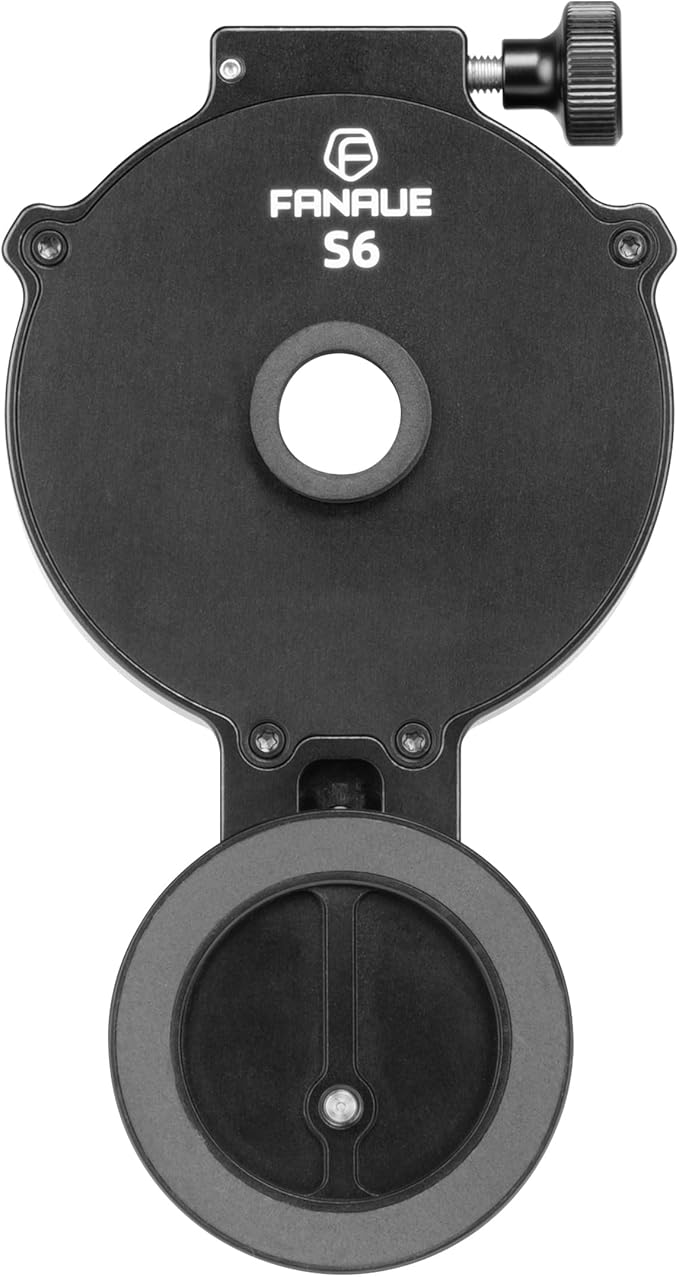
Designed to fit a wide range of eyepieces from 30mm to 60mm, this magnetic phone adapter works with various scopes and binoculars. It stands out for its quick alignment and secure fit, making it a solid choice for anyone wanting to attach an iPhone 11 Pro Max, 12 Pro Max, or XS Max for digiscoping without fuss.
Setup is straightforward: slide your phone into the adapter, center the camera over the eyepiece, then tighten the knobs to lock everything in place. The magnetic mount simplifies mounting and removal, so you can adjust or reposition quickly. Its rust-resistant build holds up well even during outdoor use, while one-hand operation means you don’t have to juggle tools or multiple parts during setup.
The adapter consistently delivers stable and clear shots by keeping your phone camera aligned with the scope’s eyepiece. It feels solid in hand, with adjustable knobs that avoid slipping.
Some note occasional challenges with perfectly centering the camera, which takes a moment of patience. Most appreciate the rust resistance and water-resistant design, but others wish the fit was a touch tighter on certain scopes.
Most users find the magnetic adapter very easy to attach and secure, ensuring clear image alignment for digiscoping. A frequent issue has been the time needed to fine-tune camera positioning precisely, especially with certain eyepiece shapes.
People using iPhone 11 Pro Max, 12 Pro Max, or XS Max with scopes that fit within the 30mm to 60mm eyepiece size range will appreciate its flexibility and build quality. Those with smaller or non-standard eyepieces might look for a more specialized fit elsewhere.
Pros
- Fits a wide range of eyepiece sizes
- Magnetic mount allows quick attachment
- Rust resistant for outdoor durability
- One-hand operation simplifies use
Cons
- Camera alignment can require patience
- Fit may feel loose on some scopes
| Specification | Details |
|---|---|
| Compatible Devices | Binoculars, Smartphones, Spotting Scopes, Telescopes |
| Compatible Phone Models | iPhone 11 Pro Max, iPhone 12 Pro Max, iPhone XS Max |
| Mounting Type | Magnetic Mount |
| Eyepiece Size Fit | 30mm-60mm (1.18 inches-2.36 inches) |
| Additional Features | Adjustable, One-Hand Operation, Rust Resistant |
| Water Resistance Level | Water Resistant |
8. GOSKY Spotting Scope Phone Adapter

GOSKY Spotting Scope Phone Adapter connects your iPhone to spotting scopes and similar optics to take photos and videos through the eyepiece. It suits those who want a straightforward way to capture distant views using their phone camera.
Its biggest strength lies in easy setup and secure phone mounting.
Getting started involves placing your phone into the adapter and aligning the camera with the eyepiece. A single knob tightens the mount, holding your phone firmly without complicated adjustments. Day-to-day use benefits from its simple manual focus and adjustable parts, meaning quick changes can be made while out in the field or at home.
The adapter supports altazimuth movement, making panning natural.
Performance matches well with its stated features, delivering clear images at zoom ranges from 28x to 90x through the 32-millimeter Plössl eyepiece lens. The build feels solid enough for regular use, focusing manually for precision shots.
Most users find it easy to operate, while the main drawback is occasional difficulty achieving perfect camera alignment for some phones.
Strongest praise highlights how easy it is to mount your phone quickly with the knob tightening system. The most common complaint involves difficulty aligning the phone camera perfectly with the eyepiece for clear shots, requiring some trial and error.
Those wanting a quick, adaptable method to connect phones to spotting scopes will appreciate this adapter. People who want automated focus or a quick setup might prefer other products designed specifically for those features.
Pros
- Easy three-step phone mounting process
- Compatible with various scopes and binoculars
- Adjustable for precise camera alignment
- Altazimuth mount allows smooth directional control
Cons
- Manual focus requires user patience and skill
- Camera alignment can be tricky with some phones
| Specification | Details |
|---|---|
| Eye Piece Lens Description | Plössl |
| Mount | Altazimuth Mount |
| Focus Type | Manual Focus |
| Focal Length Description | 32 millimeters |
| Zoom Ratio | 28x-90x |
9. Universal Binocular Phone Adapter with 360° Rotation

Attaching your iPhone to a spotting scope becomes straightforward with this adapter, ideal for birdwatching or astronomy. It handles various eyepieces and phone sizes smoothly, and the standout feature is the 360° rotation, which lets you adjust angles without fuss, making it a flexible tool for digiscoping enthusiasts.
Setup involves clamping the adapter around your phone and the device’s eyepiece. It fits most smartphones, including iPhones, even with slim to medium cases, and adjusts easily to eyepiece diameters from 16mm to 50mm. The single alignment window helps secure your phone firmly, keeping the view steady while you rotate or reposition your shot.
Switching angles is simple thanks to the smooth rotation mechanism.
It delivers solid stability during shooting, thanks to the clip lock system and the strong locking mechanism. The build feels durable with high-strength materials supporting frequent adjustment. Reviews often highlight the convenient 360° rotation as a strong plus, but some users note the fixed focus eyepiece limits fine tuning, which can be a drawback for precise shots.
The adapter is praised for its smooth 360° rotation and firm locking mechanism that keeps the phone steady during digiscoping. Its main limitation is the fixed focus eyepiece, which does not allow for fine adjustments, impacting image sharpness in some cases.
People who want a versatile and sturdy adapter for birdwatching, astronomy, or science exploration will find this model suitable. Those needing precise focus control for detailed shots might want to consider other options with adjustable focus features.
Pros
- Fits most smartphones including iPhones with cases
- 360° smooth rotation for easy angle adjustments
- Solid locking system for stable shooting
- Compatible with multiple optical devices
Cons
- Fixed focus limits precision focusing
- May require careful setup for larger eyepieces
| Specification | Details |
|---|---|
| Eye Piece Lens Description | Universal Compatibility |
| Mount | Adjustable Alt-Azimuth Mount |
| Focus Type | Fixed Focus |
| Compatible Devices | Microscope, Smartphone, Spotting Scope, Telescope, Telescopic Sight |
| Additional Features | 360° Rotation with Clip Lock System, High-Strength Materials, Micro-Fine Tuning Knobs, Durable Locking Mechanism, Universal Compatibility |
10. Universal Telescope Phone Adapter with Wireless Shutter

Universal Telescope Phone Adapter with Wireless Shutter suits anyone looking to connect their smartphone to a variety of optical devices for photography. Its universal fit across phones and eyepieces stands out as the biggest advantage for those wanting flexibility with different gear and capturing shots remotely.
Setting it up is straightforward, as it clamps onto eyepieces from 22.5mm to 50mm comfortably. Daily use is easier with the 360° rotation, which lets you switch between vertical and horizontal photo modes without reattaching.
Wireless shutter control means snapping photos or videos remotely through your smartphone without touching the device and risking shake.
The adapter performs well capturing clear photos through scopes, binoculars, and microscopes, transforming any optical instrument into a sharable camera. Its build quality is solid albeit mostly plastic, balancing lightweight design with firm grips on eyepieces.
Most praise highlights the easy rotation and wireless shutter, while a common gripe mentions occasional difficulty locking the adapter tightly on very narrow eyepieces.
Easy rotation and wireless shutter make daily use smooth and enjoyable, though securely attaching the adapter on smaller eyepieces can sometimes present a challenge. The wireless shutter feature enables stable image capture without physically touching the phone, enhancing photo quality.
Perfect for those who use multiple optical devices and phones, appreciating quick setup and versatility. Users with very small eyepiece diameters or seeking heavier-duty materials might want to consider other options better suited to those specifics.
Pros
- Compatible with many phone brands and models
- 360° rotation provides flexibility for both portrait and horizontal orientations.
- Wireless shutter for remote photo capture
- Works with telescopes, scopes, binoculars, microscopes
Cons
- May slip on eyepieces near 22.5mm size
- Plastic build can feel less durable
| Specification | Details |
|---|---|
| Model Name | LC08 |
| Brand | Ssryxsnan |
| Fits Eyepiece Diameter | 22.5mm to 50mm |
| Number of Items | 2 |
| Warranty | 2 year |
11. APEXEL 360° Telescope Phone Adapter with Bluetooth Remote

Solid metal construction and a clever 360° rotating design make this a smart choice for attaching your phone to spotting scopes or telescopes. Ideal for those who want to capture detailed digiscoping shots with ease, its biggest strength lies in quickly switching between horizontal and vertical shooting modes to fit your framing needs.
Setting up takes just seconds thanks to a simple one-piece slide rail and stretch clip system. No tools or adjustments are needed beyond sliding your phone in place.
Daily use feels natural because you can rotate the adapter easily without removing your phone. The included Bluetooth remote lets you snap photos without touching the phone, reducing shake and improving shot clarity.
Image quality benefits from a tighter exit pupil distance, which minimizes black edges in photos and expands your field of view. Manual focus ensures precision while using different eyepieces. Its build feels sturdy, but the clip’s fit may sometimes feel slightly tight or loose depending on your phone model.
Most praise the rotating function and ease of installation, but some find manual focusing requires patience.
Many appreciate how quickly it installs and the smooth rotation that lets you capture shots both horizontally and vertically without hassle. At the same time, the manual focusing takes some getting used to, and the clip doesn’t always hold phones perfectly, which can interrupt your workflow.
Photographers pairing smartphones with binoculars or telescopes who want quick setup and flexible shooting angles will enjoy this adapter. Those looking for fully automated focusing or a more universal clip fit might prefer to explore other options.
Pros
- 360° rotation easily switches shooting orientation
- Quick 4-step installation in about 10 seconds
- Bluetooth remote included for steady shots
- Universal fit works with many optical devices
Cons
- Manual focus can be tricky and slow at times
- Clip fit inconsistent across different phone sizes
| Specification | Details |
|---|---|
| Eye Piece Lens Description | Barlow |
| Mount | Altazimuth Mount |
| Focus Type | Manual Focus |
| Compatible Devices | Binocular, Microscope, Monocular, Spotting Scope, Telescope |
| Field Of View | 4.1 degrees |
| Zoom Ratio | 1:700 |
12. APEXEL 6X Telephoto Lens for Smartphones

Pure 6X telephoto power stands out, bringing faraway details up close with a 144mm equivalent focal length. Perfect for anyone wanting crisp zooms for street photography, travel snapshots, or everyday scenes. Its lighter design makes carrying around much less of a burden than heavier lenses.
Setup is quick with the universal clip, letting the lens attach to almost any smartphone easily. Day-to-day use benefits from the dual purpose: clip it on for telephoto shots or switch to handheld monocular mode by adding the eyecup. Manual focus means taking control for sharper results, but it demands some attention while shooting.
The 10 premium glass elements with multi-layer coatings deliver noticeably sharper images compared to standard phone zoom. Built from aircraft-grade aluminum, the lens feels solid and weighs only 4.3 ounces.
Its strongest praise lies in the clarity it provides, while users often mention the absence of image stabilization as a drawback during handheld shooting.
The strongest praise revolves around the sharpness and clarity the premium optics provide at a fraction of the weight expected for such zoom range. The most common drawback comes from the lack of image stabilization, which makes handheld shots harder to keep steady, especially at full zoom.
Anyone prioritizing portability alongside better-than-phone zoom will appreciate this lens. Those looking for stabilized images or smooth autofocus should consider alternatives that include built-in stabilization and auto focusing features.
Pros
- Lightweight aircraft-grade aluminum housing
- Multi-use: phone lens or standalone monocular
- Sharp image quality from premium glass elements
- Easy to clip-on with universal 17mm mount
Cons
- No image stabilization for steady shots
- Manual focus requires careful adjustment
| Specification | Details |
|---|---|
| Focal Length Description | 144mm equivalent |
| Lens Design | Zoom |
| Focus Type | Manual Focus |
| Lens Coating Description | Full-Surface Multi-Coating |
| Weight | 4.3 oz (121g) |
13. ZEISS Digiscoping Smartphone Adapter

Ideal for anyone serious about using an iPhone with a spotting scope, the ZEISS Digiscoping Smartphone Adapter offers quick attachment and a fit that works with nearly every phone and case. Its biggest strength lies in the magnetic connection that links easily to ZEISS Digiscoping-to-Spotter adapters, making switching between different angles and orientations straightforward.
Setting up means just one-handed clipping, thanks to its rubber inserts and curved clamps that hold the phone securely without covering buttons or the camera. Switching between portrait and horizontal views only takes seconds, which is handy when capturing birds or wildlife on the go.
The adapter stays steady, feels solid, and doesn’t add much bulk to your gear.
Made from stainless steel, anodized aluminum, and quality rubber, the build quality supports durability through frequent field use. It performs well in holding the phone steady for clear images or videos through the scope. The most common downside in feedback is related to its weight at 6.72 ounces, which some find a bit heavy, but the strong materials bring stability over lightness.
The adapter offers excellent stability and easy switching between angles, praised for protecting the phone and keeping it secure during use. Some mention the weight being on the heavier side compared to simpler plastic adapters, which may feel bulky after extended use in the field.
People wanting a solid, reliable attachment for serious digiscoping will appreciate this adapter’s build and fit. Those looking for a lighter, less brand-specific option might want to explore alternatives better suited to casual or occasional use.
Pros
- Fits every phone model and case without blocking buttons
- Quick, one-handed attachment and removal
- Magnetic connection for easy switching
- Durable materials for solid stability
Cons
- Heavier than some other adapters at 6.72 ounces
- Limited to ZEISS Digiscoping-to-Spotter magnetic adapters
| Specification | Details |
|---|---|
| Item Package Dimensions L x W x H | 5.9 x 2.7 x 1.5 inches |
| Package Weight | 6.72 ounces |
| Material | Stainless Steel |
| Brand Name | ZEISS |
| Warranty Description | 2 Year Warranty |
| Model Name | spotting scope smartphone adapter |
Best iPhones for Digiscoping Side by Side
| Product | Compatible Devices | Mount Type | Focus Type | Warranty |
|---|---|---|---|---|
| tridaptor Phone Scope Adapter | Smartphone | 3-axis digiscoping mount | Manual Focus | – |
| APEXEL 360° Digiscoping Adapter | Smartphones | Assist Grip Mount | – | – |
| OLLIN iPhone 17 Pro Snapcase | iPhone 17 Pro | Magnetic Case | – | Lifetime |
| Magsafe iPhone Telescope Adapter | Smartphone | Magnetic attachment | Manual Focus | – |
| Celestron NexYZ DX Adapter | Mobile phones, scopes | Phone Mount | – | – |
| Magsafe iPhone Digiscoping Adapter | Smartphone | Magsafe compatible | Manual Focus | – |
| FANAUE Telescope Phone Adapter | Binoculars, Smartphones | Magnetic Mount | – | – |
| GOSKY Spotting Scope Adapter | Camera | Altazimuth Mount | Manual Focus | – |
| Universal Binocular Phone Adapter | Microscope, Smartphone | Adjustable Alt-Azimuth | Fixed Focus | – |
| Wireless Telescope Phone Adapter | Universal Phone Adapter | – | – | 2 year |
| APEXEL 360° Bluetooth Adapter | Binocular, Microscope | Altazimuth Mount | Manual Focus | – |
| APEXEL 6X Telephoto Lens | Camera | Universal Clip | Manual Focus | – |
| ZEISS Digiscoping Adapter | Smartphone | – | – | 2 Year |
- Compatible DevicesSmartphone
- Mount Type3-axis digiscoping mount
- Focus TypeManual Focus
- Warranty–
- Compatible DevicesSmartphones
- Mount TypeAssist Grip Mount
- Focus Type–
- Warranty–
- Compatible DevicesiPhone 17 Pro
- Mount TypeMagnetic Case
- Focus Type–
- WarrantyLifetime
- Compatible DevicesSmartphone
- Mount TypeMagnetic attachment
- Focus TypeManual Focus
- Warranty–
- Compatible DevicesMobile phones, scopes
- Mount TypePhone Mount
- Focus Type–
- Warranty–
- Compatible DevicesSmartphone
- Mount TypeMagsafe compatible
- Focus TypeManual Focus
- Warranty–
- Compatible DevicesBinoculars, Smartphones
- Mount TypeMagnetic Mount
- Focus Type–
- Warranty–
- Compatible DevicesCamera
- Mount TypeAltazimuth Mount
- Focus TypeManual Focus
- Warranty–
- Compatible DevicesMicroscope, Smartphone
- Mount TypeAdjustable Alt-Azimuth
- Focus TypeFixed Focus
- Warranty–
- Compatible DevicesUniversal Phone Adapter
- Mount Type–
- Focus Type–
- Warranty2 year
- Compatible DevicesBinocular, Microscope
- Mount TypeAltazimuth Mount
- Focus TypeManual Focus
- Warranty–
- Compatible DevicesCamera
- Mount TypeUniversal Clip
- Focus TypeManual Focus
- Warranty–
- Compatible DevicesSmartphone
- Mount Type–
- Focus Type–
- Warranty2 Year
How to Choose the Best iPhone for Digiscoping
Choosing an iPhone with a good camera, optical zoom, and image stabilization is essential for clear, detailed digiscoping photos. Prioritizing these features ensures better photo quality and reduces the need for extra accessories, saving both money and frustration in the long run.
Camera Quality and Features
Using a phone with a low-resolution sensor often results in grainy or unclear shots, especially in dim conditions commonly found during dawn or dusk birdwatching sessions. Phones designed with at least a 12-megapixel sensor and enhanced lowlight capabilities make a noticeable difference by producing sharper images with more detail even without extra lighting.
Optical zoom is crucial when capturing distant subjects through a scope, as digital zoom tends to degrade image quality. Models offering 2x to 3x optical zoom or more allow closer framing without pixelation.
Image stabilization is another key feature; it helps reduce blur caused by hand movement during shooting. Compatibility with third-party apps that provide manual control over focus, exposure, and ISO lets you fine-tune shots beyond the standard camera app’s limits.
Compatibility with Digiscoping Equipment
Finding a phone that fits well with common digiscoping scopes and adapters makes setup less frustrating and more secure. Some phones have dimensions that simply don’t align well with standard adapters, causing misalignment and poor image capture.
Adjustable alignment features are a big help, letting you position the phone lens exactly over the eyepiece to avoid vignetting or blurry edges. Stability during use is critical; excessive shaking ruins photos and videos, so the phone and adapter must grip tightly while allowing small adjustments. Phones with flat backs and slim profiles usually work better with most mounts.
Battery Life and Power Management
Long battery life matters during long outdoor sessions when charging opportunities are scarce. Phones with at least 10 hours of continuous video or photo use avoid interruptions mid-session.
Running out of power quickly has been a common frustration, especially when capturing rare moments.
Fast charging can be a lifesaver if you get a chance to top up between hikes or birdwatching periods. Power management features that reduce drain when idle help stretch battery life; for example, automatic screen dimming and background activity control. Look for devices supporting these functions to keep going in the field.
Size and Ergonomics
Holding a phone steady for extended periods while aiming through a scope can become uncomfortable if the device is too bulky or heavy. Phones weighing under 200 grams with ergonomic shapes improve grip comfort and reduce hand fatigue outdoors.
Button placement also affects ease of use; controls reachable with one hand enable quick photo capture without awkward repositioning. Flat backs combined with rounded edges usually feel more natural to hold.
A device that balances well in the hand simplifies handling during long observation sessions.
Durability and Environmental Resistance
Outdoor conditions expose devices to water, dust, and sudden impacts that can quickly damage less rugged models. Phones rated IP68 or higher offer reliable protection against dust and temporary water immersion, which is critical during unpredictable weather.
Sturdy build quality with materials like aluminum frames and reinforced glass withstands drops and knocks on rocky terrain. Screen protectors help prevent scratches and cracks that otherwise obscure the display or camera lens. Choosing a phone with these durability features reduces the risk of malfunctions in harsh environments.
Optimizing iPhone Camera Settings for Superior Digiscoping Results
Using an iPhone for digiscoping means adjusting your camera settings to get the best clarity and detail. Make sure to lock the focus and exposure by tapping and holding on your subject in the Camera app.
This prevents the phone from hunting for focus or adjusting brightness unexpectedly when you’re capturing distant images. Turning on the grid lines helps compose shots in line with the rule of thirds, which can improve framing around your scope. Avoid using digital zoom on the iPhone camera; instead, rely on the zoom from your scope itself to preserve image quality.
Shooting in RAW format is useful if you plan to edit photos later, as it retains more detail than JPG. Lastly, stabilize your iPhone and scope setup, ideally with a tripod or mount, to reduce blur from hand movements, especially when zoomed in.
Essential Maintenance Tips to Prolong Your iPhone’s Performance in the Field
Keeping your iPhone in good shape while out in the field is key. Protect it from dust and moisture by using a weather-resistant case or a sealable plastic bag. Regularly clean the camera lens with a microfiber cloth to remove smudges and debris that can degrade image quality.
Monitor the device’s temperature; avoid leaving it in direct sunlight for extended periods as overheating can affect performance. Battery life can drain faster in cold conditions, so carry a portable charger or an external battery pack.
Close unnecessary apps and turn on airplane mode if cellular signal isn’t needed, which helps conserve power. After each outing, check the ports and buttons for dirt or damage and clean gently. These steps keep your iPhone reliable during long digiscoping sessions.
Comparing Digiscoping Apps to Enhance Your iPhone Photography Experience
Choosing the right digiscoping app can simplify capturing and managing your photos through the scope. Apps like ProCamera and Moment offer manual controls for focus, exposure, and shutter speed, giving you more control than the default Camera app.
PhotoSphere lets you create 360-degree panoramas which can be useful for nature surveys. For tracking birds or wildlife, iNaturalist combines photography with species identification and logging. Consider apps that support RAW image capture if you plan serious post-processing.
Review how each app integrates with your workflow, some offer easier exporting and sharing options than others. Testing a few apps under field conditions shows which works best with your setup and style.
People Also Asked
How Do I Attach My Phone Securely for Digiscoping?
Use a phone adapter specifically designed for digiscoping that tightly clamps your phone onto the eyepiece. Make sure the mount aligns your camera lens with the scope for steady images and to prevent shifting during use.
What Size Phone Case Works Best for Digiscoping Mounts?
Slim to medium-sized phone cases work best since bulky or very thick cases may not fit securely in the adapter mount. Removing the case is also an option for a tighter grip and better optical alignment.
How Do I Avoid Damage When Using a Phone with Digiscoping?
Avoid sudden movements and hold your setup with both hands to reduce drops. Using a wrist strap or neck lanyard for the phone or scope can also help prevent falls while moving around in the field.
Will My Phone Camera Lens Be Compatible with Digiscoping Adapters?
Most modern phones with a single main lens are compatible with digiscoping adapters, but multi-lens phones require careful alignment with the adapter to choose the correct lens. Verify that the adapter fits your phone’s camera layout.
How Long Can I Expect My Phone Battery to Last During Digiscoping?
Phone battery life can range from 3 to 6 hours of continuous use during digiscoping depending on screen brightness and video or photo activities. Carry a portable charger to extend shooting time during long sessions outdoors.
Conclusion
Choosing the best iPhone for digiscoping comes down to camera quality, especially the zoom and low-light performance, as these affect clarity when shooting through a scope. Battery life is important too since digiscoping sessions can be long.
Consider the phone’s size and how it fits with your scope setup for quick and steady use.
Think about how often you plan to use the iPhone for digiscoping and your budget before making a decision. Matching the phone to your actual needs helps avoid overspending or carrying unnecessary weight.
For a detailed look at features and how each model compares, check the comparison table and the picks in the sections above.