Top 12 Best Digital 800 MHz Scanner You Can’t Miss
Finding a reliable signal can be tough with a poorly made digital 800 mhz scanner. Users often face dropped frequencies or slow response times, which means missing important communications.
A well-chosen best digital 800 mhz scanner allows clear reception over busy airwaves, making it a crucial tool for anyone needing dependable tracking of broadcasts in the 800 mhz band.
Durability and scan speed matter most in these scanners. Metal casing helps prevent damage during frequent use, while a scan speed of at least 20 channels per second ensures quick switching between signals.
Battery life is another key point, with a good device lasting several hours on a single charge, since long operation times keep you connected without constant recharging.
Need a Quick Check?
| Image | Product | Price |
|---|---|---|
Our Top Picks 1  | Uniden BCD996P2 Scanner | Check Price |
Our Top Picks 2  | Uniden SDS100 Handheld Scanner | Check Price |
Our Top Picks 3  | Uniden SDS200 Base/Mobile Scanner | Check Price |
Our Selected Top 12 Digital 800 Mhz Scanner Worth Buying
This list features top digital 800 MHz scanners selected for their performance and reliability. Each review covers how the scanner performs, its ideal users, and highlights key strengths and weaknesses to help you make an informed choice.
1. Uniden BCD996P2 Digital Mobile Scanner
When you want reliable updates on nearby radio transmissions and weather alerts, this scanner fits the bill. It suits anyone needing to monitor emergency channels or weather conditions while on the move. Its standout feature is the combination of NOAA weather access alongside Close Call RF Capture, keeping you in the know at all times.
Setting it up involves plugging into a 12-volt source and optionally syncing with your smartphone for location-based scanning. Day-to-day, the Close Call technology automatically detects nearby transmissions without disturbing active channels. Scanning through 25,000 channels feels straightforward thanks to the clear LCD display.
Alerts from the S.A.M.E. weather system keep safety front and center without requiring constant monitoring.
Performance-wise, tracking trunked radio systems with TrunkTracker V works smoothly, with quick lock-on to transmissions. The build is typical for a mobile scanner, solid but not water resistant, so indoor or vehicle use is ideal.
Most praise highlights how effective the NOAA weather alerts are. Common drawbacks mention the complexity of handling so many channels and the lack of water resistance.
The strongest praise centers on the scanner’s ability to provide timely NOAA weather alerts that keep users aware during severe conditions. The most frequent complaint concerns how handling 25,000 channels and setting them up can feel complicated for everyday use.
This scanner fits well for those focused on mobile safety awareness and emergency monitoring. People needing a simple, rugged scanner for outdoor or water-prone environments might want to look for alternatives designed with water resistance and easier controls.
Pros
- Accurate NOAA weather and S.A.M.E. alerts
- Effective Close Call RF Capture technology
- Handles 25,000 channels with ease
- TrunkTracker V tracks trunked systems smoothly
Cons
- Not water resistant, limited outdoor durability
- Complex channel management can be overwhelming
| Specification | Details |
|---|---|
| Channels | 25,000 |
| Power Source | 12 volts Direct Current (DC) |
| Radio Bands Supported | 1-Band |
| Connectivity Technology | IR |
| Audio Output Mode | Stereo |
| Display Type | LCD or LED |
2. Uniden SDS100 Digital Handheld Scanner
True I/Q reception sets this digital handheld scanner apart, handling difficult signal environments better than most. It fits anyone wanting reliable access to digital and analog radios around the US and Canada with minimal setup.
Its standout quality lies in clear reception even where signals are weak or overlapping.
Entering a zip code quickly loads local frequencies thanks to the HomePatrol database, kept current by weekly updates. The color display is adjustable, showing only the info you want, which makes browsing channels straightforward.
A USB connection handles programming, while the microSD slot stores additional data. Daily use proves it can adapt to changes in radio traffic without constant fiddling.
Built to withstand regular handling, the SDS100 is solid yet portable. It excels at picking up digital trunked systems and simulcast signals with clarity.
Most praise cites its superior digital performance in challenging RF environments. Common complaints point to programming complexity despite automatic features, which can slow down some users.
The strongest point lies in its digital reception quality, especially with difficult signals. Programmed via zip code, it provides a solid start, though some users note the interface isn’t completely intuitive, making setup time-consuming for newcomers. Weekly database updates keep it relevant but add a reliance on continued software support.
People who want a scanner handling complex digital trunking across broad areas without constant manual tuning will appreciate its features. Those searching for the simplest, plug-and-play experience might prefer a less advanced model with fewer setup demands and simpler controls.
Pros
- True I/Q receiver improves signal clarity
- HomePatrol database includes US and Canada systems
- Customizable color display for easy info access
- Weekly database updates keep frequencies current
Cons
- Programming complexity can challenge new users
- Dependent on software updates for database accuracy
| Specification | Details |
|---|---|
| Scanner Type | Digital Handheld Scanner |
| Connection Type | USB |
| Resolution | 24 Bits |
| Color Depth | 24 |
| Media Type | MicroSD Card |
3. Uniden SDS200 Digital Base/Mobile Scanner
People interested in scanning digital and analog radio signals around 800 MHz will find the Uniden SDS200 fitting well. Its standout feature is a large 3.5 color display that can be customized to show exactly what you want, making it great for anyone who wants clear, flexible reading of multiple channels and systems.
Setting it up involves plugging in via USB and updating the database, which covers all known radio systems in the US and Canada and gets weekly updates. The HomePatrol database simplifies finding and organizing frequencies, and the display colors can be adjusted to highlight important information.
Daily use benefits from its straightforward menu and clear screen, letting you monitor scanners’ activity without fuss or confusion.
Performance holds up with strong reception even on tough digital simulcast systems, highlighting its modern Software Defined Radio and True I/Q technology. It’s built solidly with LED lighting on the screen, supporting clear visuals. Praise frequently centers on the ease of use and excellent display.
Common critiques mention some users wishing for more frequent or automatic updates beyond weekly database refreshes.
Many users appreciate how easily the clear, colorful display helps scanning activity feel organized and readable. Some find the need to manually update the database weekly to be a bit tedious, wishing the process was more automatic. The combination of HomePatrol with advanced SDR technology keeps performance steady on complex signals.
Anyone wanting an easy interface and detailed scanning capabilities will appreciate this model. People looking for a scanner that updates itself automatically or wants a fully hands-off experience might look at other options. It suits those comfortable with occasional manual database maintenance and prioritizing screen customization.
Pros
- Customizable 3.5″ color display
- Weekly database updates
- Strong reception on digital simulcast
- Includes comprehensive HomePatrol databases
Cons
- Database updates require manual action
- Not fully automatic update system
| Specification | Details |
|---|---|
| Scanner Type | Radio Scanner |
| Connection Type | USB |
| Resolution | scanner |
| Standard Sheet Capacity | 10 |
| Light Source Type | LED |
| Media Type | USB |
4. Uniden Bearcat BCD260DN Base/Mobile Scanner

Uniquely tailored for digital 800 MHz scanning, the Uniden Bearcat BCD260DN stands out with its quick signal detection and extensive frequency coverage. Ideal for emergency responders and hobbyists tracking public safety bands, its main strength is the ability to access 10,000 frequencies with pre-programmed service bands for convenience.
Setup is straightforward thanks to the pre-programmed service bands including weather alerts, aviation, marine, and more. Day-to-day operation benefits from features like Band Scope Rapid System and Channel Number Tagging, making it easier to find signals you want without endless manual tuning. Connecting via USB adds simple integration with your computer for updates or extra control.
The scanner delivers clear and narrowband reception crucial for picking up emergency transmissions. It handles a wide range of radio frequencies reliably, while its build feels solid enough for regular use in mobile or base settings. Common praise highlights the comprehensive search features, but some users note that the interface can take getting used to.
The strongest praise centers on fast and reliable scanning across emergency and specialized radio bands, making it easy to catch elusive signals. Users often mention the complexity of the interface as the most common challenge, requiring some time to become fully comfortable navigating its features.
People wanting broad frequency coverage along with pre-programmed emergency bands will appreciate this scanner’s depth and speed. Those looking for a more straightforward or beginner-friendly model might find it more demanding to operate at first and consider simpler alternatives.
Pros
- Access to 10,000 frequencies pre-programmed for convenience
- Rapid signal detection with Band Scope feature
- Clear narrowband reception for emergency channels
- USB connection for easy integration and updates
Cons
- The interface can feel complex when you first start using it
- Learning curve for advanced search features
| Specification | Details |
|---|---|
| Scanner Type | Radio Frequency scanner |
| Connection Type | USB |
| Resolution | 300 dpi |
| Frequency Coverage | 10,000 frequencies |
| Pre-programmed Bands | S.A.M.E weather alerts, Aviation, Marine, Railroad, NASCAR, emergency services |
5. Uniden Bearcat BCD160DN Handheld Scanner
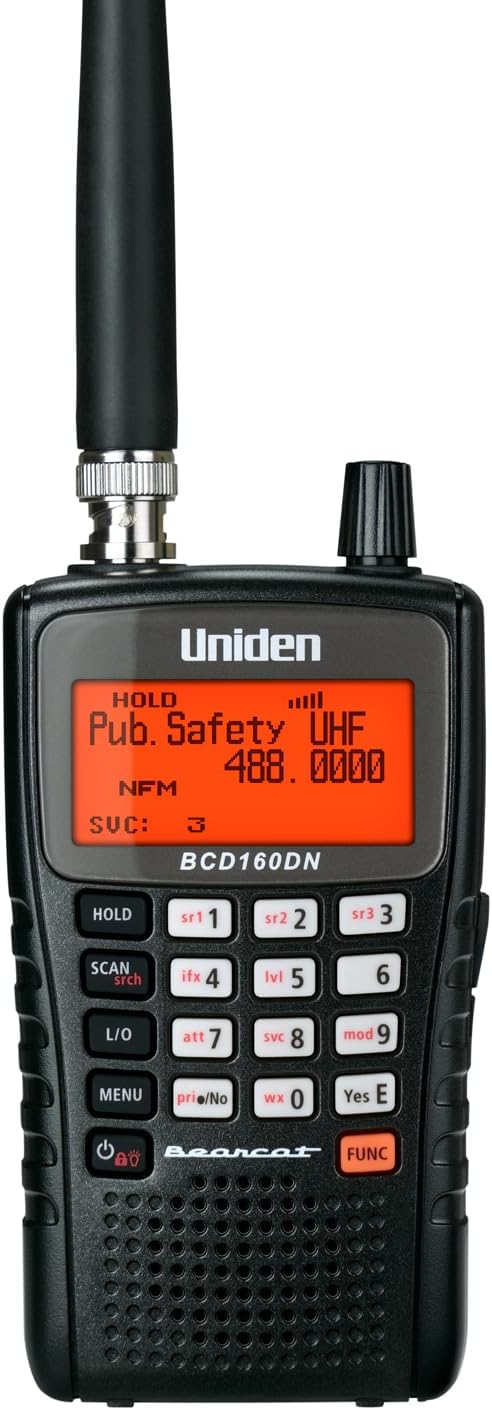
Uniden Bearcat BCD160DN delivers clear digital scanning tailored for those focusing on 800 MHz communications. It excels in quickly detecting system settings thanks to its fast decoding of digital and analog signals. Ideal for users who need reliable and detailed signal information without the complexity of trunking.
Setup involves connecting via USB and using its intuitive menu to start scanning. Daily use benefits from the Rapid Decode feature that instantly shows CTCSS tones and DCS codes, making it easy to tweak settings and identify systems.
Searching is smoother with Band Scope and Channel Number Tagging, helping track elusive transmissions effectively.
The scanner performs well decoding DMR and NXDN out of the box, with an added firmware upgrade allowing APCO P25 decoding. Its build feels solid enough for handheld use but keeps things light.
The clearest praise highlights how fast and accurate detection is, while most criticism revolves around its lack of trunking support and inability to decode encrypted signals.
Rapid detection of tones and codes makes finding system info quick and easy, but limitations like no trunking and inability to decode encrypted signals restrict its use for some scanners. It works best in straightforward scanning scenarios and requires firmware updates for expanded digital support.
Those focusing on digital formats like DMR and NXDN will appreciate its performance and features. People needing trunking or encrypted signal decoding should look for other models that handle those functions better.
Pros
- Fast decoding of DCS/CTCSS tones
- Supports multiple digital formats out of the box
- Easy connection through USB
- Helps find signals quickly with Band Scope
Cons
- No trunking support
- Cannot decode encrypted signals
| Specification | Details |
|---|---|
| Scanner Type | Radio Scanner |
| Connection Type | USB |
| Digital Decoding | DMR, NXDN, APCO P25 (via update) |
| Special Features | Band Scope, Rapid Decode, Narrow-band Reception |
| Trunking | Not Supported |
6. Uniden BCD325P2 Handheld TrunkTracker Scanner

Feeling solid and responsive in hand, this scanner suits hobbyists who want to track everything from local emergency channels to Project 25 Phase II systems. Its ability to scan 25,000 channels with pinpoint accuracy stands out as its biggest strength, keeping users connected to important radio traffic around them.
Setup takes a bit of time but the Quick-Key System Access makes daily use straightforward. You can program 100 keys to jump straight to your frequently used systems. The Close Call RF Capture Technology automatically locks onto nearby signals, making sure you don’t miss developments in your vicinity, even without constantly adjusting the scanner manually.
Performance-wise, the scanner picks up a wide range of channels clearly and adjusts quickly to changes in signal. Built with a sturdy frame and equipped with GPS compatibility, it supports accurate location-based scanning. Many appreciate its large channel capacity and ease of use.
Some find the setup options initially complicated until they get familiar with the controls.
The scanner excels at locking onto local signals quickly with Close Call RF Capture, which makes day-to-day monitoring less fiddly. People mention that the initial programming process requires patience and some learning to master the Quick-Key system effectively.
Those who want a scanner for heavy use with lots of channel options and GPS support will appreciate its features. Anyone looking for a simpler, more straightforward device might find it a bit overwhelming at the start.
Pros
- Scans up to 25,000 channels
- Close Call RF Capture finds nearby signals automatically
- Quick-Key access with 100 programmable keys
- GPS compatible for location-based scanning
Cons
- Setup can be confusing at first
- Black bits color depth lacks vibrancy
| Specification | Details |
|---|---|
| Scanner Type | Radio |
| Connection Type | gps |
| Resolution | 2400 dpi |
| Wattage | 20 watts |
| Media Type | USB |
7. Whistler WS1065 Digital Trunking Desktop Scanner

Great for anyone looking to monitor digital trunking signals, this scanner fits well on a desktop and excels at tracking 800 MHz digital frequencies. Its standout feature is an advanced adaptive tracking system that automatically adjusts without user intervention, making it easy to stay locked on to signals.
Setting it up involves connecting via Wi-Fi, which makes updates and use more flexible. The programmable multi-color LED alerts help you instantly recognize different signal types or priorities without constantly watching the screen. Day-to-day, the scanner handles signal drops smoothly thanks to its adaptive real-time P25 decoding, so you rarely need to tweak settings.
The audible alarms can be customized to suit your listening preferences, adding a useful hands-free layer of information.
Sound clarity is solid with its digital automatic gain control compensating well for low audio levels. It filters out unwanted transmissions effectively using Network Access Code filtering. The device feels sturdy on a desk and the LED colors offer a visual cue that’s hard to miss.
Some reviews mention the scanner can be tricky to use for those not familiar with digital trunking settings, which might take some getting used to.
The real-time adaptive P25 tracking sets it apart by keeping signals clear and stable without manual intervention. Common feedback highlights its strong alert system while pointing out the setup complexity for those unfamiliar with trunking scanners. The audible notices and diverse LED colors help users stay informed quietly.
Someone focusing on monitoring specific digital trunking signals with a bit of patience for initial setup will find it rewarding. Users looking for a simpler interface or broader media compatibility might consider alternative options more suited to beginner or casual scanning needs.
Pros
- Automatic adaptive tracking adjusts 50+ times per second
- Customizable multi-color LED alert supports 8 user-defined colors
- Handles low audio digital signals well with AGC and NAC filtering
- Wi-Fi connection allows easy updates and remote control
Cons
- Setup and navigation may challenge newcomers to digital scanning
- Media type limited to paper for scanning uses
| Specification | Details |
|---|---|
| Scanner Type | Radio |
| Connection Type | Wi-Fi |
| Resolution | 200 |
| Media Type | paper |
8. Whistler WS1040 Handheld Digital Scanner
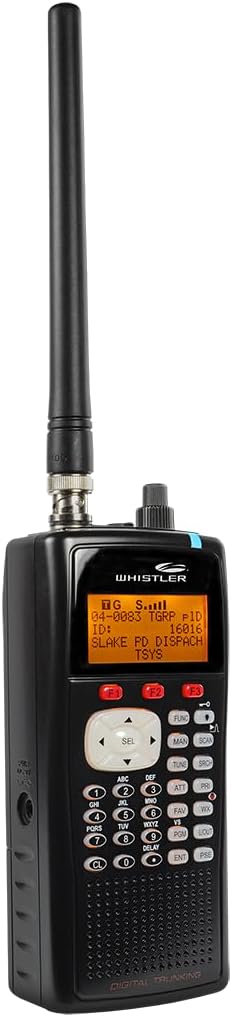
Plastic casing and compact size make it a practical choice for people who want a handheld digital scanner. Most helpful for those who value straightforward menu navigation and easy programming.
The biggest strength lies in its context-sensitive help feature, which simplifies setup and daily operation.
Programming the scanner is intuitive, thanks to the menu driven system with clear help text for each option. Organizing scan lists suits anyone who likes customizing groups or priorities. Memory allocation adapts dynamically to your needs, avoiding wasted space unlike older models.
The USB connection makes data transfers manageable for routine use. Instant access to storm spotter frequencies adds a handy layer for real-time weather monitoring.
Reception quality meets the basic requirements expected from a 800 MHz scanner, with dependable scanning of programmed channels. Its build holds up well during field use, feeling solid without being bulky.
The most praised aspect among users is the helpful on-screen assistance, though some find the menu system a bit slow to respond occasionally. It delivers consistent performance without complicated extras.
The scanner’s on-screen help assists well with setup and daily use but the occasional lag in menu navigation can be frustrating. The dynamic memory allocation is a practical improvement over older models that use rigid memory banks.
Ideal for users who need straightforward programming and storm spotter frequency access. Those wanting a sturdier, faster interface might prefer exploring more rugged or advanced scanners.
Pros
- Context sensitive help available for programming
- Dynamic memory allocation minimizes waste
- Scan list customization for personal preferences
- Instant access to storm spotter networks
Cons
- Menu response can feel slow at times
- Plastic construction may lack ruggedness
| Specification | Details |
|---|---|
| Scanner Type | Radio Scanner |
| Connection Type | USB |
| Resolution | 10000 |
| Standard Sheet Capacity | 300 |
| Light Source Type | LED |
| Media Type | USB |
9. Uniden BC365CRS 500 Channel Scanner

Affordable and straightforward, the Uniden BC365CRS fits well on any desktop and works best for those who want to listen to a variety of channels without fuss. Its biggest strength lies in offering 500 channels with easy access to popular emergency, weather, and radio bands right out of the box.
Setting it up involves plugging in the corded power and inserting 3 AA batteries for backup. Day-to-day use includes scanning through preset channels like police, fire, weather, and marine, plus switching between the built-in FM radio and alarm clock. The push-button controls keep things simple, making it easy to tune in to your interests without diving into complicated menus.
Performance is solid for an analog scanner of this range, capturing signals clearly across many bands. The desktop design feels sturdy enough for regular use, though it lacks portability due to the corded power source.
Many praise its simple interface, but some mention the audible noise can reach 50 db, which might be noticeable in quieter rooms.
The scanner is praised for its straightforward, ready-to-use presets covering various emergency and radio bands. Common complaints focus on the noise level from the device and reliance on external power, limiting portability. Setup and controls are friendly enough for casual listeners wanting quick access to channels.
People interested in a basic, multifunctional desktop scanner with FM radio will find this suitable. Those needing a portable device or very quiet operation might want to look at other options that run on rechargeable batteries and produce less noise.
Pros
- 500 channels with popular presets included
- Built-in FM radio with 30 station presets
- Simple push-button control
- Functions as an alarm clock
Cons
- Requires corded power during use
- Audible noise level can be distracting
| Specification | Details |
|---|---|
| Channels | 500 |
| Power Source | Corded Electric |
| Battery | 3 AA batteries required |
| Control Method | Push Button |
| Audible Noise | 50 db |
| Mounting Type | Tabletop Mount |
10. Uniden BCD436HP HomePatrol Handheld Scanner

Ideal for anyone wanting quick, easy access to public safety and emergency channels, the Uniden BCD436HP stands out because it requires no programming. Just enter your zip code and it begins scanning, making it perfect for those who want a powerful digital scanner without fussing with complicated setups.
Turning it on is straightforward, and the HomePatrol-1 system automatically organizes channels around your location. The large display makes it easy to read while scanning live communications from police, fire, weather, and more.
GPS connectivity helps it stay accurate, and Close Call RF Capture picks up nearby signals you might not have known about, making daily use intuitive and informative.
Scan speed is solid at 85 channels per second, so you don’t miss fast-moving traffic. It handles frequencies between 25 and 1300 MHz, covering a broad range of public and private services. The handheld design feels sturdy but isn’t water resistant, so care is needed outdoors.
Praise focuses on its ease of use and wide channel coverage. The main drawback cited is the battery life, which lasts about 8 hours on 3 AAA batteries and may need frequent replacement.
Ease of use is the scanner’s biggest draw, allowing instant scanning after just entering a zip code. The biggest complaint involves the battery life, as the 8-hour run time on AAA batteries means you’ll need backups for extended use.
Anyone looking for a no-fuss, freely roaming public safety scanner will be happy here. Those needing rugged, weatherproof gear or longer battery life should look at other models.
Pros
- No programming needed, just enter zip code
- Large, easy-to-read display
- Includes GPS connectivity for location accuracy
- Close Call RF Capture picks up nearby signals
Cons
- Battery life only about 8 hours on AAA batteries
- Not water resistant, requires careful handling outdoors
| Specification | Details |
|---|---|
| Scan Speed | 85 channels per second |
| Frequency Range | 25-512 MHz, 758-824 MHz, 849-869 MHz, 894-960 MHz, 1240-1300 MHz |
| Number of Channels | 85 |
| Batteries Required | 3 AAA |
| Battery Average Life | 8 hours |
| Water Resistance | Not Water Resistant |
11. Uniden Bearcat BC125AT Analog Handheld Scanner
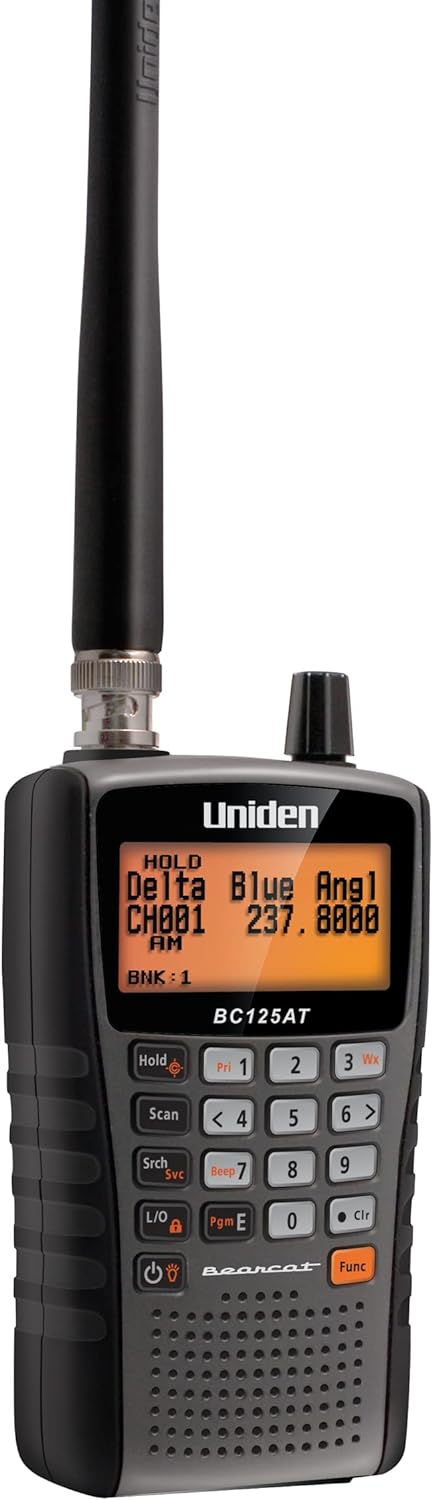
Tracking local analog radio signals can quickly become confusing without a reliable scanner. Perfect for enthusiasts and those interested in analog transmissions, this handheld unit handles up to 500 channels with ease, making sure you never miss a nearby transmission with its Close Call RF capture feature.
Setting it up is straightforward, and the compact design makes it easy to carry around daily. The Close Call feature automatically tunes to nearby signals, so you don’t have to hunt around.
The Do Not Disturb mode prevents interruptions during active transmissions, letting you listen without accidental channel changes. The display is easy to read, and it uses just 2 AA batteries, which last about 10 hours, so it’s ready for long listening sessions.
It performs well within its analog-only range, picking up frequencies from low VHF to UHF effectively. The build feels solid enough for casual use but is not water-resistant, so it’s best kept indoors or dry settings. Many note the straightforward operation as a plus, though the inability to scan digital systems limits it for users near cities moving to digital trunking.
Battery life is decent but could require frequent changes on active use days.
Many appreciate its reliable analog scanning and clear display, making it simple to find local transmissions quickly. The main drawback remains its inability to handle digital trunked systems, which affects usefulness in some urban areas where digital communication is standard.
This scanner suits anyone focused on analog communication, especially in suburban or rural locations. Those needing to monitor digital systems like Project 25 or DMR should look for a digital-capable scanner instead to cover more modern frequencies.
Pros
- Compact and easy to carry
- Close Call RF capture for nearby signals
- 500 alpha-tagged channels
- Long battery life up to 10 hours
Cons
- Not compatible with digital radio systems
- Not water resistant
| Specification | Details |
|---|---|
| Number of Channels | 500 |
| Frequency Range | 25-54 MHz, 108-174 MHz, 225-380 MHz, 400-512 MHz (UHF) |
| Battery Average Life | 10 hours |
| Voltage | 3 volts |
| Number of Batteries | 2 AA batteries required (included) |
12. Uniden SDS150 Software Defined Radio Scanner

Offering support for TrunkTracker X and APCO P25 Phase I & II, this digital scanner is ideal for enthusiasts and professionals who need sharp reception of multiple radio types. Its enhanced sensitivity stands out, making signal reception clear even in noisy environments.
The setup is straightforward with the simplified digital display and control layout. Using the Bluetooth connection, pairing with a smartphone through the U/AWARE app feels natural and expands scanning capabilities. The built-in GPS receiver assists with location-specific features, and the charge cradle keeps it powered without fuss during extended use.
In daily operation, the scanner captures a wide range of frequencies confidently across AM, NFM, FM, WFM, or FMB bands. Its lightweight design doesn’t sacrifice durability and feels sturdy enough for professional field use.
The most appreciated feature is its improved signal filtering that cuts down interference. Some mention the battery life, although extended, could still see improvement during very long outings.
Users praise the superior signal clarity and filtering, which makes picking up digital transmissions easier in crowded radio environments. The most common complaint points to the nonstandard battery, which can be tricky to replace and limits quick swaps during long sessions.
Those needing a lightweight scanner with advanced digital support and smartphone integration will find this a solid fit. It may not suit users who rely on very long battery life or those preferring standard batteries for easier replacements during fieldwork.
Pros
- Improved signal reception and interference filtering
- Lightweight yet rugged design for field use
- Built-in GPS for location-based scanning
- Bluetooth connectivity with smartphone app
Cons
- Battery life good but could be longer for extended outings
- Uses a nonstandard battery that must be replaced carefully
| Specification | Details |
|---|---|
| Connectivity Technology | Bluetooth |
| Tuner Type | TrunkTracker X, APCO P25 Phase I & II, Motorola, EDACS, LTR DMR Tier III*, Hytera XPT*, Single-Channel DMR*, NXDN 4800/9600*, EDACS ProVoice* |
| Power Source | Battery Powered |
| Radio Bands Supported | AM, NFM, FM, WFM, or FMB |
| Water Resistance Level | Water Resistant |
| Additional Features | Weather Alert, built-in GPS receiver, charge cradle |
Best Digital 800 MHz Scanners Comparison Table
| Product | Scanner Type | Connectivity | Power Source | Frequency Range |
|---|---|---|---|---|
| Uniden BCD996P2 Scanner | Radio Frequency | IR | 12 volts DC | 25 MHz |
| Uniden SDS100 Handheld Scanner | Digital Handheld Scanner | USB | – | – |
| Uniden SDS200 Base/Mobile Scanner | Radio Scanner | USB | – | – |
| Uniden Bearcat BCD260DN Scanner | Radio Frequency scanner | USB | – | – |
| Uniden Bearcat BCD160DN Handheld | Radio Scanner | USB | – | – |
| Uniden BCD325P2 TrunkTracker Scanner | Radio | GPS | – | – |
| Whistler WS1065 Desktop Scanner | Radio | Wi-Fi | – | – |
| Whistler WS1040 Handheld Scanner | Radio Scanner | USB | – | – |
| Uniden BC365CRS 500-Channel Scanner | – | – | 3 AA batteries | – |
| Uniden BCD436HP HomePatrol Scanner | – | – | 3 AAA batteries | 25-512, 758-824, 849-869, 894-960, 1240-1300 MHz |
| Uniden Bearcat BC125AT Analog Scanner | Analog Scanner | – | 2 AA batteries | 25-54, 108-174, 225-380, 400-512 MHz |
| Uniden SDS150 SDR Scanner | – | Bluetooth | Battery Powered | – |
- Scanner TypeRadio Frequency
- ConnectivityIR
- Power Source12 volts DC
- Frequency Range25 MHz
- Scanner TypeDigital Handheld Scanner
- ConnectivityUSB
- Power Source–
- Frequency Range–
- Scanner TypeRadio Scanner
- ConnectivityUSB
- Power Source–
- Frequency Range–
- Scanner TypeRadio Frequency scanner
- ConnectivityUSB
- Power Source–
- Frequency Range–
- Scanner TypeRadio Scanner
- ConnectivityUSB
- Power Source–
- Frequency Range–
- Scanner TypeRadio
- ConnectivityGPS
- Power Source–
- Frequency Range–
- Scanner TypeRadio
- ConnectivityWi-Fi
- Power Source–
- Frequency Range–
- Scanner TypeRadio Scanner
- ConnectivityUSB
- Power Source–
- Frequency Range–
- Scanner Type–
- Connectivity–
- Power Source3 AA batteries
- Frequency Range–
- Scanner Type–
- Connectivity–
- Power Source3 AAA batteries
- Frequency Range25-512, 758-824, 849-869, 894-960, 1240-1300 MHz
- Scanner TypeAnalog Scanner
- Connectivity–
- Power Source2 AA batteries
- Frequency Range25-54, 108-174, 225-380, 400-512 MHz
- Scanner Type–
- ConnectivityBluetooth
- Power SourceBattery Powered
- Frequency Range–
How to Choose the Best 800 MHz Scanner
Consider factors like scanning range, channel capacity, and ease of programming to ensure the scanner meets your listening needs without unnecessary features. Choosing the right specifications helps avoid wasted money on overly complex models and prevents frustration from limited functionality or poor reception.
Frequency Range and Coverage
Large events or emergency situations often involve agencies using different frequencies. Not covering the digital 800 MHz band can leave important chatter unheard. Devices with single-band support miss out on various state, local, and federal transmissions that operate on multiple bands.
A scanner supporting the 800 MHz digital band plus additional ranges like VHF and UHF better ensures complete coverage. It’s essential that the unit handles both digital and analog signals since some agencies still use analog while others have switched to digital.
Having multiband scanning capabilities allows for monitoring a wider variety of communications without switching devices. Expect a frequency range spanning roughly 400 MHz to 960 MHz for comprehensive coverage.
This makes daily scanning less frustrating and more reliable in capturing transmissions from different sources.
Reception Sensitivity and Clarity
Walking through urban areas or forests, signal strength shifts suddenly and can cause dropped or distorted audio if the scanner isn’t sensitive enough. Poor reception sensitivity leads to missing crucial parts of transmissions just when clarity matters most.
A device with strong noise reduction and digital filtering helps by cutting out static and background interference. Receivers that maintain solid performance in weak signal areas rely on advanced filters or DSP (digital signal processing) to improve clarity. Realistically, a scanner with a sensitivity rating around -122 dBm can pick up faint signals reliably.
Choosing one without proper filtering means frequent squelch breaks or scratchy audio which quickly wears out patience during long sessions.
User Interface and Ease of Programming
Programming a scanner filled with dozens or hundreds of channels from different agencies is tedious if the interface is clunky or confusing. Keypad buttons that feel cramped or poorly labeled slow down setup and frustrate frequent users. Bright, readable LCDs with decent backlighting ease use indoors or outdoors.
Models that allow programming through software or smartphone apps drastically reduce the time spent entering frequencies and managing scan lists. Without these options, manual programming through the device itself can take hours and leads to errors.
Pay attention to how menus are organized and whether the controls respond quickly. Editing or grouping channels should be straightforward.
Intuitive interfaces make using the product easier and encourage people to use it more often.
Portability and Power Options
Carrying a heavy or bulky scanner during long hours at events or stakeouts can become uncomfortable. Weight under 2 pounds and compact dimensions make a big difference when moving around.
Battery life also plays a major role in uninterrupted scanning; some models run 10 hours on a single charge, but cheaper scanners might drain fast. Devices powered by AA batteries offer easy replacement on the go, yet rechargeable lithium-ion packs save money and waste long-term. External DC power input adds flexibility for vehicles or fixed setups.
Without reliable power options, the scanner risks shutting down unexpectedly. Portability should suit your typical use case, balancing durability against size and power requirements.
Audio Quality and Output Options
A scanner’s speaker often struggles to deliver clear audio in noisy environments or outdoors, leading to missed details. Volume control that offers a wide range helps tailor loudness from quiet rooms to open spaces.
Presence of a headphone jack or a port for external speakers improves personal listening or group monitoring. Audio output compatibility matters for those who want to connect the scanner to recording devices or computer sound systems. Some models offer the ability to record transmissions directly, which is useful for reviewing important calls later.
Skimping on audio quality can spoil hours of scanning by making transmissions hard to understand or losing subtle voice inflections. A balanced and distortion-free sound performance allows better interpretation of the messages heard.
Optimizing Scan Settings for Clearer 800 MHz Reception
Adjusting the scan settings is crucial for better clarity when using an 800 MHz digital scanner. Prioritize setting the correct frequency range for your area to avoid picking up unrelated signals.
Most scanners allow manual tuning; spending a few minutes here reduces static and distortion significantly.
Recommended steps:
- Set the frequency step size according to your scanner’s capabilities and the band you want to cover.
- Use priority channels if your scanner supports it, so important transmissions get immediate attention.
- Adjust squelch settings to block background noise but still pick up weaker signals.
Many models support firmware updates via USB, which can improve signal handling and add features. Check the manufacturer’s website periodically to download any updates.
These practical adjustments often have a bigger impact on reception quality than buying a more expensive scanner.
Routine Maintenance Practices to Extend Scanner Lifespan
Cleaning the exterior and connectors of your 800 MHz digital scanner helps maintain signal integrity. Dust and debris can interfere with connection points, making performance erratic.
Use a soft cloth and isopropyl alcohol to gently clean antenna connectors and control buttons.
Follow these maintenance tips:
- Inspect antenna cables for cuts or wear and replace if damaged.
- Keep the firmware updated to prevent software glitches.
- Store the scanner in a dry environment to avoid corrosion or moisture damage.
- Periodically test speaker and jack outputs to ensure audio clarity.
Consistent care like this prevents common issues and helps the device operate as intended for years. Skipping routine checks may lead to frustrated troubleshooting later on.
Comparing Digital 800 MHz Scanners with Analog and Hybrid Models
Digital 800 MHz scanners handle signals differently than analog or hybrid models. They decode digital transmissions directly, which means clearer audio on digital talk groups compared to analog scanners. However, analog scanners might pick up signals that digital ones can’t if those transmissions haven’t transitioned to digital.
Key points of comparison:
- Analog scanners pick up a wide range of transmissions but can sound distorted on digital signals.
- Hybrid models attempt to cover both digital and analog, sometimes compromising on optimal reception for one or the other.
- Digital scanners require programming specific trunking systems, which can be more complex but delivers better sound on compatible networks.
Choosing the right type depends largely on your listening goals and the communication formats in your area. Digital-only scanners excel in areas with fully digital systems, while hybrid or analog units might still have uses where legacy systems operate.
People Also Asked
How Do I Program a Digital 800 MHz Scanner Correctly?
Programming a digital 800 MHz scanner involves connecting it to a computer and using software to input frequencies. Start by getting a database of local frequencies to ensure you scan the right channels. Manual programming is possible but can be slow and error-prone.
Is a Digital 800 MHz Scanner Compatible with All Local Frequencies?
Digital 800 MHz scanners generally work with most local frequencies, but not all. Some scanners may not support encrypted or trunked systems common in certain areas. Confirm compatibility with local communications to avoid missing important transmissions.
What Are Common Issues with Using a Digital 800 MHz Scanner?
Common issues include poor reception due to antenna placement and difficulty decoding encrypted signals. Interference is another frequent problem, especially in urban settings. Regularly updating the scanner’s firmware can help maintain performance.
How Long Does the Battery Usually Last in Digital 800 MHz Scanners?
Battery life often ranges from 8 to 12 hours depending on usage and settings. Using features like scanning quieter channels or turning off the backlight can extend run time. Carrying a spare battery or power bank is handy for longer sessions.
Are There Safety Concerns When Using a Digital 800 MHz Scanner?
Using a digital 800 MHz scanner does not pose direct safety risks, but following legal restrictions on listening is important. Avoid scanning encrypted or private communications without permission. Keep the volume at a comfortable level to protect hearing during extended use.
Conclusion
Choosing the right digital 800 MHz scanner depends mostly on what frequency coverage you need and how clear the audio must be. Another key factor is the scan speed, faster scanners let you catch more transmissions without delays. Consider durability too; some models hold up better under regular use.
Think about where you’ll use the scanner and how often, which can influence the features to prioritize and help keep costs reasonable. Check the comparison table and product descriptions above to find a model that fits your needs and budget without paying for extras you won’t use.