Top 13 Best Carplay Stereo That Will Blow Your Mind
Driving with a cheap or poorly chosen CarPlay stereo often means dealing with a glitchy connection, unclear sound, or a screen that’s just too dim to use under sunlight. The best CarPlay stereo can maintain a solid link to your phone, deliver clear audio, and keep controls easily visible and accessible during a drive. Without these key features, distraction and frustration build quickly.
A good CarPlay stereo stands out through its screen size and brightness; around 6 to 7 inches with 500 nits brightness works well for daylight visibility. Sound quality depends on built-in DACs and amplifier output, typically measured around 20 to 50 watts RMS per channel. Fit is critical too, as the unit should match the dash opening and keep installation straightforward, usually aligning with the standard double-DIN size.
Ease of cleaning and button durability also matter for everyday use since these devices endure dust and frequent tapping.
Need a Quick Check?
| Image | Product | Price |
|---|---|---|
Our Top Picks 1  | QLED 7 Double Din | Check Price |
Our Top Picks 2 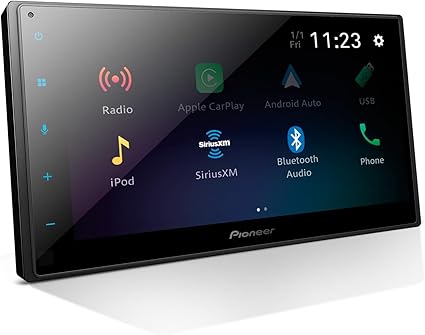 | Pioneer DMH-1600NEX | Check Price |
Our Top Picks 3 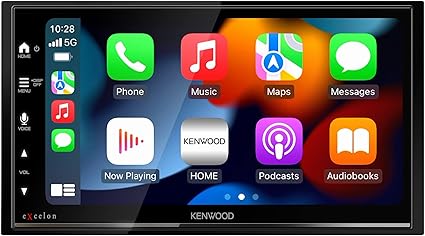 | Kenwood DMX709S eXcelon | Check Price |
Our Selected Top 13 Carplay Stereo for Different Needs
This list features a variety of CarPlay stereos tailored to different preferences and needs. Each review covers performance, ideal users, strengths, and potential drawbacks to help readers make an informed choice based on their specific requirements and priorities.
1. QLED 7 Double Din Car Stereo with Wireless Apple CarPlay
Drivers wanting a smooth way to connect their iPhones or Androids with a clear and bright screen will appreciate this double din car stereo. Its standout feature is the wireless Apple CarPlay combined with a crisp 7 QLED display, making navigation and entertainment easy on the eyes and convenient to use while driving.
Setting it up is straightforward by linking your phone through Bluetooth, which then offers quick access to your music, messages, and maps. The touchscreen is responsive, and voice control options like Siri keep distractions low.
Daily use involves streaming from internet services or watching 1080P videos, all rendered in vibrant colors whether it’s day or night.
The stereo performs solidly with a 240-watt output that fills the car cabin with stereo sound across four channels. The build feels sturdy and the screen delivers detailed visuals that stand out compared to older models. Customer feedback notes the clarity and wireless connection as major positives, while some mention occasional hiccups in touch sensitivity.
Wireless connectivity and vivid display quality rank high in everyday use. Users find the stereo great for streaming and navigation, yet some experience inconsistent touchscreen response during operation. The sound system delivers powerful audio but setup requires attention to the RCA connection requirements.
This stereo suits those who want an easy phone link and sharp visuals without cables cluttering the dash. People seeking the absolute fastest touch input or plug-and-play simplicity without RCA wiring may want to explore other options better suited for those preferences.
Pros
- Wireless Apple CarPlay and Android Auto
- Bright, clear 7″ QLED touchscreen
- Supports 1080P video playback
- 240 watts output for good sound power
Cons
- Touchscreen occasionally less responsive
- Needs RCA connectors for audio/video
| Specification | Details |
|---|---|
| Screen Size | 7″ |
| Resolution | 1280×720 (supports 1080P video playback) |
| Connectivity Technology | Bluetooth, Wi-Fi |
| Output Power | 240 watts |
| Audio Output Mode | Stereo |
| Supported Internet Services | Pandora, YouTube |
2. Pioneer DMH-1600NEX 6.8 Double Din Car Stereo
Among double din car stereos, the Pioneer DMH-1600NEX stands out for its wired Apple CarPlay and Android Auto integration, making it ideal for anyone wanting a mix of modern smartphone control and dependable Bluetooth hands-free calling. It fits well for drivers focused on connectivity and customizable audio in their vehicle dash.
Setup requires connecting via USB to enjoy smartphone features, and the touchscreen interface handles calls, music, and navigation easily on the go. Bluetooth pairing comes with an external microphone for clear hands-free calling without fumbling with your phone. The 13-band equalizer helps tailor the audio to your car’s sound system, giving you good control daily over how your music sounds.
Audio quality is strong for its class, delivering stereo sound with adjustable EQ presets ready to suit different music styles or speaker setups. The unit feels solid in the dashboard, although some mention the touchscreen can feel a bit unresponsive at times.
Users appreciate the clear call quality but note occasional lag when switching between apps.
The strongest praise centers on its reliable hands-free calling clarity thanks to the external microphone. Common complaints highlight occasional sluggishness with the touchscreen and the necessity of wired connections for CarPlay and Android Auto functions. The sound customization options are consistently appreciated for daily listening adjustments.
People wanting dependable smartphone integration and detailed sound control will be satisfied with this stereo. Those preferring wireless smartphone connections or faster touchscreen reactions might want to consider other options that offer these features more readily.
Pros
- Clear hands-free calling via external microphone
- 13-band equalizer for personalized sound
- Supports both Apple CarPlay and Android Auto wired
- Compatible with SiriusXM and various audio formats
Cons
- Touchscreen occasionally unresponsive
- Wired connection required for smartphone integration
| Specification | Details |
|---|---|
| Connectivity Technology | Bluetooth, USB, Wi-Fi |
| Controller Type | Android, iOS |
| Number of Channels | 2 |
| Surround Sound Channel Configuration | 5.1 |
| Audio Output Type | Bluetooth, RCA |
3. KENWOOD DMX709S eXcelon 6.95 Double Din Car Stereo
Kenwood DMX709S eXcelon serves drivers needing a sharp, clear display with smooth Apple CarPlay integration. Its biggest strength lies in the large 6.8 capacitive touchscreen that makes accessing apps like Maps and Spotify a simple, safer task while driving.
Setup involves connecting your smartphone via USB, which quickly links with Apple CarPlay for voice commands or touchscreen use. Daily driving feels more connected and less distracting, thanks to hands-free controls and familiar apps showing clearly on the high contrast screen.
Bluetooth lets you stream audio with ease, while the Android controller support adds extra convenience for mixed-device households.
Audio performance delivers a solid stereo output with four channels and 5.1 surround configuration, filling the cabin nicely without distortion. Build quality is solid with a responsive touchscreen and sturdy buttons.
Strongest praise centers on the vivid, clear display and smooth app control. The most common complaint points to occasional touchscreen sensitivity issues under certain lighting.
Vivid display and smooth app integration make everyday drives more connected and enjoyable. Some users notice the touchscreen sensitivity can drop under bright sunlight, making touch input a bit tricky occasionally.
Those who want clear visuals with smooth voice and touch control will appreciate this stereo. Drivers preferring wireless connectivity or flawless performance in all lighting conditions might want to explore other options.
Pros
- Large, bright capacitive touchscreen
- Supports Apple CarPlay and Android Auto wired
- Responsive voice control with Siri
- Multiple audio connectors including 3.5mm jack and USB
Cons
- Touchscreen can be less responsive in bright light
- Limited to wired connection for CarPlay and Android Auto
| Specification | Details |
|---|---|
| Screen Size | 6.8″ capacitive touchscreen LCD |
| Connectivity Technology | USB |
| Audio Output Mode | Stereo, 5.1 Surround |
| Supported Internet Services | Maps |
| Wattage | 2.51 Milliwatts |
4. KENWOOD DMX4710S 6.8 Single Din Digital Car Stereo

Feeling at home with your smartphone’s navigation and music controls directly on your dash is easily achieved through the KENWOOD DMX4710S 6.8 Single Din Digital Car Stereo. Ideal for drivers who want a compact setup without losing modern multimedia capabilities, it excels at blending phone integration with straightforward usability.
Getting it going is simple thanks to its compatibility with Apple CarPlay and Android Auto, so linking your phone takes moments. The touchscreen controls combine with Bluetooth and USB connectivity to keep calls and tunes accessible without distraction. The Maestro system support adds smooth integration with your vehicle’s electronics, making daily interactions feel intuitive rather than cluttered.
Sound customization stands out with a 13 Band Graphic EQ and Digital Time Alignment, giving you real control over the audio environment inside your car. The physical build fits well in a single DIN slot, balancing compact size and solid performance. Reviews mention great sound quality and ease of use, though some note the screen brightness could be better in direct sunlight.
The main praise revolves around excellent sound customization options and smooth smartphone integration. The most common complaint centers on screen visibility in bright daylight, which can be challenging during sunny drives. People appreciate how the unit keeps their music and calls accessible without overcomplicating the controls.
Drivers looking for a neat single DIN solution with strong multimedia features will be happy here, especially if they want detailed audio tuning. Those who need a larger or brighter display, or clearer wattage details, might want to consider other models better suited to those specific priorities.
Pros
- Supports Apple CarPlay and Android Auto
- 13 Band Graphic EQ for detailed sound adjustment
- USB and Bluetooth options for versatile connectivity
- Compact single DIN size fits many vehicles
Cons
- Screen brightness struggles in direct sunlight
- Output wattage listed as both 50 watts and 300 watts
| Specification | Details |
|---|---|
| Connectivity Technology | Bluetooth, USB |
| Controller Type | Hand Control |
| Output Power | 300 watts |
| Number of Channels | 6 |
| Audio Format Support | WAV, WMA |
| Compatible Devices | Smartphone, Tablet |
5. 7 Double Din Car Stereo with Wireless Apple CarPlay

Perfect for anyone looking to upgrade their car with smart tech, this double din stereo handles wireless Apple CarPlay and Android Auto smoothly. Its biggest strength is automatic phone connection and voice control, keeping driving safe and convenient.
Installing it takes typical double din space and setup connects easily to your phone by Bluetooth or cable. Voice commands with Siri or Google Assistant work flawlessly for navigation, messages, and calls.
The interface feels intuitive and phone connection is reliable every drive, eliminating fumbling with cables.
Audio quality impresses with crisp sound and powerful bass thanks to the built-in DSP and subwoofer output. The large rear heat sink keeps the unit cool during longer drives.
The most praised feature is how well the hands-free voice control functions. A common complaint involves occasional hiccups with wireless connection stability.
Voice control through Siri or Google Assistant works well, making hands-free driving easy and safe. Some users notice occasional glitches with the wireless connection that require restarting the phone or stereo to fix. Once connected, the audio experience is consistently clear with strong bass.
Great choice for anyone looking to easily integrate their smartphone and enjoy powerful sound customization. Drivers valuing absolute wireless stability or response speed might want to consider alternatives better suited to flawless wireless performance.
Pros
- Automatic phone connection on car start
- Supports both wireless and wired CarPlay/Android Auto
- Customizable sound with 10-band EQ and subwoofer output
- Large rear heat sink prevents overheating
Cons
- Wireless connection can be unstable at times
- Interface sometimes slightly laggy switching apps
| Specification | Details |
|---|---|
| Connectivity Technology | Auxiliary, Bluetooth, USB |
| Output Power | 240 watts |
| Number of Channels | 5 |
| Controller Type | Android, iphone |
| Special Features | Android Auto, Apple CarPlay, Voice Control |
6. 10.1 QLED Double Din Car Stereo with Wireless CarPlay
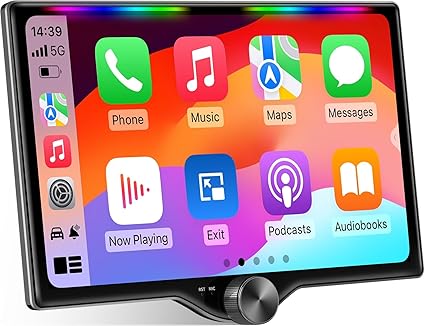
QLED display technology brings vibrant color and sharp clarity to this 10.1-inch double din car stereo suited for most dash openings. Its standout feature is the combination of wireless and wired CarPlay with Android Auto, making smartphone integration smooth and safe while driving.
Setup requires confirming your dash opening size and possibly a dash kit, but once in place, connecting to your phone is quick via Bluetooth or USB. Day-to-day use revolves around the bright touchscreen and voice control for easy access to maps, calls, and music without taking hands off the wheel.
Two rear USB ports offer extra connectivity, and the sound-synchronized illumination adds a nice touch while you drive.
Sound quality delivers 240 watts across four channels, which fills the car well without distortion. Build feels solid, with a responsive touchscreen that doesn’t lag. Reviews often praise the clear visuals even in sunlight, but some find the dash fit requires adjustments or accessories beyond the base unit.
Bright visuals and strong audio output stand out as key positives, while fitting the stereo into different dashboards can require extra parts or patience. Voice commands are generally accurate, making hands-free control reliable.
Anyone looking for modern touchscreen functionality with flexible smartphone support will appreciate this unit’s features. Those who prefer a plug-and-play installation without additional dash kit purchases might consider alternatives better matched to their vehicle dash size.
Pros
- Bright 10.1-inch QLED touchscreen
- Supports both wireless and wired CarPlay
- 240 watts output for clear stereo sound
- Voice control with accurate microphone
Cons
- May need a dash kit for proper fit
- Some people experience challenges during dash installation
| Specification | Details |
|---|---|
| Connectivity Technology | 2 Rear USB Port, Bluetooth |
| Controller Type | Android, iOS |
| Output Wattage | 240 watts |
| Compatible Devices | Smartphone, iPhone |
| Display Size | 10.1 Inch QLED |
| Audio Output Mode | Stereo |
7. 9.26 Wireless Portable CarPlay Screen

Wireless connectivity stands out as the top feature of the 9.26 Wireless Portable CarPlay Screen, making it ideal for anyone wanting Apple CarPlay or Android Auto without messy cables. Those who value convenience and easy access to navigation and music on the go will appreciate what it offers.
Setting up involves pairing the screen via Bluetooth and Wi-Fi, which takes just a few minutes. Day-to-day use feels like having a tablet dedicated to your car, with a touchscreen that’s responsive and supports voice commands.
The backup camera adds an extra layer of safety when reversing, and you can easily switch between apps like Apple Maps, Google Maps, and Waze without breaking focus.
Performance is solid with a stereo audio output and clear sound through Bluetooth or AUX connections. The build feels sturdy and portable enough to move between vehicles if needed.
Users mostly praise the wireless connection stability, while some mention occasional hiccups with app responsiveness. The screen’s ability to receive OTA updates keeps the software current.
Wireless connection reliability gets high marks from users, making hands-free calls and navigation smooth most of the time. Complaints about app lag or occasional unresponsiveness come up but do not seem to be constant problems. OTA updates help address bugs over time.
Drivers who want a portable, cable-free CarPlay experience and a backup camera will find it useful. Those preferring a larger screen or integrated factory solutions might want to look elsewhere.
Pros
- Wireless CarPlay and Android Auto connection
- Backup camera included for safer reversing
- Supports live traffic navigation apps
- OTA updates keep software fresh
Cons
- Occasional app responsiveness issues
- Screen size may feel small to some
| Specification | Details |
|---|---|
| Connectivity Technology | Bluetooth, Wi-Fi |
| Controller Type | Touch |
| Control Method | App, Touch, Voice |
| Audio Output Type | AUX, Bluetooth, FM Transmission, Speakers |
| Connector Type | USB Type-C |
| Number of Channels | 2 |
8. 7 Wireless Double Din Car Stereo with Apple CarPlay

Wireless connection to Apple CarPlay and Android Auto sets this 7-inch double din stereo apart for anyone wanting hands-free phone control and navigation while driving. It suits drivers who want straightforward access to apps, calls, and music without fumbling with cables, making the daily drive more connected and less distracting.
Setup involves connecting the unit to your car’s wiring, but pairing your phone happens automatically as soon as you start the car. Wireless Apple CarPlay or Android Auto activate without extra steps, so you can ask Siri or Google Assistant to make calls, get directions, or play music.
Its built-in Bluetooth and USB ensure you can hook up other devices and keep the stereo versatile in everyday use.
Sound performance is impressive thanks to an internal DSP and 4.2 channel preamplifier, delivering a total output of 240 watts that fills the car with clear audio from all directions. The video supports several formats including 1080p, making media playback flexible.
Build quality is solid, designed to fit standard double din slots. Voice control works well, though some users note occasional wireless connection glitches or slight delays in app responsiveness.
The wireless Apple CarPlay and Android Auto connection generally works smoothly and activates automatically, making hands-free use simple. Occasional complaints mention that wireless pairing can be unreliable or delayed, which interrupts the user experience from time to time.
Drivers who want easy access to phone features without cords will appreciate this stereo’s capabilities. Those who require consistently flawless wireless performance or who need an extremely user-friendly DIY install might consider other options.
Pros
- Wireless connection activates automatically when car starts
- Strong 240 watt output with built-in DSP for clear sound
- Supports both Apple CarPlay and Android Auto via voice
- Accepts many popular video and audio file formats
Cons
- Wireless connection can sometimes drop or lag
- May require professional installation for complex vehicles
| Specification | Details |
|---|---|
| Screen Size | 7 inches |
| Output Power | 240 watts |
| Connectivity Technology | Auxiliary, Bluetooth, USB |
| Controller Type | Android Auto, Apple Carplay |
| Supported Video Formats | MPEG-4, RMVB, DivX, AVI, 1080P, MP3, WMA, JPEG |
| Surround Sound Channel Configuration | 4.2 |
9. 6.9 Single Din Car Stereo with Wireless Apple CarPlay
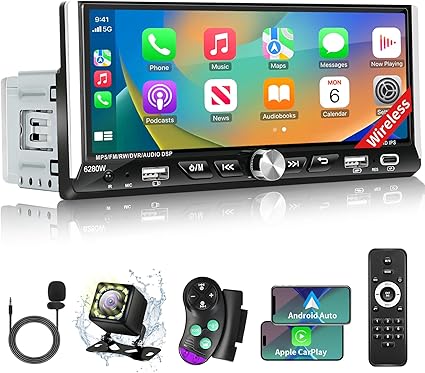
Long drives or busy commutes call for a car stereo that keeps you connected and entertained without distractions. Designed as a 6.9-inch single din unit, this stereo suits people who want wireless Apple CarPlay and Android Auto in vehicles where space is limited. Its wireless connectivity is a standout, removing the hassle of cables while accessing your phone’s features.
Setting it up requires attention to the wiring diagram and checking your vehicle compatibility, especially because it might cover vents or buttons in some cars. Daily use is straightforward thanks to the touchscreen and voice control options, including Siri and Google Assistant. Bluetooth and multi-color illumination add convenience and personalize your ride while hands-free calling keeps your focus on the road.
Performance matches what you’d expect from a modern car stereo with clear radio reception and reliable wireless connections. The build feels solid, with several control methods like hand, remote, and push buttons to suit different preferences. A common downside is the potential for installation challenges related to fitting and wiring, but the brand offers 10 years of product support and free replacements.
Many find the wireless Apple CarPlay feature very convenient for hands-free use. Common complaints mostly focus on compatibility issues during installation, like potential blocking of vents or controls in certain cars.
Ideal for anyone wanting wireless connection ease and comprehensive control options. Those with limited dashboard space or uncertain wiring skills might want to consider other models with simpler installation requirements.
Pros
- Wireless Apple CarPlay makes phone use safer
- Multiple control options including voice and touchscreen
- 10-year free product replacement support
- Supports rear view camera input for safer parking
Cons
- May block vents or buttons in some vehicles
- Installation can be tricky without following wiring diagram
| Specification | Details |
|---|---|
| Connectivity Technology | Bluetooth, USB, Type-C |
| Controller Type | Hand Control, Remote Control, Voice Control, Google Assistant, Siri Assistant, Push Button, Touchscreen |
| Screen Size | 6.9 inch IPD Display |
| Special Features | Wireless Apple CarPlay, Android Auto, FM AM Car Radio, Hands-Free Calling, Multi Color Illumination |
| Compatibility | Smartphone, iPhone, USB Storage Devices, Backup Cameras |
10. 10.1 Wireless Single Din Car Stereo with Apple CarPlay

10.1-inch IPS touchscreen stands out with its vivid HD display and multi-angle adjustment, fitting most single or double din dash openings. Ideal for drivers wanting easy access to Apple CarPlay and Android Auto without tangled wires, it combines entertainment and navigation in a compact and stylish design.
Setting up involves plugging in via USB or opting for wireless CarPlay or Android Auto, both of which respond well and offer hands-free voice control through Siri or Google Assistant. Wired MirrorLink also connects your phone for screen mirroring, letting you stream videos or maps smoothly.
The touchscreen is responsive and easy to adjust for comfortable viewing angles while driving.
The stereo delivers solid stereo sound with an output of 240 watts across four channels, filling the car with clear audio backed by a built-in subwoofer. The construction feels sturdy though some users note occasional minor glitches in wireless connection stability. On command, voice controls reliably handle calls, navigation, and music without much lag.
Voice control runs smoothly and reliably, making hands-free commands effective, though some people notice occasional hiccups in the wireless connection that can disrupt usage. The display is clear and configurable, pleasing for daily driving and media use.
Drivers looking for flexible CarPlay options and solid audio performance will appreciate this stereo. People needing fully integrated navigation or guaranteed wireless connectivity without interruptions may want to explore other options.
Pros
- Wireless or wired CarPlay and Android Auto options
- Multi-angle screen adjustment for better viewing
- Strong 240-watt stereo output with subwoofer
- Responsive voice control for safer driving
Cons
- Wireless connection can sometimes be unstable
- No mention of built-in navigation; relies on phone apps
| Specification | Details |
|---|---|
| Display | 10.1-Inch IPS Touchscreen |
| Output Power | 240 watts |
| Connectivity Technology | Auxiliary, Bluetooth, USB |
| Controller Type | Remote, Voice Control |
| Special Features | Android Auto, Apple CarPlay, Screen Mirroring, Subwoofer |
11. QLED 7 Double Din Car Stereo with Wireless Apple CarPlay

People who want a modern, easy-to-use car stereo that supports both Apple CarPlay and Android Auto wirelessly find a lot to like here. It’s especially good for those who prefer a bright, clear touchscreen that works well even in sunlight. The wireless CarPlay is its biggest strength, keeping your phone synced without cables.
Setup is straightforward, and connecting your phone happens automatically once inside the car. The 7-inch QLED screen is bright and sharp, offering wide viewing angles that make it easy to see from any seat. Voice commands through Siri or Google Assistant work smoothly, so you can focus on driving while handling messages, navigation, or music.
Bluetooth, USB, and Wi-Fi make it easy to connect other devices as well.
Sound quality lives up to expectations with 240 watts output through four channels, providing clear stereo audio. The stereo supports various video formats and integrates easily with amplifiers and speakers. Build quality feels solid for daily use, though some mention the touchscreen can be a bit sensitive at times.
Most appreciate the wireless convenience while some wish the interface had faster response times.
Wireless connection for Apple CarPlay and Android Auto works well and connects without needing cables, making daily use convenient. The touchscreen clarity stands out, even on sunny days, though some users find the touch controls too sensitive or slow at times. The sound output and device compatibility add to its appeal.
Those looking for bright, easy smartphone integration with a simple setup will appreciate this stereo. People who need very fast interface responsiveness or prefer physical buttons might want to explore other options instead.
Pros
- Wireless Apple CarPlay & Android Auto support
- Bright 7-inch QLED HD touchscreen display
- Auto-syncs phone for quick connection
- Supports multiple media formats and devices
Cons
- Touchscreen sensitivity can cause occasional mis-taps
- Interface response speed could be improved
| Specification | Details |
|---|---|
| Connectivity Technology | Bluetooth, USB, Wi-Fi |
| Controller Type | Android Auto, Apple Carplay |
| Output Wattage | 240 watts |
| Display | 7″ QLED touchscreen, 1280×720 resolution, 170° wide viewing angle |
| Connector Type | RCA, USB Type A |
12. 7 Double Din Car Stereo with Wireless Apple CarPlay

Wireless Apple CarPlay and Android Auto bring a clutter-free experience to anyone wanting easy phone integration while driving. This double din stereo suits people looking to upgrade their car’s dashboard with a tactile 7-inch screen where navigation and communication apps are simple to access without cables getting in the way.
Setup involves connecting the stereo via Bluetooth or Wi-Fi for wireless CarPlay or Android Auto use, meaning you don’t have to plug in your phone every time. The IPS touchscreen is responsive, supporting various video formats and providing a bright and clear display.
Voice commands through Siri or Google Assistant help with calls and messages, allowing hands-free control that keeps your attention where it belongs.
Sound output comes through a 4-channel stereo system delivering around 100 watts, which powers car speakers effectively. The build feels sturdy and the screen sharp; however, a few reviews mention occasional glitches with wireless connectivity. The overall navigation experience integrates well, showing maps directly on the screen for easier route-following without fiddling with your phone.
Many appreciate the convenience of wireless connectivity and the bright, clear display for GPS navigation, though some note disruptions in the wireless connection at times. The screen size and multi-format video support offer good multimedia choices, but a few users find the lack of advanced sound settings limiting.
Anyone prioritizing easy access to phone apps without cables and wanting a strong, clear display will find this stereo suitable. People with cars who want highly detailed sound customization or perfect wireless reliability might want to look at other options.
Pros
- Wireless Apple CarPlay and Android Auto support
- 7-inch responsive IPS touchscreen
- Strong 100 watt output power
- Supports multiple video formats
Cons
- Occasional wireless connectivity glitches
- No mention of advanced sound tuning options
| Specification | Details |
|---|---|
| Connectivity Technology | Auxiliary, Bluetooth, USB, Wi-Fi, Wireless |
| Controller Type | Hand Control |
| Audio Output Mode | Stereo |
| Output Power | 100 watts |
| Number of Channels | 4 |
| Screen | 7-inch IPS Touchscreen |
13. 7 Double Din Car Stereo with Apple CarPlay and Android Auto
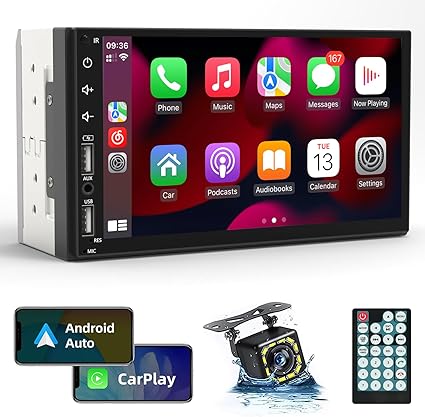
7 Double Din Car Stereo with Apple CarPlay and Android Auto lets you control your phone hands-free while driving. Perfect for anyone wanting easy access to calls, music, and navigation through voice command or touch. Its biggest advantage is smooth integration with both iPhone and Android devices for safer, smarter driving.
Setup involves connecting your phone to use features like Maps, Spotify, or YouTube since GPS depends on your phone’s signal. The stereo has two USB ports, one for music playback, one for fast charging your phone at 2A, which helps keep devices powered on longer drives.
Voice control via Siri or Google Assistant works well, letting you respond to messages or make calls without needing to touch the screen much.
Sound output reaches 240 watts across four channels, delivering clear, balanced stereo audio. The build feels solid with dependable Bluetooth connectivity and a bright touchscreen with responsive controls. Most praise comes from how well Apple CarPlay and Android Auto function together, though some mention that GPS navigation requires phone connectivity, meaning no offline GPS option is built into the unit itself.
Voice commands and phone integration receive strong compliments for making driving easier and safer. The main drawback is that GPS features do not work without a connected smartphone since no internal GPS exists.
People who rely on smartphone navigation and want voice control will find this suits their needs well. Those wanting an all-in-one unit with built-in GPS may want to consider other options.
Pros
- Supports both Apple CarPlay and Android Auto
- Voice control works smoothly
- Two USB ports, including 2A fast charge
- 240 watts power for clear stereo sound
Cons
- GPS navigation requires phone connection
- Not a built-in GPS unit
| Specification | Details |
|---|---|
| Connectivity Technology | Auxiliary, Bluetooth, USB |
| Output Power | 240 watts |
| Control Method | Remote, Touch, Voice |
| Number of Channels | 4 |
| Android Auto, Apple CarPlay | Supported |
| USB Charging Port | 2A fast charging |
Best CarPlay Stereos Side by Side Comparison
| Product | Connectivity Technology | Controller Type | Special Features | Compatible Devices |
|---|---|---|---|---|
| QLED 7 Double Din | Bluetooth, Wi-Fi | Android, iOS | Android Auto, Apple CarPlay | Smartphone |
| Pioneer DMH-1600NEX | Bluetooth, USB, Wi-Fi | Android, iOS | Android Auto, Apple CarPlay | Smartphone |
| Kenwood DMX709S eXcelon | USB | Android, Ring | Apple CarPlay, Android Auto Wired | Smartphone |
| Kenwood DMX4710S Single Din | Bluetooth, USB | Hand Control | Android Auto, Apple CarPlay, GPS | Smartphone, Tablet |
| 7 Double Din CarPlay | Auxiliary, Bluetooth, USB | Android, iPhone | Android Auto, Apple CarPlay, Voice Control | Smartphone |
| 10.1 QLED Double Din | Bluetooth, 2 Rear USB Port | Android, iOS | Android Auto, Apple CarPlay, Touchscreen | Smartphone, iPhone |
| Wireless 9.26 CarPlay Screen | Bluetooth, Wi-Fi | Touch | Wireless mirroring, Backup camera | – |
| 7 Wireless Double Din | Auxiliary, Bluetooth, USB | Android Auto, Apple Carplay | Android Auto, Apple CarPlay, DSP | Amplifier, Smartphone, Speaker |
| 6.9 Single Din CarPlay | Bluetooth, USB, Type-C | Hand Control, Remote, Voice | Wireless CarPlay, Voice Assistants | – |
| 10.1 Wireless Single Din | Auxiliary, Bluetooth, USB | Remote, Voice Control | Android Auto, Apple CarPlay, Subwoofer | Smartphone, Speaker |
| QLED 7 Double Din Plus | Bluetooth, USB, Wi-Fi | Android Auto, Apple Carplay | Android Auto, Apple CarPlay, DSP | Amplifier, Smartphone, Speaker |
| 7 Double Din Wireless | Auxiliary, Bluetooth, USB, Wi-Fi, Wireless | Hand Control | Wireless CarPlay, IPS Touchscreen | Microphone, Smartphone, Speaker |
| 7 Double Din CarPlay Auto | Auxiliary, Bluetooth, USB | Android, iOS | Android Auto, Apple CarPlay, Voice Control | Smartphone |
- Connectivity TechnologyBluetooth, Wi-Fi
- Controller TypeAndroid, iOS
- Special FeaturesAndroid Auto, Apple CarPlay
- Compatible DevicesSmartphone
- Connectivity TechnologyBluetooth, USB, Wi-Fi
- Controller TypeAndroid, iOS
- Special FeaturesAndroid Auto, Apple CarPlay
- Compatible DevicesSmartphone
- Connectivity TechnologyUSB
- Controller TypeAndroid, Ring
- Special FeaturesApple CarPlay, Android Auto Wired
- Compatible DevicesSmartphone
- Connectivity TechnologyBluetooth, USB
- Controller TypeHand Control
- Special FeaturesAndroid Auto, Apple CarPlay, GPS
- Compatible DevicesSmartphone, Tablet
- Connectivity TechnologyAuxiliary, Bluetooth, USB
- Controller TypeAndroid, iPhone
- Special FeaturesAndroid Auto, Apple CarPlay, Voice Control
- Compatible DevicesSmartphone
- Connectivity TechnologyBluetooth, 2 Rear USB Port
- Controller TypeAndroid, iOS
- Special FeaturesAndroid Auto, Apple CarPlay, Touchscreen
- Compatible DevicesSmartphone, iPhone
- Connectivity TechnologyBluetooth, Wi-Fi
- Controller TypeTouch
- Special FeaturesWireless mirroring, Backup camera
- Compatible Devices–
- Connectivity TechnologyAuxiliary, Bluetooth, USB
- Controller TypeAndroid Auto, Apple Carplay
- Special FeaturesAndroid Auto, Apple CarPlay, DSP
- Compatible DevicesAmplifier, Smartphone, Speaker
- Connectivity TechnologyBluetooth, USB, Type-C
- Controller TypeHand Control, Remote, Voice
- Special FeaturesWireless CarPlay, Voice Assistants
- Compatible Devices–
- Connectivity TechnologyAuxiliary, Bluetooth, USB
- Controller TypeRemote, Voice Control
- Special FeaturesAndroid Auto, Apple CarPlay, Subwoofer
- Compatible DevicesSmartphone, Speaker
- Connectivity TechnologyBluetooth, USB, Wi-Fi
- Controller TypeAndroid Auto, Apple Carplay
- Special FeaturesAndroid Auto, Apple CarPlay, DSP
- Compatible DevicesAmplifier, Smartphone, Speaker
- Connectivity TechnologyAuxiliary, Bluetooth, USB, Wi-Fi, Wireless
- Controller TypeHand Control
- Special FeaturesWireless CarPlay, IPS Touchscreen
- Compatible DevicesMicrophone, Smartphone, Speaker
- Connectivity TechnologyAuxiliary, Bluetooth, USB
- Controller TypeAndroid, iOS
- Special FeaturesAndroid Auto, Apple CarPlay, Voice Control
- Compatible DevicesSmartphone
How to Choose the Right CarPlay Stereo
Look for a CarPlay stereo that fits your vehicle, offers easy connectivity, and has clear audio quality. Choosing the right features helps avoid installation issues and future upgrades, saving money and frustration in the long run. Reliability and user-friendly controls are key for a smooth experience.
Compatibility with Vehicles and Devices
Fitting a stereo that doesn’t match your car’s dashboard size or wiring causes a frustrating installation process, often requiring extra adapters or modifications. Stereos typically come in single-DIN or double-DIN sizes, so measuring your dashboard opening beforehand is essential.
A mismatch leads to gaps or unstable mounting. Beyond physical fit, the wiring system needs to align with your vehicle’s connectors; many modern cars have manufacturer-specific harnesses that simplify the process.
Smartphone compatibility can be a sticking point. Most units support both iOS and Android, but confirming your phone’s OS version and CarPlay iteration is important to avoid functionality issues. Some stereos also interface with steering wheel controls and rear cameras, which adds convenience but requires explicit compatibility that doesn’t always come standard.
Display Quality and Usability
A small or low-resolution screen makes reading maps and menus difficult in bright conditions. Screens in the 6.5-7 inch range tend to balance size and dashboard space well.
Higher resolution, around 800×480 or above, helps avoid pixelated icons and text. During daylight, reflections can ruin visibility, so antiglare coatings and sufficient brightness levels, usually around 500 nits or more, are helpful.
Responsiveness to touch affects usability while driving. A laggy or oversensitive screen forces multiple attempts to select options, increasing distraction.
A clean and straightforward interface with logical menus reduces the time your eyes leave the road. Buttons or knobs for key controls complement touchscreens for quicker access.
Audio Performance and Connectivity
The stereo’s amplifier power, often listed in watts per channel, influences how loud and clear the sound gets without distortion. For average sedans, 50 watts per channel is a reasonable baseline.
Sound clarity depends on the internal DAC and circuitry quality; poor units can produce noticeable static or muddled audio.
Multiple audio input options keep listening flexible. Bluetooth is standard for wireless streaming, while USB ports handle both playback and charging. An AUX input offers another quick wired connection.
To upgrade speakers or add a subwoofer, look for preamp outputs and EQ settings that let you fine-tune the sound profile.
Installation and Integration
Installation is smoother when the new stereo matches your car’s existing wiring harnesses and mounting points. Some units include adapter plugs or brackets that save time and avoid cutting wires. Without those, splicing wires can risk damage or poor connections.
User guides and online forums often help clarify these steps for specific car models.
Post-installation, some stereos let you update the firmware through USB or Wi-Fi, which can fix bugs and add features. Being able to troubleshoot common issues or reset settings from the unit itself also prevents unnecessary trips to a technician.
Safety and Driver Distraction Features
Voice control integration reduces distractions by allowing navigation, calling, and music control without hands. Well-implemented systems respond quickly and understand natural commands to avoid repeated attempts.
Handsfree calling should come with clear microphone input and echo cancellation for safe conversations while driving.
Quick access to navigation apps and communication functions through steering wheel buttons or straightforward menus keeps attention focused on the road. Check for safety certifications or compliance with industry standards, which indicate the unit has been tested for safe operation within a vehicle environment.
Maximizing Your CarPlay Stereo Experience with Voice Controls
Voice controls make using a CarPlay stereo safer and more convenient while driving. Most systems respond to simple commands like making calls, sending texts, or playing music without needing to touch the screen.
Setting up your voice assistant through the stereo’s settings menu is usually straightforward, and once active, it reduces distractions by allowing hands-free operation.
Here are some common voice commands that work well:
- “Call [Contact Name]” to quickly connect to someone from your phonebook.
- Use “Navigate to [Address or Place]” to get turn-by-turn directions.
- “Play [Song or Artist]” to access your music library or streaming apps.
- “Send a message to [Contact]” to compose text messages safely on the go.
Using voice commands can improve your focus on the road while still accessing key features of your CarPlay stereo.
Essential Maintenance Tips to Prolong Your CarPlay Stereo’s Lifespan
CarPlay stereos require regular care to maintain both performance and longevity. Keeping the touchscreen clean from fingerprints and dust helps ensure that the display remains responsive.
Use a soft microfiber cloth and avoid spraying any liquid directly on the screen to prevent damage.
A few maintenance tips to keep in mind:
- Check for software updates from the manufacturer or your car’s infotainment system regularly; updates often fix bugs and improve compatibility.
- Inspect cable connections, especially the Lightning or USB cable used to connect your iPhone, ensuring they are not frayed or loose.
- Avoid exposing the stereo to extreme temperatures for prolonged periods, as heat can affect electronic components.
Routine care like this can extend the life of your CarPlay stereo and keep it running smoothly.
Comparing CarPlay Stereos with Android Auto Units: Which Suits You Better?
CarPlay and Android Auto systems serve similar functions but cater to different smartphone ecosystems. Choosing between them usually depends on the phone you use but also on the flexibility and app options you want in your car.
Consider these points when comparing:
- CarPlay works with iPhones and integrates well with Apple apps such as Messages and Maps, while Android Auto is designed for Android phones and supports Google apps like Google Maps and Google Assistant.
- Both offer voice commands and access to music streaming services, but the interface and some app availability can differ.
- Some stereos support only one system, but many newer models allow switching between CarPlay and Android Auto depending on the connected device.
Choosing the right system depends largely on your smartphone and preferred in-car features.
People Also Asked
How Do I Install a CarPlay Stereo in My Car?
Installing a CarPlay stereo usually involves removing your car’s existing head unit and connecting the new system’s wiring to the factory harness. Look up a wiring diagram specific to your vehicle model to avoid confusion and consider getting a dash kit to ensure a proper fit.
Is This CarPlay Unit Compatible with My Vehicle Model?
CarPlay compatibility depends on your car’s year, make, and model, and whether the system supports the connection interface your car uses. Check the manufacturer’s compatibility list or consult with the seller using your vehicle information to confirm it matches your stereo and wiring setup.
What Safety Features Does a CarPlay Stereo Offer?
CarPlay stereos help minimize distractions by allowing hands-free calls, voice commands, and simplified access to music and navigation apps. Using Siri regularly not only keeps your eyes on the road but can also avoid fumbling with touchscreen menus while driving.
How Long Do CarPlay Stereos Typically Last Before Issues Arise?
A CarPlay stereo can last several years without issues if installed correctly and maintained well, but lifespan varies by brand and usage. Avoid moisture exposure and extreme temperatures inside the dashboard to keep electronic components functioning longer.
What Are Common Problems Users Face with CarPlay Stereos?
Common problems include connection dropouts, laggy response times, or apps not loading correctly. Keeping your phone’s iOS up to date and occasionally restarting the stereo can help reduce these issues during regular use.
Conclusion
Choosing the best CarPlay stereo depends mainly on easy integration with your car, the quality of the screen display, and straightforward controls. Compatibility with both your phone and vehicle’s system is crucial to avoid connection problems. Sound quality and the option for manual or touch controls also make driving safer and more enjoyable.
Keep in mind the size of your car’s dash and your budget when making a choice. Consider how often you will use the system daily as well. For a clear overview, revisit the comparison table and the detailed picks provided earlier to find the best fit for your setup.