Top 13 Best Auto Diagnostic Scan Tool That Fixes Cars Fast
Using a poorly made scan tool often means slow readings, incorrect error codes, or frustrating connectivity problems with modern car systems. Many have experienced the disappointment of an unresponsive device that wastes time or leads to unnecessary repairs.
The best auto diagnostic scan tool avoids these pitfalls by delivering clear and accurate data quickly, saving both time and money during car troubleshooting.
A reliable diagnostic scan tool must have a well-built interface that connects smoothly with a vehicle’s OBD-II port, typically supporting protocols like CAN or ISO 9141. Device responsiveness depends largely on processing power and how updated its software is, so regular firmware updates are key.
Compatibility with a broad range of car models and a clear digital display for easy reading are also important factors to consider for effective diagnostics.
Need a Quick Check?
| Image | Product | Price |
|---|---|---|
Our Top Picks 1  | ANCEL AD310 Scanner | Check Price |
Our Top Picks 2  | Autel MK900BT Tool | Check Price |
Our Top Picks 3  | TOPDON AD900 Lite | Check Price |
Our Selected Top 13 Auto Diagnostic Scan Tool Worth Considering
This list features a carefully chosen variety of auto diagnostic scan tools designed for different needs and skill levels. Each review explains how the tool performs, who it is best suited for, and highlights its main advantages and limitations to help you make an informed decision.
1. ANCEL AD310 Universal OBD II Scanner
Compact and sturdy design makes this a reliable tool for anyone needing a clear read on engine issues. Suited for everyday drivers and DIY mechanics, it stands out for its ability to diagnose check engine lights quickly and accurately.
Setup takes just moments with the included cable that’s thick and flexible, keeping it safe from drops during use. Plug it into the OBD II port, and the scanner immediately pulls codes, live data, freeze frame, and I/M readiness status.
No need for a charger or adapter, which adds to the ease of its day-to-day use.
Performance keeps the basics solid without fuss. It reads and clears trouble codes across emission systems and shows freeze frame data clearly. The build feels tough enough to handle working around cars without worrying about damage.
A common complaint is the screen size feels small, limiting how much data is visible at once.
Many appreciate how easily it identifies the cause of the check engine light and clears codes, saving time and guesswork. It can fall short when more complex data or a larger screen is needed, which may feel limiting during detailed diagnostics.
People wanting straightforward engine code reading and a tough, portable tool will find it a solid fit. Those looking for a scanner with a bigger display or extra advanced features might want to explore other options.
Pros
- Thick, flexible 2.5-foot cable included
- No charger or adapter needed
- Clear and quick trouble code reading
- Compact and durable construction
Cons
- Small screen limits data visibility
- No advanced diagnostic functions
| Specification | Details |
|---|---|
| Brand Name | ANCEL |
| Included Components | 1* AD310 OBD2 Scanner, 1* User’s Manual |
| Model Number | AD310 |
| Manufacturer Warranty Description | For AD310 OBD2 scanner |
2. Autel MaxiCOM MK900BT Diagnostic Tool
Getting diagnostics done on your vehicle becomes straightforward with the Autel MaxiCOM MK900BT Diagnostic Tool, designed for professional mechanics and serious car enthusiasts. Its biggest strength lies in the range of functions it supports and the included MaxiVCI V150 Bluetooth connector for wireless connectivity.
Setup involves unboxing several components like the main unit, MaxiVCI V150, power adapter, and others which come neatly packed in a carrying case. The device uses a USB Type-C cable for charging and features a quick reference guide to get you started. Day-to-day use benefits from one year of free software updates, ensuring new diagnostic protocols and vehicle coverage stay current.
The scanner delivers strong performance in automotive diagnostics, providing detailed scanning and fault detection across a wide range of vehicles. The build is solid and weighs 600 g, making it portable but sturdy. Users often mention reliable Bluetooth connectivity as a standout feature, while occasional issues with the VCI150 connector and subscription renewals have been noted as downsides.
The wireless connection through the MaxiVCI V150 makes daily use much easier by allowing diagnostics without tangled cables, though some users have experienced problems with the Bluetooth connector’s reliability. Keeping up with subscription renewals and software activation requires contacting support, which might slow things down but ensures solutions are provided.
Those who need comprehensive and portable diagnostic capabilities with solid wireless use will find this tool useful. Anyone concerned about Bluetooth issues or wanting a completely straightforward subscription plan might consider other options better fitting their priorities.
Pros
- Wireless Bluetooth connectivity with MaxiVCI V150
- Comes with 1 year free software updates
- Well-packed with useful accessories included
- Compact yet sturdy design at 600 g
Cons
- VCI150 Bluetooth connector can malfunction
- Subscription renewal process can be confusing
| Specification | Details |
|---|---|
| Brand Name | Autel |
| Item Weight | 600 g |
| Model Number | Newest MaxiCOM MK900BT |
| Included Components | MK900BT Main Unit, MaxiVCI V150, Power Adapter, USB Type-C Cable, Soft Cloth, Quick Reference Guide, Carrying Case |
| Manufacturer Warranty | 1 Year |
| Software Update | 1-Year Free, most features remain active after subscription expires |
3. TOPDON AD900 Lite OBD2 Scanner
Ideal for those needing quick and accurate vehicle diagnostics, the TOPDON AD900 Lite stands out with its powerful hardware and wireless capability. It suits people looking for a dependable tool to diagnose and test components actively without the usual tethered setup.
Setup is straightforward with the Android 11.0 system supporting a responsive 8-inch touchscreen. The scanner connects smoothly via Bluetooth 5.0, allowing cordless operation around the vehicle.
Daily use benefits from a 10000mAh battery giving up to 12 hours of continuous use. Optional battery testing and DTC repair guides help during troubleshooting, adding practical support.
Performance matches its promise by sending commands directly to the ECU for active testing of various parts like injectors and headlights. It handles this workload fast due to a 5x faster CPU. Built solidly and weighing 4.8 pounds, it feels durable but not overly heavy.
The most praised feature is its wireless freedom; the main complaint is occasionally limited compatibility with some vehicle makes.
The wireless Bluetooth connection and long-lasting battery make diagnosing convenient and flexible, praised for freeing users from cords during testing. Compatibility limitations with some vehicle models create frustrations when certain diagnostics don’t function as expected.
Those needing thorough active testing and wireless freedom will find it a solid choice, especially for frequent use without power worries. People with older or less common vehicles might want to consider alternatives that guarantee wider brand coverage or lighter designs.
Pros
- Wireless diagnosis via Bluetooth 5.0
- Long battery life of 12 hours continuous use
- Fast performance with 5x faster CPU
- Bidirectional control for active ECU tests
Cons
- Occasionally limited vehicle compatibility
- Relatively heavy at nearly 5 pounds
| Specification | Details |
|---|---|
| Operating System | Android 11.0 |
| Battery Capacity | 10000mAh |
| Screen Size | 8-inch touchscreen |
| Connectivity | Bluetooth 5.0 |
| Item Weight | 4.8 pounds |
4. Autel MaxiCheck MX808S Bidirectional OBD2 Scanner

Getting quick and detailed information about your car’s health can save a lot of time and money. Perfect for people with cars looking for more than basic diagnostics, the Autel MaxiCheck MX808S provides many functions that simplify understanding and fixing vehicle problems. Its biggest strength lies in the variety of diagnostic options, including bidirectional control features.
Setting up involves connecting the main unit with the included cables and powering it up, which is straightforward thanks to the clear quick guide. Day-to-day, the scanner is easy to hold and use with a lightweight design and the compact carrying case. It works with multiple car makes but checking compatibility beforehand is recommended since functions vary by vehicle.
Messages about errors or adjustments are displayed clearly on the screen.
Performance-wise, the scanner handles most common diagnostics well, including live data and trouble code reading. Build quality feels solid but not bulky, weighing just under 0.7 kg.
The strongest praise comes from its comprehensive features, while the most frequent complaint is about switching languages unexpectedly or certain functions not working on some cars. Customer support offers help through email if issues arise.
The scanner’s comprehensive diagnostic tools receive high marks for detailed results and variety. Common complaints focus on language changes and limited functionality depending on the vehicle, which can be confusing. Factory support responds promptly via email for problems post-purchase.
Those wanting in-depth scanning on various vehicles and easy transport will appreciate this tool. Drivers with very specific makes or language preferences might want to check compatibility closely or consider alternatives better suited for their needs.
Pros
- Covers wide range of diagnostic functions
- Lightweight and portable design
- Clear display for reading codes
- Includes all necessary cables and carrying case
Cons
- Some functions vary by car brand
- Language switching issues reported
| Specification | Details |
|---|---|
| Brand Name | Autel |
| Item Weight | 0.69 kg |
| Model Number | MX808 |
| Included Components | MX808S Main Unit, Main Cable, Mini USB Cable, Power Adapter, Quick Guide, Packing List, Soft Cloth, Carrying Case 380 x 300 x 120 mm |
| Manufacturer Warranty | 1 Year Manufacturer |
5. FOXWELL NT604 Elite OBD2 Scanner

Plugging straight into the OBDII port and ready to go, this diagnostic scan tool is ideal for drivers seeking clear answers about ABS, SRS, engine, and transmission issues. It stands out by offering the latest software right out of the box, so you can start diagnosing without delay.
Setup is as simple as connecting the included diagnostic cable, no software downloads needed. Daily use involves straightforward scanning of common vehicle systems, with results accessible immediately on the device.
The quick start guide and user manual make navigating its features easy, so you won’t waste time figuring out how to run basic checks.
The tool delivers accurate diagnostics across key systems, helping identify problems before any repairs. Build quality includes a sturdy protective box that keeps the scanner safe when not in use. Most praise focuses on its plug-and-play style and comprehensive scanning, while some find its interface less intuitive for less experienced users.
A main benefit lies in being ready out of the box with updated software, which many praise for speeding up diagnostics. Some users mention the interface as a bit confusing, making it harder for those without much prior experience.
Drivers comfortable with basic vehicle systems will find this tool useful. People wanting deeper or expert-level diagnostics might want more advanced options.
Pros
- Use this tool right away without needing any software downloads
- Scans ABS, SRS, engine, transmission
- Includes sturdy protective carrying box
- Clear quick start guide and user manual
Cons
- Interface may feel complex for beginners
- Limited to common vehicle systems only
| Specification | Details |
|---|---|
| Brand Name | FOXWELL |
| Model Number | NT604Elite |
| Included Components | 1 * Diagnostic Cable & USB Cable, 1 * Quick Start Guide, 1 * Sturdy Protective Box, 1 * User Manual, Foxwell NT604 Elite Scan Tool |
| Manufacturer Part Number | NT604 ELITE |
6. FOXWELL NT301 OBD2 Diagnostic Scanner

Great for drivers wanting quick and clear engine diagnostics without mechanic visits, this tool shines in straightforward fault code reading. Its biggest strength lies in decoding and clearing check engine lights fast, making vehicle health more transparent for everyday drivers.
Setup involves plugging the scanner into the car’s 16-pin DLC port and turning the ignition on, after which results appear in seconds. The included quick reference guide helps get started without prior car knowledge. Day-to-day use is simple, focusing solely on engine fault codes without complex menus or extra functions.
Accuracy in reading and clearing engine fault codes is consistent, providing clarity on engine issues promptly. The compact build feels durable and lightweight at 0.16 kg, easy to handle.
Most praise notes the fast, clear display of codes, though some mention the absence of diagnostics for ABS, airbags, and other advanced vehicle systems.
Instantly reading and clearing engine fault codes stands out as the main advantage, helping users understand engine issues without hassle. However, it lacks diagnostics for ABS, airbags, and tire pressure, limiting its use for advanced vehicle systems.
Drivers looking for a straightforward scanner to handle engine light issues will find it suitable. Those needing full-system diagnostics or specialized functions should consider other options.
Pros
- Instant reading and clearing of engine fault codes
- No mechanic or prior car knowledge needed
- Lightweight and easy to hold
- Includes USB cable and quick guide
Cons
- Does not support ABS, SRS, or TPMS diagnostics
- No manufacturer-specific full-system scanning
| Specification | Details |
|---|---|
| Brand Name | FOXWELL |
| Model Number | NT301 |
| Item Weight | 0.16 kg |
| Included Components | 1*NT301 obd2 scanner, 1* usb cable, 1* quick reference guide |
| Manufacturer Warranty | 12 Months |
7. BLCKTEC 460T OBD2 Diagnostic Scanner

Offering all 10 OBD2 modes and extensive system diagnostics, the BLCKTEC 460T suits enthusiasts and professionals tackling various vehicle problems. Its biggest strength lies in the wide range of coverage, including Engine, Transmission, ABS, and SRS codes, plus workshop reset tools for deeper insight and control.
Setup involves connecting the included OBD2 cable to the vehicle, and the straightforward quick start guide helps you get rolling quickly. From day one, it provides real-time live data and allows reading and clearing trouble codes across multiple systems. Checking compatibility on the BLCKTEC site or with support ensures your vehicle is covered before use, which is critical for getting full functionality.
Diagnostics are accurate and comprehensive, helping identify underlying issues clearly. The tool feels solid and durable in hand, built for frequent use with a protective storage case included. Strong praise centers on the detailed live data and system resets.
A common downside noted is that some features depend heavily on your vehicle’s model, which can limit functionality.
The tool consistently receives praise for delivering detailed live data and effective system resets, valuable for diagnosing complex faults. However, the biggest limitation is that its extensive features depend on your specific vehicle’s support, meaning not all functions are guaranteed across all makes and models.
Anyone needing broad and professional-level diagnostics, especially home mechanics with compatible vehicles, will find this scanner useful. Those who require guaranteed all-feature access regardless of vehicle choice might look for other options better suited to their model’s support.
Pros
- Supports all 10 OBD2 diagnostic modes
- Reads and clears Engine, Transmission, ABS, SRS codes
- Includes workshop reset tools and real-time live data
- Comes with OBD2 cable and storage case
Cons
- Function availability depends on vehicle compatibility
- Not all advanced features work on every car model
| Specification | Details |
|---|---|
| Brand Name | BLCKTEC |
| Model Number | 460T |
| Included Components | Tool, OBD2 Cable, Storage Case, Quick Start Guide |
| Manufacturer Warranty Description | 2 year limited manufacturer warranty |
| Manufacturer | McGaaw, LLC |
8. THINKCAR 673BT Bidirectional OBD2 Scanner

thinkcar 673BT Bidirectional OBD2 Scanner stands out by offering professional-level bidirectional control, making it ideal for automotive technicians and serious DIYers. Its top strength is the ability to send direct commands to the vehicle’s ECU to test various components like injectors, fuel pumps, and door locks, which speeds up diagnosis and repairs.
Setting up the 673BT is straightforward with the included BT 5.0 VCI and charging cable. Daily use leans heavily on its bidirectional function, allowing real-time control of actuators like windows and wipers.
The unit connects smoothly and the carrying case makes it easy to keep organized. Accessing vehicle fault codes and running operation tests is clear and efficient, helping to isolate problems without guesswork.
Performance on fault detection and system control is impressive, with accurate test commands sent to the ECU even in complex scenarios. Construction feels solid but not overly heavy, weighing 0.76 kg.
Most praise highlights the detailed diagnostic capability and easy control over vehicle functions. A common complaint mentions the learning curve involved in mastering bidirectional commands for first-time users.
Strongest praise focuses on the scanner’s ability to send specific commands to the vehicle for accurate fault pinpointing. Users rely on its detailed actuator testing to speed up repairs, although many note it takes time to fully understand those advanced features.
Technicians and experienced DIYers will find the 673BT a useful tool for deep diagnostics and system tests. Beginners or casual users looking for simple code reading might prefer a more basic scanner with fewer controls to manage.
Pros
- Pro-level bidirectional control for detailed diagnostics
- Includes carrying case for easy storage
- Lightweight at 0.76 kg for portability
- 2-year manufacturer warranty for support
Cons
- Steep learning curve for bidirectional functions
- Requires some prior knowledge for best use
| Specification | Details |
|---|---|
| Brand Name | thinkcar |
| Model Number | 673BT |
| Included Components | 1 * BT 5.0 VCI, 1 * Carrying Case, 1 * Charging Cable, 1 * Scanner, 1 * User Manual |
| Item Weight | 0.76 kg |
| Manufacturer Warranty | 2 Year Manufacturer |
9. Innova 5610 Bidirectional OBD2 Scan Tool
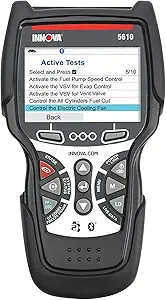
Using the Innova 5610 feels straightforward and satisfying for anyone who wants reliable insight into their vehicle’s health. It suits drivers who want to tackle their car’s issues confidently without frequent trips to the mechanic.
Its biggest strength lies in offering real-time live data from OBD2 and advanced systems like ABS and transmission.
Setting up the scanner is simple with the included OBD2 cable and USB connection. The protective boot and storage pouch make it easy to keep safe between uses. Daily checks become faster with the enhanced data stream and special reset function that mimics dealership re-learn procedures, helping you address and clear codes efficiently.
Performance on diagnosing everything from engine faults to SRS issues is solid, offering detailed, live information that feels precise and clear. Built tough enough for frequent use, it weighs 1.3 pounds, making it easy to handle without feeling bulky. Most praise points to its reliability, while some mention it could be a bit complex for absolute beginners without some initial reading.
The strongest praise lies in how well the scan tool provides real-time diagnostics on advanced systems like ABS and transmission, which comes close to dealership-level details. Some find the range of features a bit overwhelming when starting out, making the learning curve a common complaint.
Those comfortable with technical tools and wanting thorough diagnostics will appreciate this model. People needing something extremely simple or ultra-compact might prefer a different scanner with fewer complex features.
Pros
- Access to live OBD2 and OEM data streams
- Special Reset Function for re-learn procedures
- Includes protective boot and storage pouch
- Lightweight at just 1.3 pounds
Cons
- May be complex for users without technical background
- Not exactly pocket-sized; could be bulkier than simpler scanners
| Specification | Details |
|---|---|
| Model Number | 5610 |
| Unit Count | 1 Count |
| Item Weight | 1.3 pounds |
| Included Components | Code Reader with Protective Boot, Manual, OBD2 Cable, Soft Pouch for Storage, USB Cable |
| Manufacturer | Innova Electronics Corporation |
10. TOPDON ONE Bidirectional Scan Tool

Great for mechanics and car enthusiasts focused on thorough, reliable diagnostics, it offers an exceptional touchscreen interface and fast, stable wireless connectivity. Its single biggest strength lies in the extensive software updates that expand its functionality well beyond basic scanning.
Getting started is straightforward with included cables and a quick user guide. The dual WiFi connection keeps the device running smoothly without lag, especially on the large 10.1 touchscreen. This allows quick navigation through different diagnostics, ensuring work stays efficient with continuous update support active.
Diagnostics are precise, aided by functions like ECU Coding and TopFix AI when updates are active. The unit feels solid, weighing 3.5 pounds, with components like the tablet and VCI designed for professional use. Highly praised for its speed and comprehensive features, the device’s weight and need for an update subscription are common points of critique.
Strong points in reviews highlight the unit’s quick wireless scans and a responsive touchscreen as key benefits. Complaints often mention the extra cost and dependency on software subscriptions to unlock all functions, which can be a drawback for some users.
People wanting deep vehicle diagnostics and regular updates will find this tool very useful. Those looking for a lighter device or fewer ongoing expenses might want to consider alternatives without subscription costs.
Pros
- 3x faster wireless connection than Bluetooth
- Large, responsive 10.1″ touchscreen
- Yearly software updates offer new features
- Comes with multiple connecting cables
Cons
- Requires subscription for full feature access
- Heavier than some other diagnostic tools
| Specification | Details |
|---|---|
| Screen Size | 10.1″ |
| Connectivity | Dual WiFi |
| Weight | 3.5 pounds |
| Included Components | OBDII Extension Cable, USB Cables, ONE Tablet, ONE VCI, Power Adapter, Quick User Guide |
| Manufacturer Warranty | 1 Year Warranty |
11. ANCEL AD410 Enhanced OBD2 Scanner

Built with a sturdy plastic casing, this scanner suits everyday drivers wanting an easy way to check their engine’s health. It stands out for its extensive database of over 42,000 fault codes, making it simple to identify why the check engine light is on before heading to a mechanic.
Getting started takes just a few moments since it connects directly to your car’s OBD2 port without any need for software installation. It displays live data, freeze frame info, and runs EVAP and O2 sensor tests, so daily diagnostics don’t require guesswork.
The clear code definitions help you understand problems even if you don’t have technical knowledge.
This tool is solid enough for regular home use, providing accurate readings and a straightforward interface. Most people appreciate how it interprets fault codes clearly, although some mention the screen could be a bit brighter in direct sunlight. The compact size and included USB cable make it practical for storing and updating as needed.
The scanner provides clear code definitions that reduce guesswork when diagnosing engine issues, a feature praised frequently. Complaints often focus on the screen being hard to read in bright light, which might slow down quick checks outdoors.
Drivers wanting straightforward, reliable OBD2 diagnostics without extra tech features will find this tool helpful. Those seeking a wireless or smartphone-connected scanner may want to explore different options better suited for that.
Pros
- Over 42,000 built-in DTC code lookups
- Supports key OBD2 functions like freeze frame and EVAP test
- Compact and lightweight at just over 10 ounces
- Easy to understand code definitions for beginners
Cons
- Screen visibility poor in direct sunlight
- No wireless connectivity or app support
| Specification | Details |
|---|---|
| Brand Name | ANCEL |
| Item Weight | 10.56 ounces |
| Model Number | AD410 |
| Included Components | 1 * AD410, 1 * User Manual, 1* USB Cable |
| Manufacturer Part Number | AD 410 |
12. BlueDriver Bluetooth OBD2 Scanner

BlueDriver Bluetooth OBD2 Scanner helps car owners and amateur mechanics get clear diagnostic information without any guesswork. Its professional-grade trouble code reading combined with easy smartphone use stands out, making it ideal for those seeking detailed insights without complicated gear.
Setup involves plugging the scanner into your car’s OBD2 port and connecting it to your phone via Bluetooth. The BlueDriver app, available on iOS and Android, acts as the interface. Day-to-day use is straightforward: scan your vehicle with just a few taps, read detailed trouble codes beyond just engine issues, and clear them when needed.
It supports a wide range of systems including ABS, airbag, and transmission, letting you track multiple vehicle problems from one app.
Performance is solid, with the scanner reading and clearing more codes than basic devices. Repair reports linked to your exact car model come with explanations, so no second-guessing.
The compact 2.08-ounce design feels durable for regular use. Most users praise the accurate diagnostics and ease of use. Common complaints focus on the need to always have your phone handy and reliance on the app for scanning.
The product delivers trustworthy diagnostics supported by technician-verified fixes, helping users avoid unnecessary repairs. The dependence on a smartphone and the app can be inconvenient for users wanting a standalone device.
Anyone comfortable using their phone as a diagnostic tool will appreciate the detailed codes and ease of clearing them. Those preferring devices without a phone connection might want to look elsewhere.
Pros
- Reads and clears extensive trouble codes
- Provides verified repair reports
- Lightweight and compact design
- Easy smartphone connection via Bluetooth
Cons
- Requires smartphone for operation
- Dependent on app functionality
| Specification | Details |
|---|---|
| Brand Name | BlueDriver |
| Number of Items | 1 |
| Item Weight | 2.08 ounces |
| Model Number | LSB2 |
| Included Components | BlueDriver OBD2 Scanner, access to BlueDriver App on iOS or Android |
| Manufacturer Warranty | 180-day 100% money back guarantee |
13. Autel MaxiCOM MK808S Bidirectional OBD2 Scanner

Offering extensive diagnostic capabilities without the high cost, Autel MaxiCOM MK808S fits mechanics and serious car enthusiasts wanting a broad range of testing functions. Its biggest strength lies in running the same CPU as higher-end models, giving access to thousands of active tests and comprehensive system scans at a lower price point.
Setting up involves simple registration and checking vehicle compatibility since functions depend on the model. Day-to-day use benefits from hot service menus, bidirectional controls, and easy access to all-system diagnostics.
The unit supports a wide variety of vehicle makes, making it versatile when you need to identify issues or reset service lights quickly.
Performance matches more expensive Autel scanners, handling 3,000+ active tests reliably across many systems. The device is lightweight and sturdy, weighing just 0.27 grams, and carries a 1-year warranty.
Common praise highlights the cost-effectiveness and detailed diagnostics. A recurring complaint is that some functions vary depending on vehicle compatibility, requiring users to double-check before purchase.
The device is praised for its affordability paired with powerful testing features, closely matching more expensive models. Common complaints center on varying features depending on the car, which means confirming compatibility beforehand is necessary to use all functions fully.
Those who want a wide diagnostic range for multiple vehicles will find this scanner fulfills those needs without overspending. People with less common vehicles or very specific features might consider another tool ensuring full function support for their model.
Pros
- Runs same CPU as higher-end MK900 series
- Access to 3,000+ active diagnostic tests
- Includes hot service menus and all-system scans
- Lightweight and easy to handle
Cons
- Some features vary by vehicle compatibility
- Requires confirmation of supported vehicle functions
| Specification | Details |
|---|---|
| Brand Name | Autel |
| Unit Count | 1 Count |
| Item Weight | 0.27 g |
| Model Number | Newest Autel MaxiCOM MK808S |
| Manufacturer Warranty Description | 1 year warranty for quality problem |
Best Auto Diagnostic Scan Tools Comparison Table
| Product | Brand | Weight | Included Components | Warranty |
|---|---|---|---|---|
| ANCEL AD310 Scanner | ANCEL | 10.56 oz | AD310 Scanner, Manual | – |
| Autel MK900BT Tool | Autel | 600 g | MK900BT Unit, VCI, Adapter | – |
| TOPDON AD900 Lite | TOPDON | 4.8 lbs | OBD2 Scanner | 2 Year Manufacturer |
| Autel MX808S Scanner | Autel | 0.69 kg | MX808S Unit, Cables, Case | – |
| FOXWELL NT604 Elite | FOXWELL | – | Diagnostic Cable, User Manual | – |
| FOXWELL NT301 Scanner | FOXWELL | 0.16 kg | NT301, USB Cable, Guide | – |
| BLCKTEC 460T Scanner | BLCKTEC | – | Tool, OBD2 Cable, Case | 2 year limited warranty |
| THINKCAR 673BT Tool | thinkcar | 0.76 kg | BT 5.0 VCI, Case, Charger | – |
| Innova 5610 Scanner | Innova | 1.3 lbs | Code Reader, Manual, USB | – |
| TOPDON ONE Scanner | TOPDON | 3.5 lbs | ONE Tablet, Cables, Adapter | – |
| ANCEL AD410 Scanner | ANCEL | 10.56 oz | AD410, USB Cable, Manual | – |
| BlueDriver Bluetooth | BlueDriver | 2.08 oz | Scanner, App Access | – |
| Autel MK808S Scanner | Autel | 0.27 g | MK808S Unit | – |
- BrandANCEL
- Weight10.56 oz
- Included ComponentsAD310 Scanner, Manual
- Warranty–
- BrandAutel
- Weight600 g
- Included ComponentsMK900BT Unit, VCI, Adapter
- Warranty–
- BrandTOPDON
- Weight4.8 lbs
- Included ComponentsOBD2 Scanner
- Warranty2 Year Manufacturer
- BrandAutel
- Weight0.69 kg
- Included ComponentsMX808S Unit, Cables, Case
- Warranty–
- BrandFOXWELL
- Weight–
- Included ComponentsDiagnostic Cable, User Manual
- Warranty–
- BrandFOXWELL
- Weight0.16 kg
- Included ComponentsNT301, USB Cable, Guide
- Warranty–
- BrandBLCKTEC
- Weight–
- Included ComponentsTool, OBD2 Cable, Case
- Warranty2 year limited warranty
- Brandthinkcar
- Weight0.76 kg
- Included ComponentsBT 5.0 VCI, Case, Charger
- Warranty–
- BrandInnova
- Weight1.3 lbs
- Included ComponentsCode Reader, Manual, USB
- Warranty–
- BrandTOPDON
- Weight3.5 lbs
- Included ComponentsONE Tablet, Cables, Adapter
- Warranty–
- BrandANCEL
- Weight10.56 oz
- Included ComponentsAD410, USB Cable, Manual
- Warranty–
- BrandBlueDriver
- Weight2.08 oz
- Included ComponentsScanner, App Access
- Warranty–
- BrandAutel
- Weight0.27 g
- Included ComponentsMK808S Unit
- Warranty–
How to Choose the Right Auto Diagnostic Scan Tool
Choosing the right auto diagnostic scan tool depends on compatibility with your vehicle, ease of use, and the range of supported functions. Picking the right features helps accurately identify issues, preventing costly repairs and saving time by avoiding unnecessary trips to the mechanic.
Vehicle Compatibility
Many diagnostic tools struggle with only a handful of car brands or systems, leading to wasted time and missed issues. A device that supports a wide range of makes, both domestic and foreign, helps avoid frustrations when working on different cars.
True versatility comes from compatibility not just with OBDII, but also older OBDI systems and manufacturer-specific protocols. This ensures access to detailed trouble codes and live data across various models. Ignoring compatibility means running into errors reading codes or missing important data tied to vehicle-specific systems like ABS or airbags.
A reliable tool works well on vehicles from the mid-90s onward and supports factory-level diagnostics. Look for units listing support for multiple protocols and covering a broad vehicle lineup. This avoids surprises during diagnostics and makes the tool usable for different cars in your fleet or home.
User Interface and Ease of Use
Screen clutter and confusing menu structures turn quick checks into headaches fast. Clear displays with large fonts and logically arranged options save time every time a code needs reading or clearing. Many newer devices connect with smartphones or tablets, allowing users to control the tool’s interface on a larger screen while also receiving regular updates and improved features.
Error codes translated into plain language, along with multilingual support, reduce guesswork. A good tool explains what each trouble code means in non-technical terms rather than just listing cryptic numbers.
This helps anyone from beginners to pros perform basic troubleshooting without constantly referencing manuals or code databases.
Diagnostic Functions and Features
Basic scan tools often limit users to reading engine codes and live data, but car systems go far beyond just that. Tools that cover ABS, airbags, emission systems, and transmission diagnostics offer a clearer picture of overall vehicle health. Advanced features like programming keys or resetting service lights add significant value for serious users.
Bidirectional controls, where commands are sent to systems rather than only read from them, help verify repairs on the spot. Staying current is crucial, as automakers update vehicle software often, check how frequently the tool provides software updates to maintain compatibility with newer technologies and safety features.
This ongoing support separates a tool suited for one-off use from one worth keeping long term.
Build Quality and Portability
Repeated use in a garage or outdoors demands tools built tough enough to survive bumps, drops, and temperature swings. A compact, rugged casing protects internal components while keeping the device easy to handle and store in a toolbox or glove compartment. Large, tactile buttons and a bright screen are key for quick navigation, especially if working in dim environments.
Many quality models include backlit screens or adjustable brightness to maintain visibility whether under a garage hood or in direct sunlight. A bulky or fragile tool can become a nuisance, slowing down diagnostics or even breaking after heavy use.
Opt for devices known for solid construction combined with a design focused on portability and practical use.
Power Source and Battery Life
Tools powered by the vehicle’s OBD port avoid battery worries but tether the user to the car. Cordless models run on built-in batteries, offering freedom to move around the vehicle or use away from the engine bay.
Battery life varies widely; devices that last several hours between charges stand up better to longer diagnostic sessions. Rechargeable batteries are standard on portable units; a clear indicator of remaining power prevents unexpected shutdowns mid-check. Power-saving modes that dim screens or shut off after inactivity extend operational time significantly.
Choosing the right power setup depends on usage style, a mix of portability, battery longevity, and charging convenience makes daily diagnostics less disruptive.
How to Maximize the Accuracy and Efficiency of Your Auto Diagnostic Scan Tool
Updating the scan tool’s software regularly is critical for accuracy as manufacturers issue new codes and fixes. Ensure your vehicle’s engine is turned off and the battery is fully charged before connecting the device; a weak power source can lead to incomplete or false readings. Use the correct adapter or connector for your vehicle model to avoid communication errors.
Running scans in a well-ventilated area helps prevent overheating of the tool during extended diagnostics. Before interpreting the results, cross-check fault codes with a reliable database or the vehicle’s manual, as some codes might be non-specific or require further investigation.
Clearing codes without fixing related issues can cause the problem to recur, so always address the root cause. Keeping notes of your diagnostic sessions helps track recurring problems, which improves troubleshooting efficiency over time.
Common Mistakes to Avoid When Using an Auto Diagnostic Scan Tool
Ignoring tool updates often leads to missed or incorrect diagnostic information, which can cause confusion. Skipping the steps of connecting the tool properly can result in communication failures and inaccurate data. Many users rely purely on code definitions without considering symptoms, which reduces diagnostic effectiveness.
Not allowing the scan tool enough time to complete the routine tests can prematurely end essential diagnostics. Overlooking compatibility between the scan tool and vehicle models causes non-functioning or incomplete scans.
Clearing error codes before resolving the underlying problem simply removes evidence but does not fix the issue. Relying solely on the scan tool without inspecting physical components can lead to incomplete repair strategies.
Comparing Auto Diagnostic Scan Tools with Professional Mechanic Equipment
Auto diagnostic scan tools designed for consumers often cover basic and intermediate fault codes but might not access specialized systems like advanced transmission or airbag modules. Professional mechanic equipment typically connects directly to all vehicle systems and supports live data streaming from multiple sensors simultaneously.
These tools often include more frequent software updates aligned with manufacturer releases, ensuring wider vehicle model compatibility and deeper diagnostics. Scan tools aimed at everyday users generally come with simplified interfaces, making them easier to operate but sometimes limiting detailed parameter adjustments. Professional devices usually provide extensive repair guidance and testing procedures integrated within the software.
Regular drivers will find that consumer-level scan tools provide a solid balance of cost and features without the complexity or high price of professional equipment.
People Also Asked
How Do I Connect an Auto Diagnostic Scan Tool to My Car?
Connect the diagnostic scan tool to your car using the OBD-II port, usually located under the dashboard near the steering column. Make sure the car ignition is in the on position before powering the device for it to communicate properly with the vehicle’s systems.
Is This Scan Tool Compatible with All Car Models and Years?
Not all scan tools work with every car model or year, especially older vehicles before 1996 which may have different connectors. It helps to check the tool’s compatibility list or manual to ensure it supports your specific make and model before purchasing.
How Long Does the Battery Typically Last on These Devices?
Most diagnostic tools either draw power directly from the car’s battery via the OBD-II port or run on internal batteries that can last several hours during active use. Devices powered internally might need recharging after one or two diagnostic sessions depending on usage.
Can This Diagnostic Tool Detect Both Engine and Transmission Issues?
Many basic diagnostic scan tools primarily read engine-related codes but higher-end models can also access transmission, ABS, and other systems. Check which systems the tool supports based on your need to avoid buying something limited to engine codes only.
What Are Common Problems When Using an Auto Diagnostic Scanner?
Common problems include trouble connecting to the vehicle due to dirty or damaged OBD-II ports, software compatibility issues, or outdated code libraries. Keeping the tool’s software updated and ensuring the connection port is clean often prevents most issues.
Conclusion
Accuracy in reading and clearing error codes is essential. The tool should cover the systems specific to your vehicle make and model. Ease of use matters too, especially if you plan to handle diagnostics without professional help.
Consider how often you will use the scanner and where you will store it. A compact model might suit occasional home use better than a bulky version meant for a garage setup.
Review the comparison table and product details above to find the right balance between functionality and cost.