Top 13 Best Police Scanner for Mac You Can’t Miss
One common issue with many police scanners is unreliable reception or complicated software that doesn’t work smoothly on a Mac system. The best police scanner for Mac runs stable, has clear audio reception, and integrates well with macOS without frequent crashes or sluggish performance.
Users dealing with unreliable devices often end up missing critical updates or spending extra time troubleshooting connectivity problems.
The key factors that separate a reliable police scanner for Mac include compatibility with macOS versions, many scanners require specific drivers or apps that support at least macOS Catalina or newer. Audio clarity is essential, which typically depends on digital signal processing capabilities and good antenna design.
Another important aspect is the scanner’s ability to handle multiple frequency bands like VHF, UHF, and digital police channels, usually spanning from 25 MHz to 1.3 GHz, ensuring a broad coverage.
Need a Quick Check?
| Image | Product | Price |
|---|---|---|
Our Top Picks 1 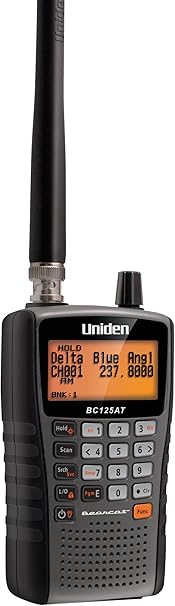 | Uniden Bearcat BC125AT | Check Price |
Our Top Picks 2  | Uniden BC365CRS Scanner | Check Price |
Our Top Picks 3  | Uniden SDS200 TrunkTracker | Check Price |
Our Selected Top 13 Police Scanner for Mac You Can Trust
This list features reliable police scanner software options designed for Mac users, highlighting their performance, ideal users, and key advantages and disadvantages. Readers will gain clear insights to help choose the best scanner that fits their needs and preferences.
1. Uniden Bearcat BC125AT Analog Handheld Scanner
Compact and straightforward, the Bearcat BC125AT fits well for anyone wanting an analog-only police scanner without digital extras. Its standout feature is Close Call RF capture technology, which quickly locks onto nearby transmissions, making it handy for quick updates without digging through channels.
Getting it set up just means inserting the two included AA batteries and programming channels, thanks to the 500 alpha-tagged presets. Day-to-day use benefits from a clear digital display and Do Not Disturb Mode, which keeps it from searching during active transmissions so you don’t miss anything important. The scanner is light and easy to carry around for quick scans.
Performance-wise, it handles analog signals over a wide frequency range from 25 to 512 MHz and picks up signals from up to 50 kilometers away. The build is simple but effective; not water-resistant, so it’s best kept dry.
The key praise is how quickly it tunes into strong nearby signals, while the main drawback is the lack of digital scanning capability, which limits its use in areas with newer digital systems.
Close Call RF capture receives praise for quickly finding nearby signals, making the scanner useful for urgent monitoring. The most frequent complaint centers on its inability to scan digital signals, limiting use in areas upgrading to digital systems.
People looking for easy access to analog emergency channels and straightforward operation will appreciate this scanner. Those needing to monitor digital or trunked systems are better off selecting a different model that supports those formats.
Pros
- Instant tuning with Close Call RF capture
- 500 alpha-tagged channels for easy organization
- Lightweight and compact design
- Long battery life up to 10 hours
Cons
- Not compatible with digital radio systems
- Not water-resistant for outdoor use
| Specification | Details |
|---|---|
| Number of Channels | 500 |
| Frequency Range | 25-54 MHz, 108-174 MHz, 225-380 MHz, 400-512 MHz (UHF) |
| Battery Average Life | 10 hours |
| Voltage | 3 volts |
| Number of Batteries | 2 AA batteries required (included) |
| Tuner Type | UHF |
2. Uniden BC365CRS 500 Channel Scanner with Alarm Clock
Uniden BC365CRS 500 Channel Scanner mixes a police scanner, an alarm clock, and an FM radio into one desktop unit. It suits anyone wanting a straightforward way to keep track of emergency channels while also having a bedside radio and alarm. The biggest strength is its 500 channels ready to tune in right away.
Setup involves plugging in the corded electric power and inserting 3 AA alkaline batteries for backup. Day-to-day, you switch through pre-set channels for police, fire, weather, aircraft, and more, making it easy to jump between interests.
The 30 FM presets let you save local stations, and push-button controls keep things simple without needing complex menus.
The core function of scanning analog channels works well, catching calls across multiple bands quickly. The solid tabletop design feels durable, with an ultrasonic sensor adding some convenience to controls. Most praise highlights good sensitivity and a wide range of channels.
A common drawback is its need for constant power since it’s corded, making portability limited.
Many appreciate its ability to scan a wide variety of analog channels quickly, making it a practical tool for staying informed. At the same time, the tether to a power outlet limits mobility, which comes up often in reviews. The alarm clock and FM radio add useful daily functions.
Someone who wants a fixed desktop scanner with alarm clock features and a solid channel lineup will find it fitting nicely. Those needing a fully portable scanner for outdoor or mobile use might prefer a battery-powered option without reliance on an outlet.
Pros
- Easy access to 500 pre-set channels
- Includes alarm clock and FM radio
- Push button controls are straightforward to use
- Supports a wide range of emergency and other bands
Cons
- Requires constant power from corded electricity
- Not designed for portable, battery-only operation
| Specification | Details |
|---|---|
| Power Source | Corded Electric |
| Battery Requirement | 3 AA batteries |
| Channels | 500 |
| Control Method | Push Button |
| Additional Features | Alarm Clock and FM Radio |
3. Uniden SDS200 TrunkTracker X Digital Scanner
Feels intuitive and powerful right out of the box, ideal for people serious about monitoring police and other radio traffic. Its biggest strength lies in combining an easy-to-use database with the advanced scanning technology for reliable and clear signal reception.
Getting started involves connecting it via USB, with minimal fuss thanks to the HomePatrol database that covers radio systems across the US and Canada. Daily use is straightforward because the 3.5 color display can be customized to show exactly what you want, making it easier to track multiple channels without getting overwhelmed by information.
Performance on digital simulcast systems is impressive, handling complex signals where simpler scanners struggle. Construction feels solid and the LED backlight on the display keeps things visible under various lighting conditions. Positive feedback focuses on its advanced scanning capabilities, while the main complaint tends to be about the size and weight, which can be a bit bulky for portable use.
Users appreciate the scanner’s ability to handle tricky digital simulcast systems and find the weekly updates of the HomePatrol database very helpful. On the downside, many point out the physical size and weight make it less convenient for carrying around frequently.
People looking for a durable home or mobile scanner with wide regional coverage will find this product satisfying. Those looking for a compact, lightweight device primarily for handheld use might consider alternative models better suited to portability.
Pros
- Comprehensive HomePatrol database for US and Canada
- Customizable 3.5″ color display makes reading the screen easier.
- Strong performance with digital simulcast systems
- USB connection simplifies updates and data transfer
Cons
- Somewhat bulky and less portable for on-the-go use
- Display customization options can be overwhelming for beginners
| Specification | Details |
|---|---|
| Scanner Type | Radio Scanner |
| Connection Type | USB |
| Resolution | scanner |
| Standard Sheet Capacity | 10 |
| Light Source Type | LED |
| Media Type | USB |
4. Uniden SDS150 Digital Radio Scanner with GPS

Great for anyone seeking a reliable and advanced police scanner, this one stands out for its enhanced signal reception and GPS integration. It suits hobbyists and professional users who need accurate, interference-free scanning on the go.
Its biggest strength is the combination of improved sensitivity and a user-friendly interface.
Setting it up is straightforward with a new simplified control layout and digital display, making daily use intuitive. The built-in GPS receiver and Bluetooth connectivity add convenience, especially when paired with a smartphone and the U/AWARE app. The battery life is long enough to last through extended field sessions, and it feels durable without being heavy.
Reception quality is excellent, handling numerous digital and analog formats like APCO P25 and Motorola with clarity. The device is water resistant, so occasional exposure to the elements isn’t a worry. While the scanner performs very well for its size, some users mention the nonstandard battery can be harder to replace or find.
Signal reception and interference filtering receive strong praise from those relying on detailed and clear digital radio scans. Common frustrations stem from the nonstandard battery, which adds difficulty to finding replacements quickly.
People needing a durable, portable scanner with multi-format digital capabilities will appreciate this model. Those new to radio scanning or requiring frequent battery swaps might want to explore alternatives with simpler power options.
Pros
- Improved signal reception with interference filtering
- Built-in GPS receiver for location tracking
- Compatible with smartphone and U/AWARE app
- Extended battery life for long-term use
Cons
- Uses a nonstandard battery that may be hard to replace
- Advanced tuner features might be complex for beginners
| Specification | Details |
|---|---|
| Connectivity Technology | Bluetooth |
| Tuner Type | TrunkTracker X, APCO P25 Phase I & II, Motorola, EDACS, LTR DMR Tier III*, Hytera XPT*, Single-Channel DMR* NXDN 4800/9600*, EDACS ProVoice* |
| Power Source | Battery Powered |
| Frequency | 1300 MHz |
| Display Type | digital |
| Water Resistance Level | Water Resistant |
5. Uniden Bearcat SR30C Analog Handheld Scanner

Designed with a compact, handheld plastic body, this analog scanner suits anyone wanting a straightforward way to keep up with multiple types of radio traffic. Its biggest strength lies in letting you instantly access over 32,000 preset frequencies without hassle, making it ideal for casual monitoring and emergency info enthusiasts.
Setting it up means plugging it in via USB to program channels easily from your computer, which is a huge time saver. The presets span Police, Fire, Weather, Marine, and other bands, so you can skip hunting down frequencies manually.
Running on AA batteries gives good portability, and features like Close Call RF Capture and Turbo Search help catch nearby signals you might otherwise miss during regular listening.
It delivers clear reception across a wide frequency range, handling the main task of scanning well even with its analog tuner. The build feels durable but not overly heavy, which makes it comfortable to carry around. Most praise goes to its range of presets and easy PC programming, while a common downside mentioned is that it covers only analog signals and no digital scanning.
Many appreciate the wide preset range and PC programming tools, allowing quick channel setup without long manual searches. However, its lack of digital scanning means missing out on newer communication formats, which some listeners find limiting. Audio is clear for analog but only mono, so not suited for stereo audio needs.
People wanting a simple, portable scanner for analog channels and basic emergency info will be happy. Those needing digital signal support or richer audio quality should look at alternative models designed for those features.
Pros
- Works with over 32,000 preset frequencies
- Compact, lightweight handheld design
- Easy programming via PC USB connection
- Multiple service bands included
Cons
- Only supports analog signals, no digital scanning
- Mono audio output limits sound quality
| Specification | Details |
|---|---|
| Frequency | 32000 MHz |
| Radio Bands Supported | 1-Band |
| Connectivity Technology | USB |
| Power Source | USB, Battery-Powered |
| Number of Batteries | AA batteries required |
| Audio Output Mode | Mono |
6. Uniden BC355N Base/Mobile Scanner

Analog scanning stands out immediately with the Uniden BC355N, ideal for anyone in areas still using conventional radio frequencies. Its strongest feature is the “Close Call RF Capture Technology” that automatically tunes in to nearby signals, making it quick to pick up local police and emergency broadcasts without manual searching.
Setup is straightforward with USB connectivity and a corded power source, so there’s no worry about battery life during extended use. The LCD display is clear, and sorting through frequencies feels simple thanks to wide frequency and service bank support. Having just one-band frequency support means checking specific channels without the clutter of multiple bands.
Performance works well for analog signals around 800 MHz but falls short with any digital radio systems, which are becoming more common in urban areas. The build is solid but basic, typical for a corded scanner. Most praise focuses on ease of finding active transmissions nearby, while a common downside is incompatibility with digital trunked systems.
Close Call RF Capture technology is praised for instantly tuning into nearby transmissions, making local monitoring straightforward. Most commonly mentioned drawback is the scanner’s inability to handle digital radio signals, which limits use in many larger cities
Those in rural or small-town areas with analog radio systems will find this scanner effective and easy to use. Users needing access to digital modern police systems should consider digital-compatible models instead.
Pros
- Quickly captures nearby signals with Close Call technology
- Simple USB connection and corded power
- Clear LCD display for easy reading
- Wide frequency support for analog channels
Cons
- Does not support any digital trunked radio systems
- Limited to single frequency band
| Specification | Details |
|---|---|
| Frequency | 800 MHz |
| Radio Bands Supported | 1-Band |
| Connectivity Technology | USB |
| Power Source | Corded Electric |
| Display Type | LCD |
| Additional Features | Close Call RF Capture Technology, Wide Frequency and Service Bank Support |
7. Uniden BCD996P2 Digital Mobile TrunkTracker Scanner

Choosing a scanner for Mac that handles trunked systems and delivers accurate weather alerts is important for serious listeners. Designed for users who want reliable emergency and police scanner coverage, it stands out through its Close Call RF technology and vast channel capacity. Perfect for those prioritizing detailed local transmissions combined with weather safety features.
Setting up involves programming with its 25,000 channels and linking to your smartphone through infrared connectivity. Using the TrunkTracker V technology, the scanner smoothly locks on to trunked radio systems around you. The S.A.M.E. Weather alerts keep you informed about severe weather events as they occur, making your daily scans more reassuring.
Performance delivers sharp reception across a single radio band at 25 MHz, capturing even close transmissions effectively. The construction relies on standard radio frequency hardware with an LCD or LED display, which is clear but not water-resistant.
Strong points include precise location-based scanning and the convenience of a rechargeable lithium-ion battery. A commonly noted downside is the lack of water resistance and a somewhat limited connectivity method with only IR available.
The scanner receives praise for its accurate and sensitive Close Call RF Capture technology, which efficiently identifies nearby radio transmissions without interruption. Complaints mainly mention the lack of water resistance, which can be a drawback for users needing a more rugged device in outdoor environments.
People wanting detailed monitoring of trunked police and emergency channels combined with weather alerts should be pleased. Those seeking water-resistant, modern wireless connection options might find better choices elsewhere, especially for frequent outdoor use or advanced connectivity needs.
Pros
- Access to 25,000 channels for extensive coverage
- Close Call RF Capture detects nearby transmissions
- S.A.M.E. weather alerts warn of severe weather conditions
- Location-Based Scanning simplifies finding active channels
Cons
- Not water resistant, limiting outdoor durability
- Connectivity limited to infrared, no modern wireless options
| Specification | Details |
|---|---|
| Close Call RF Capture Technology | Included |
| TrunkTracker V technology | Yes |
| S.A.M.E. weather alert | Included |
| Connectivity Technology | IR |
| Power Source | 12 volts Direct Current (DC) |
| Number of Batteries | 1 Lithium Ion (included) |
8. Whistler WS1025 Analog Desktop Scanner
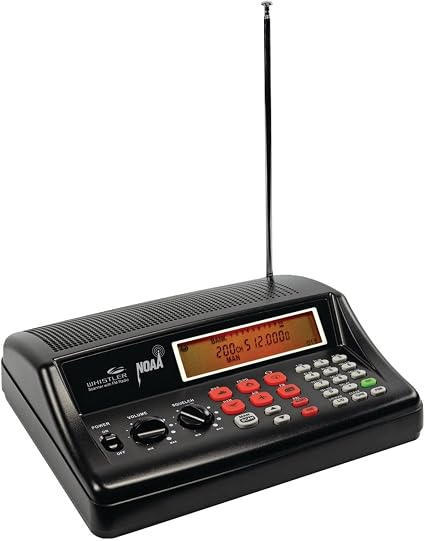
Keeping track of local emergency channels and police activity on a Mac can be tricky without the right scanner. Suited for experienced users, this analog desktop scanner shines in managing diverse frequencies with priority channel scanning to catch important transmissions faster.
Setup demands a bit of know-how but runs smoothly once established. The priority channel feature keeps checking one channel every two seconds, making sure important chatter doesn’t get lost.
It also pauses for two seconds on a channel to catch replies, which is handy during busy scans. Using the Tune function helps find new frequencies, starting from any specified point you choose.
It performs well in locking onto analog radio frequencies and feels solid enough for desktop use. The Bluetooth connection adds convenience but also requires a stable Mac setup.
Many users appreciate how clearly it picks up channels and the flexibility in scanning priority. Complaints mostly focus on the need for experience to operate it properly and occasional difficulty tuning certain frequencies.
Users praise the scanner’s ability to focus on priority channels and catch replies with the scan delay. The most common downside is that the controls and tuning require experience to avoid frustration.
People comfortable with technical setups and analog scanning will appreciate its features. Those new to scanning or seeking simpler plug-and-play options should look elsewhere for an easier start.
Pros
- Priority channel checks important frequencies often
- Scan delay catches replies clearly
- Tune feature finds unlisted channels
- Bluetooth connection compatible with Macs
Cons
- Requires experience to use effectively
- Tuning can be difficult on some frequencies
| Specification | Details |
|---|---|
| Scanner Type | Radio |
| Connection Type | Bluetooth |
| Resolution | 200 dpi |
| Standard Sheet Capacity | 300 |
| Optical Sensor Technology | CCD, CMOS |
| Light Source Type | LED |
9. Epson Workforce ES-50 Mobile Document Scanner

Scanning a single page in just 5.5 seconds makes this portable document scanner perfect for quick, on-the-go use. It’s especially handy for anyone needing to digitize receipts, ID cards, or longer documents without bulky equipment holding them back.
Setup involves plugging the scanner in via USB, which works smoothly with both Mac and Windows. The Epson ScanSmart software feels intuitive and keeps things organized by letting you scan, review, and save everything quickly. Handling documents up to 8.5 x 72 inches means it’s versatile enough for a variety of paperwork sizes, making daily organization simpler.
Performance-wise, the scanner consistently lives up to its claim of speed and accuracy. Its compact design with LED light source and CIS sensor technology keeps it lightweight and energy-efficient at just 2.1 watts. Most users appreciate how fast it scans, although some mention the single-sheet capacity as limiting during larger tasks.
Fast scanning speed is the most praised feature, making quick digitizing a breeze for various document types. The biggest complaint focuses on its single-sheet capacity, which can slow down productivity when scanning many pages.
Great for people who regularly need to scan individual documents or long receipts. Those with heavy scanning needs or seeking multi-sheet feeders might want to explore alternatives.
Pros
- Scans a single page in 5.5 seconds
- Compatible with Mac and Windows
- Handles documents up to 8.5 x 72 inches
- Lightweight and portable design
Cons
- Only holds one sheet at a time
- Limited to USB connection
| Specification | Details |
|---|---|
| Scanner Type | Document |
| Connection Type | USB |
| Resolution | 1200 |
| Standard Sheet Capacity | 1 |
| Color Depth | 16 bpp |
| Wattage | 2.1 watts |
10. Whistler WS1065 Digital Trunking Desktop Scanner

People who want a reliable digital police scanner that connects easily to their Mac will appreciate the Whistler WS1065 Digital Trunking Desktop Scanner. It’s best suited for those who value clear alerts and automatic signal adjustments. Its main strength lies in adapting instantly to signal changes without needing manual tweaks.
Setting it up is straightforward thanks to the Wi-Fi connection. Day-to-day use benefits from the programmable audible alarms and customizable multi-color LED alerts, which help keep track of different transmissions without confusion.
The automatic adaptive digital tracking works continuously, adjusting 50+ times every second to maintain clear reception even when signals fade or shift.
The scanner performs very well at decoding P25 digital signals and filtering them through Network Access Code support, keeping unwanted chatter out. It feels solid on the desktop without being bulky. Most praise focuses on how quickly it locks onto digital frequencies, while some mention that the range of alert colors can be a bit overwhelming to set up at first.
The Whistler WS1065 scanner’s adjustable LED colors and clear audible alerts help keep track of various signals without confusion. Its digital tracking adapts quickly to signal changes, which means less time fiddling with settings. Some find the interface a bit complex at first, slowing setup and daily operation until more familiar with it.
People who need a reliable scanner for monitoring police and public safety channels on a desktop will appreciate the adaptive tracking and filtering capabilities here. Those wanting a simpler, plug-and-play experience with fewer customizations may prefer a more basic model that focuses on ease of use over advanced digital features.
Pros
- Automatically adapts to signal changes in real time
- Customizable LED alerts with 8 user-defined colors
- Supports P25 NAC filtering to block unwanted transmissions
- Wi-Fi connection enables easy link with Mac
Cons
- Alert color setup can feel complicated
- Physical unit only supports paper media type
| Specification | Details |
|---|---|
| Scanner Type | Radio |
| Connection Type | Wi-Fi |
| Resolution | 200 |
| Media Type | paper |
11. Uniden Bearcat BCD160DN Handheld Digital Scanner
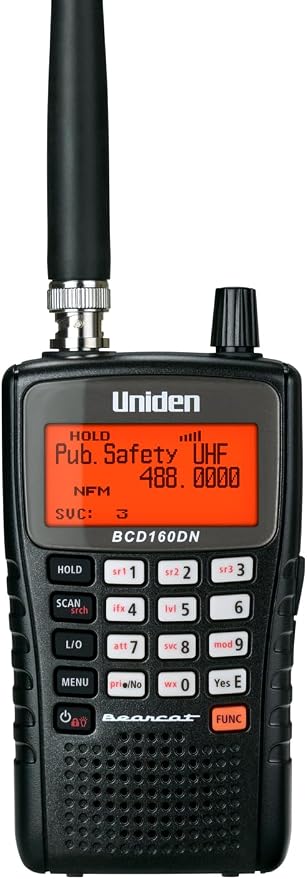
Unique decoding features make this police scanner stand out, ideal for anyone wanting detailed radio signals on a Mac. Its biggest strength lies in quick detection of elusive tones and codes, perfect for hobbyists and professionals tracking digital transmissions without trunking complications.
Setting up through USB connection is straightforward, and day-to-day use benefits from automatic detection of CTCSS tones and DCS codes. Features like Band Scope Rapid System and Channel Number Tagging help search faster and stay organized. Firmware updates bring support for multiple decoding standards, keeping the scanner relevant as protocols evolve.
Performance is solid for decoding conventional digital signals like DMR and NXDN, with reliable results in varied environments. The build feels durable and practical, but it does not support trunking or encrypted signals, limiting some advanced scanning needs.
Many appreciate the quick tone detection, while complaints center on its lack of trunking and encryption capabilities.
Positive feedback highlights quick and accurate decoding of tones and codes, making signal identification faster during use. On the downside, many mention the scanner’s inability to handle trunking and encrypted communications as a significant restriction for some scanning needs.
People satisfied with detailed conventional digital scanning and easy Mac connection will enjoy this unit. Those requiring support for trunking systems or encrypted transmissions should look for alternatives better suited to those advanced demands.
Pros
- Instant detection of CTCSS and DCS codes
- Supports multiple digital decoding formats
- USB connection for easy setup with Mac
- Rapid system and channel tagging features
Cons
- No trunking support or encrypted signal decoding
- Limited to conventional digital decoding only
| Specification | Details |
|---|---|
| Scanner Type | Radio Scanner |
| Connection Type | USB |
| Decoding Supported | DMR, NXDN, APCO P25 Phase 1 & 2 (via update) |
| Exclusive Features | Band Scope Rapid System/Channel Number Tagging |
| Narrow-band Reception | Included |
12. Uniden BearTracker BCT15X Base/Mobile Scanner

Uniden BearTracker BCT15X is a radio scanner designed for serious enthusiasts who want to monitor police, highway patrol, and other channels on the move or at home. Its biggest strength lies in the extensive channel capacity combined with location-based scanning that adjusts frequencies automatically as you travel.
Setup includes connecting it to power and an antenna, which feels straightforward with included mounting hardware and power cords. Its 9,000 channel capacity, along with the dynamic memory system, means you can store plenty of programs without juggling settings constantly. The close call RF capture and alpha tagging help keep track of active frequencies easily, while chaining it with compatible GPS gear lets it switch channels based on your location automatically, saving a lot of manual input.
Performance focuses on the advanced TrunkTracker III technology, which follows Motorola, EDACS, and LTR systems well, keeping you tuned into relevant channels. The build feels sturdy and practical for both vehicle and base use, though some mention that the programming process could take patience. Common praise highlights its wide channel selection and reliable scanning, while some critique the complexity of programming as a downside.
Many highlight the scanner’s vast channel capacity and accuracy in tracking multiple trunking systems as its main advantage. The most frequent downside mentioned is the learning curve in programming channels and operating all features effectively without prior knowledge.
People who want detailed, state-by-state coverage and have some patience for setup will appreciate this scanner. Those looking for a plug-and-play model or an integrated GPS solution might want to consider other options with simpler interfaces.
Pros
- Automatically selects systems with GPS connection
- Large 9,000 channel capacity
- Captures close call signals reliably
- Includes complete vehicle mounting kit
Cons
- Programming can be complicated for beginners
- No built-in GPS, requires compatible receiver
| Specification | Details |
|---|---|
| Channels | 9,000 |
| Memory System | Advanced Dynamic Memory |
| TrunkTracker Technology | TrunkTracker III |
| Alpha Tagging | Yes |
| Included Accessories | AC Adapter, Vehicle Power Cord, Antenna, Mounting Bracket |
| Warranty | 1 year manufacturer |
13. Uniden SDS100 True I/Q Digital Handheld Scanner

Handling radio signals feels surprisingly smooth and clear with the SDS100. It suits anyone serious about scanning police and emergency channels on the go, especially where digital signals can get tricky. The standout feature is its True I/Q receiver, which really makes a difference in noisy or weak signal areas.
Setting it up is straightforward thanks to the HomePatrol database, which automatically populates local frequencies just by entering a zip code. Daily use involves navigating a customizable color display that keeps key info front and center. Updates for radio systems come weekly via Sentinel software, so the scanner stays current without manual searching.
Its USB connection and microSD slot make managing data simple.
Performance shines in both simulcast environments and places with weak signals. The digital handheld design feels durable enough for regular handling, though some might find the size a bit bulky for pocket carry.
Users praise the powerful digital reception, while a common complaint revolves around the learning curve for some advanced settings.
Reception quality receives high marks especially in difficult digital environments, making it reliable for serious listeners. However, some find the interface complex beyond basic programming, which slows down initial handling.
Those wanting a powerful scanner with up-to-date system data and excellent digital signal handling will find this scanner ideal. Users preferring a smaller, more straightforward device might consider other options better suited for casual use.
Pros
- True I/Q receiver improves digital clarity
- Easy programming using zip code
- Customizable color display for quick info
- Weekly database updates via Sentinel software
Cons
- Size can feel bulky for pocket use
- Advanced settings have a learning curve
| Specification | Details |
|---|---|
| Scanner Type | Digital Handheld Scanner |
| Connection Type | USB |
| Resolution | 24 Bits |
| Color Depth | 24 |
| Media Type | MicroSD Card |
Best Police Scanners for Mac Comparison Table
| Product | Connection Type | Power Source | Additional Features | Compatibility |
|---|---|---|---|---|
| Uniden Bearcat BC125AT | – | 2 AA batteries included | Digital Display | – |
| Uniden BC365CRS Scanner | – | 3 AA batteries required | Ultrasonic Sensor | Various devices |
| Uniden SDS200 TrunkTracker | USB | – | – | – |
| Uniden SDS150 GPS Scanner | Bluetooth | Battery Powered | Weather Alert | – |
| Uniden Bearcat SR30C | USB | USB, Battery-Powered | Close Call RF Capture | Earphone, Headphone |
| Uniden BC355N Mobile Scanner | USB | Corded Electric | Close Call RF Capture | – |
| Uniden BCD996P2 TrunkTracker | IR | 12 volts DC | Location Based Scanning | – |
| Whistler WS1025 Desktop Scanner | Bluetooth | – | – | – |
| Epson ES-50 Mobile Scanner | USB | 2.1 watts | – | – |
| Whistler WS1065 Digital Scanner | Wi-Fi | – | – | – |
| Uniden Bearcat BCD160DN | USB | – | – | – |
| Uniden BearTracker BCT15X | Serial Cable | AC Adapter | Vehicle Accessory Included | – |
| Uniden SDS100 IQ Scanner | USB | – | – | – |
- Connection Type–
- Power Source2 AA batteries included
- Additional FeaturesDigital Display
- Compatibility–
- Connection Type–
- Power Source3 AA batteries required
- Additional FeaturesUltrasonic Sensor
- CompatibilityVarious devices
- Connection TypeUSB
- Power Source–
- Additional Features–
- Compatibility–
- Connection TypeBluetooth
- Power SourceBattery Powered
- Additional FeaturesWeather Alert
- Compatibility–
- Connection TypeUSB
- Power SourceUSB, Battery-Powered
- Additional FeaturesClose Call RF Capture
- CompatibilityEarphone, Headphone
- Connection TypeUSB
- Power SourceCorded Electric
- Additional FeaturesClose Call RF Capture
- Compatibility–
- Connection TypeIR
- Power Source12 volts DC
- Additional FeaturesLocation Based Scanning
- Compatibility–
- Connection TypeBluetooth
- Power Source–
- Additional Features–
- Compatibility–
- Connection TypeUSB
- Power Source2.1 watts
- Additional Features–
- Compatibility–
- Connection TypeWi-Fi
- Power Source–
- Additional Features–
- Compatibility–
- Connection TypeUSB
- Power Source–
- Additional Features–
- Compatibility–
- Connection TypeSerial Cable
- Power SourceAC Adapter
- Additional FeaturesVehicle Accessory Included
- Compatibility–
- Connection TypeUSB
- Power Source–
- Additional Features–
- Compatibility–
How to Choose the Best Police Scanner for Mac
Choosing the best police scanner for Mac involves focusing on compatibility, ease of use, and reliable signal reception. Selecting a scanner that works smoothly with your device and provides clear audio ensures you avoid technical issues and extra costs on replacements or repairs.
Compatibility with Macos
Running older scanner software on the latest macOS can cause crashes or failed connections. A well-supported program works smoothly after updates, avoiding wasted time troubleshooting. Regular updates mean new protocols or bug fixes are addressed, which is key since Apple frequently changes security and system components.
Easy installation is another important factor. Software that plugs straight into macOS without additional drivers or complicated setup saves frustration.
Checking compatibility with your Mac model and the ports it offers, like USB-C or Thunderbolt, avoids last-minute issues connecting the scanner hardware.
Scanners that support macOS updates going back at least two versions usually demonstrate solid developer support. Pay attention to whether the software offers automatic updates or manual downloads. Compatibility with built-in Mac hardware features, such as microphone access and audio output, also impacts everyday use.
Frequency Range and Coverage
Many public safety agencies operate on specific bands that vary by region and agency type. Missing a key frequency band can leave you blind to critical alerts. Scanners covering VHF and UHF bands between 25 MHz and 1.3 GHz cover most police and fire channels.
Digital signal support is equally important since many departments have switched from analog.
Scanners with adjustable frequency ranges or modular expanders let you adapt as agencies alter their frequencies or when you travel to different locations. Look for devices supporting APCO P25 digital standard and analog FM. Coverage of low VHF frequencies (30–50 MHz) is also needed where older systems are still in use.
Without this range and multi-signal support, you risk missing transmissions.
User Interface and Software Features
The user interface directly affects how fast and accurately you can find and monitor channels. Cluttered or unresponsive apps cause missed calls or wasted time. Scanning software that allows setting customizable alerts by tone, channel activity, or priority helps you focus on relevant traffic.
Recording and playback functions come in handy for reviewing or sharing significant audio clips.
Practical filtering lets you silence low-priority channels or noise without hunting through long channel lists. Prioritization options allow real-time switching to more important feeds without interrupting overall scanning. An intuitive design means fewer steps between starting the scan and getting useful information.
Features like search by frequency or agency name also improve daily use.
Connectivity and Integration
Slow USB connections can introduce audio lag or dropouts, ruining the listening experience. Bluetooth convenience comes with risks of interference and delays.
WiFi connectivity often provides the best balance but requires a stable network. Devices supporting multiple connection methods let you choose the best option based on your environment.
Integration with other mac software tools or third-party apps extends functionality, for example, mapping scanned signals or logging contacts. The connection must maintain low latency and consistent audio quality to avoid missing urgent messages.
Checking user forums for reported stability issues can prevent headaches after purchase.
Portability and Power Source
Heavy or bulky scanners become a nuisance if you carry equipment regularly or have limited desktop space. Compact, lightweight units ease transport but sometimes sacrifice battery life or input options. Battery performance is critical for portable use; expect at least 6-8 hours of runtime on rechargeable batteries for daily outings.
Desktop scanners with external power adapters offer continuous use but require nearby outlets. USB-powered models can run off your Mac or portable power banks, adding flexibility. Check if batteries are replaceable or built-in, since non-replaceable batteries shorten the device’s lifespan.
A good balance between size, weight, and power design improves everyday convenience.
Tips for Optimizing Police Scanner Performance on Mac
To improve police scanner performance on your Mac, start by checking the software’s update status. Developers frequently release patches that fix bugs and improve signal processing. A wired internet connection often provides steadier streaming than Wi-Fi, reducing dropouts during important transmissions.
Lowering other network activity on your Mac while listening can also decrease buffering issues.
Adjusting audio settings within the scanner app can bring clearer sound. Most applications let you tweak volume levels and sometimes offer noise reduction features.
Pairing your Mac with external speakers or good headphones can reveal details missed on built-in speakers.
- Close unnecessary apps to free up system resources.
- Choose scanner frequencies relevant to your location to avoid overwhelming your device.
- Regularly restart the scanner app to maintain responsiveness during long listening sessions.
Common Mistakes to Avoid When Using Police Scanner Software
Many users run police scanner software without setting correct permissions. Scanners need access to the network and sometimes microphone or location services to function properly.
Skipping these can cause the app to freeze or fail to connect. Also, relying on default frequency presets without customizing to local channels often leads to missing crucial communications.
Another mistake is leaving the software running continuously without breaks. Extended operation might cause memory leaks, slowing down your Mac or causing crashes.
Some users ignore warning signs like distorted audio or lag, which are cues to restart or update the app. Avoid running multiple scanner applications simultaneously as it strains processing power and can create conflicts.
- Don’t overlook checking your internet connection speed, especially with multiple users on the same network.
- Turn off any VPNs that block or slow down streaming data.
- Make sure your Mac’s operating system is compatible with the scanner software version.
Comparing Police Scanner Apps and Web-Based Alternatives for Mac
Police scanner apps installed on a Mac generally offer faster access to features and often have offline modes for limited listening, which web-based alternatives lack. Apps tend to allow deeper customization like filtering specific channels or setting up alerts for certain activity.
However, web platforms are convenient for quick access from any browser without installation.
Web-based scanners rely heavily on an internet connection with minimal system resource use, so they can serve as backups if your Mac struggles with app demands. Their interfaces are typically simpler, which may be easier for beginners but lack advanced options needed by frequent listeners.
Choosing between an app and a web-based scanner depends on how you intend to use it and the level of control you want. Apps are better for dedicated monitoring with multiple customizable features.
Websites are suitable for casual or occasional listening without affecting Mac performance.
People Also Asked
Is This Police Scanner Compatible with Mac Operating Systems?
Many police scanner apps and software are available that are compatible with Mac. Choosing one specifically designed or updated for macOS ensures better performance and fewer compatibility issues.
How Do I Set up a Police Scanner on My Mac?
Setting up a police scanner on a Mac usually involves downloading a scanner app from a reputable source, granting necessary permissions, and connecting to the internet. Adjust the app’s audio settings for clear sound and keep the software updated for best results.
What Safety Precautions Should I Take Using a Police Scanner?
Using a police scanner requires respect for privacy and legal restrictions. Avoid sharing sensitive information you hear, and check your local laws to ensure using a scanner is legal in your area.
How Long Do Police Scanners Typically Last with Regular Use?
Police scanners on Macs can last indefinitely since they are software-based, as long as the Mac remains functional and the software receives updates. Physical scanners might wear out, but software depends more on system compatibility over time.
What Are Common Issues When Using a Police Scanner on a Mac?
Common issues include outdated software that won’t run properly on newer macOS versions, poor audio quality, or difficulty tuning to certain frequencies. Regular updates and checking the scanner’s settings can help resolve these problems.
Conclusion
The main points to consider when choosing a police scanner for your Mac are ease of use, reliable signal reception, and compatibility with your operating system. You want software that connects quickly and keeps up with updates without interruptions.
Also, consider how frequently the scanner updates its channel lists to stay current with local transmissions.
Think about where you’ll use the scanner and how often. A simple app may be better for casual listening, while more advanced options suit regular use or professional needs. Keep your budget and space in mind before deciding.
The comparison table and detailed picks above can help you find a scanner that fits your requirements without overspending.