Top 13 Best Dash Cam Under 50 That Will Blow Your Mind!
A poorly chosen dash cam can result in grainy footage, missed moments, or constant frustrations with mounting. The best dash cam under 50 typically avoids these issues by focusing on delivering clear video without excessive bulk.
Many cheaper models struggle with low-resolution cameras and unstable mounts that fall off easily or block your view, making it hard to trust the recordings when you need them most.
A good dash cam in this price range should offer at least 1080p video quality and a decent field of view around 120 degrees to capture relevant details. It also needs a reliable power connection, usually through a standard USB cable, and an easy-to-adjust mount that fits securely on most windshields. Simplicity in operation is key since these cams often lack complex menus, but they should still support loop recording so you don’t have to worry about managing storage constantly.
Need a Quick Check?
| Image | Product | Price |
|---|---|---|
Our Top Picks 1  | 4K Front Dash Cam | Check Price |
Our Top Picks 2  | 1296P WiFi Front Cam | Check Price |
Our Top Picks 3 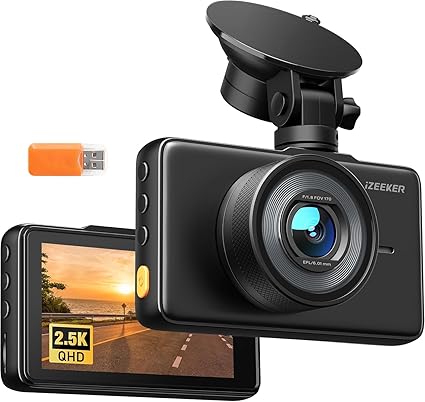 | iZEEKER 2.5K Front Cam | Check Price |
Our Selected Top 13 Dash Cam Under 50 Picks for Every Need
This list features reliable dash cams that offer solid performance within a budget. Each review explains how the device performs in real-world conditions, highlights its best features and drawbacks, and identifies the type of driver or situation it is best suited for.
1. 4K Dash Cam Front
Driving with clear recording has never felt more reliable. Perfect for anyone needing a front dash cam that captures detail without breaking the bank. Its biggest strength is delivering sharp 4K footage paired with a wide 160-degree field of view, so no moment on the road goes unnoticed.
Setup is straightforward thanks to the adhesive mount that sticks right on your windshield, and the included 32GB memory card means you’re ready to record from the start. Using it day-to-day involves tapping into the built-in 5G WiFi to control settings through the app, while features like loop recording and voice recording work quietly in the background. The 24-hour parking monitor also helps keep watch when the car is parked, adding a layer of security.
Video quality nails its purpose with crisp 2160p resolution that captures wide angles clearly. The build is compact and discreet, so it doesn’t obstruct your view or draw attention. Many users appreciate smooth video capture, but they often get frustrated that the included memory card size drops from 64GB to 32GB after June 2026 without any warning.
Reviews highlight excellent 4K video clarity and reliable recording technologies as a strong point. The main drawback mentioned is the reduction of the included memory card size, which limits initial storage capacity and may require upgrading sooner than expected.
This model suits those who want high-definition video and straightforward app-based control with ready-to-use memory. People needing a larger built-in storage or an onboard display might want to consider other options instead.
Pros
- Included 32GB memory card out of the box
- High-quality 4K 2160p video resolution
- Wide 160-degree field of view captures more road
- Easy control through built-in 5G WiFi app
Cons
- Memory card size reduced from 64GB to 32GB starting 2026
- No display screen on the device itself
| Specification | Details |
|---|---|
| Video Capture Resolution | 2160p |
| Field Of View | 160 degrees |
| Connectivity Technology | Wi-Fi |
| Flash Memory Type | microSD |
| Mounting Type | Adhesive Mount |
| Auto Part Position | Front |
2. 1296P WiFi Dash Cam Front
A dash cam that stands out for clear video quality and easy app control, it suits drivers wanting a reliable front recording under $50. Its main strength lies in sharp 1296P resolution paired with night vision, capturing details most basic cams miss.
Setup happens quickly by mounting it on the windshield and connecting your smartphone via the built-in Wi-Fi. The app lets you watch live video, replay drives, and download clips without removing the memory card.
Power comes from a cable that stays plugged in, meaning you don’t have to worry about battery life during daily use.
Video quality is sharp and covers a wide 170° angle, which helps during busy traffic or multi-lane roads. The F1.7 aperture and lens layers improve night visibility noticeably.
It’s compact and stays securely on the windshield. Most praise goes to the video clarity and easy app access, though some users mention that it always needs external power and won’t work independently.
Video clarity is a strong highlight, with crisp daytime and improved night footage praised often. The most common issue is the camera’s need for a continuous power source, preventing use without external power. The app control adds convenience but doesn’t extend battery life.
Drivers wanting clear, wide-angle front recording with easy smartphone access will appreciate this dash cam. Someone seeking a camera with internal battery operation or internet-enabled Wi-Fi should look elsewhere for different features.
Pros
- Clear and detailed 1296P video recording
- Wide 170° lens coverage captures multiple lanes
- Night vision works well in low light conditions
- Convenient app control for live view and playback
Cons
- Requires constant power cable during use
- Wi-Fi connection does not provide internet access
| Specification | Details |
|---|---|
| Video Capture Resolution | 1296p |
| Connectivity Technology | Wi-Fi |
| Field Of View | 170 degrees |
| Control Method | App |
| Display Size | 7 inches |
| Maximum Aperture | 1.6 f_stop |
3. iZEEKER 2.5K Dash Cam Front
Compact and made with a simple suction mount, this dash cam fits any vehicle and stands out with its 2.5K QHD resolution and 170° wide-angle lens. It’s best for drivers who want clear, wide coverage without fussing over complicated setups or connectivity features.
Installation involves attaching the cam with the suction cup and following straightforward instructions. The 3 IPS display makes it easy to check recordings right on the device, avoiding the need for Wi-Fi or apps. Physical buttons keep controls direct and distraction-free, making everyday use smooth while on the road.
Recording in 2560×1440P at 30fps delivers clear images of important details like license plates. The build is practical and reliable, focusing on function over flash. Positive feedback highlights its clear video quality and ease of use.
One drawback noted is the lack of wireless connectivity for reviewing footage.
Sharp video quality at 2.5K resolution gets consistently praised for capturing license plates and road signs clearly. The common complaint circles around lacking Wi-Fi, meaning users must rely on the screen or removing the memory card to access videos.
Drivers who want straightforward dash cam recording and easy on-device review will find this a solid choice. Those who want to check footage via phone or cloud might look for models with wireless connectivity instead.
Pros
- Clear 2.5K resolution captures fine details
- Wide 170° lens covers multiple lanes
- 3″ IPS screen for easy playback
- Simple, physical button controls
Cons
- No Wi-Fi connectivity for remote viewing
- Suction mount may need occasional adjustment
| Specification | Details |
|---|---|
| Video Capture Resolution | 2.5K |
| Field Of View | 170 degrees |
| Screen Size | 3″ |
| Display Type | IPS |
| Mounting Type | Suction Mount |
| Supported Standards | TS |
4. Dash Cam 2.5K Front Rear

Sharp video quality stands out with 2.5K QHD resolution capturing both front and rear views. Ideal for drivers wanting clear footage of all angles including intersections and adjacent lanes. Its biggest strength is the included 64GB memory card that lets you start recording immediately without extra purchases.
Setup takes just minutes thanks to the easy windshield mount and user-friendly 3.39-inch IPS touchscreen. Wireless WiFi connection allows downloading videos directly to your phone through the app without removing the card.
GPS tracks your route automatically, and the wide-angle lenses help cover any blind spots while driving.
Recording at 30 frames per second in 2.5K resolution ensures smooth, clear footage of every drive. The build feels solid and compact, fitting well on the windshield without blocking views.
A frequent highlight is how convenient the app makes grabbing clips, although some mention occasional connectivity glitches when transferring videos.
Clear, sharp footage and the included large memory card make recording straightforward and detailed. The app enables wireless access to clips, but some users face connectivity issues during downloads, which can interrupt the flow.
Anyone wanting well-rounded, high-resolution dual recording without extra setup costs will find this dash cam suits their needs. Drivers needing larger screens or completely flawless wireless connections might want to look elsewhere.
Pros
- Sharp 2.5K resolution front and rear recording
- 64GB card included, ready to go right away
- Wireless video download to phone via app
- Wide 160-degree view covers adjacent lanes
Cons
- Occasional connectivity issues during wireless downloads
- Screen could be larger for easier live viewing
| Specification | Details |
|---|---|
| Video Capture Resolution | 2.5K |
| Included Memory Card Size | 64 GB |
| Screen Size | 3.39 inches |
| Frame Rate | 30 FPS |
| Field Of View | 160 degrees |
| Mounting Type | Windshield Mount |
5. 1296P 3-Channel Dash Cam Front Rear Inside
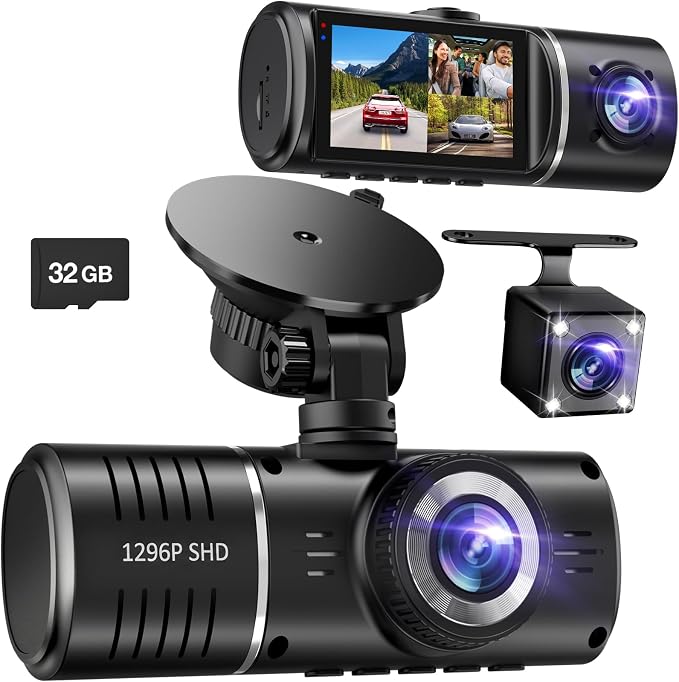
Choosing a dash cam with full coverage under $50 is tough, but this 3-channel option stands out because it covers front, rear, and inside views all at once. Ideal for those wanting thorough monitoring without spending a lot, its biggest strength lies in capturing multiple angles to reduce blind spots.
Mounting the cams on the windshield is straightforward, and adjusting the 3.47-inch IPS screen is simple thanks to its clear display from any angle. The built-in G-sensor handles parking monitoring by detecting shocks and locking emergency footage automatically. Loop recording lets you avoid storage issues by automatically replacing older videos in 1 or 3-minute segments.
Recording at 1296p resolution with a 170° front view, the video quality is sharp enough for clear evidence if needed. It’s well-built to withstand daily use, and the waterproof rear camera adds durability.
The best feature mentioned often is the solid triple-camera setup. Some users find the app control could be more intuitive, which is the most common gripe.
The triple-camera design is praised for providing comprehensive vehicle coverage with clear recording quality. Many mention the parking monitor’s reliable emergency footage locking. Some find the app control less user-friendly and report occasional glitches during setup or use.
Anyone wanting 3-channel coverage at a budget will appreciate the features and build here. Those who prefer a simpler single-camera setup or more polished software experience might want to explore other options.
Pros
- Three cameras cover front, rear, and inside views
- G-sensor locks emergency footage automatically
- Loop recording avoids storage issues
- Waterproof rear camera for outdoor durability
Cons
- App control can be confusing to use
- Occasional complaints about software stability
| Specification | Details |
|---|---|
| Video Capture Resolution | 1296p |
| Field Of View | 170 degrees |
| Screen Size | 3.47 inches |
| Mounting Type | Windshield Mount |
| Flash Memory Type | microSD |
| Control Method | App |
6. 4K+2.5K Dual Dash Cam Front Rear

Capturing clear video evidence during driving incidents matters most when you want to protect yourself on the road. Designed for cars, minivans, and trucks, this dual-channel dash cam suits family vehicles and rideshare drivers who need ultra-high resolution front and rear footage.
Its biggest strength is crystal-clear recording with 4K front and 2.5K rear cameras, improving video quality substantially.
Getting it up and running mainly includes mounting the dash cam on your windshield and connecting the rear camera. Transferring footage happens lightning-fast through WiFi 6 directly to your phone using the app.
A 3.59-inch screen helps review clips without a separate device. Loop recording keeps memory organized, while a 64GB microSD card is bundled so you can start recording immediately. Parking monitoring adds extra security when the vehicle is off.
Both cameras record in excellent resolution with a wide field of view: 160 degrees front and 155 degrees rear. The build feels solid, and the app control works smoothly. The clearest praise points to the sharpness of the 4K+2.5K video, making accident documentation reliable.
Some mention the rear camera’s placement or cable routing as slightly fiddly during installation, but performance shines once set.
Video clarity stands out as a key selling point, with front and rear footage detailed enough for insurance purposes. Some find installing the rear camera and managing the cables more complicated than expected.
People wanting crisp, high-resolution dash cam footage with easy wireless access will appreciate this model. Drivers needing a straightforward setup or a larger screen for on-device playback might want alternatives.
Pros
- Front camera records in 4K UHD at 30fps
- Rear camera upgrades to sharp 2.5K resolution
- WiFi 6 enables quick video transfers to phone
- 24-hour parking monitor for added security
Cons
- Rear camera cable routing can be tricky in some cars
- Screen size limits detailed video review at the device
| Specification | Details |
|---|---|
| Video Capture Resolution | Dual Channel 4K 30fps Front +2.5K 25fps Rear |
| Connectivity Technology | Wi-Fi |
| Screen Size | 3.59 inches |
| Field Of View | 160 degrees |
| Mounting Type | Windshield Mount |
| Flash Memory Type | microSD (free 64GB card included) |
7. 70mai M310 1296P Dash Cam Front

Recording in 1296P QHD resolution with a 130° wide-angle field of view makes this dash cam ideal for anyone wanting clear footage of the road. It shines in capturing details like license plates while covering multiple lanes to reduce blind spots, making it great for everyday drivers concerned about road safety.
Setup is straightforward with windshield mounting and controlling the camera through a dedicated app or voice commands. Built-in WiFi helps you connect easily for video transfers or settings adjustments.
Features like loop recording, parking monitor, and G-sensor make daily use practical, especially for those who want reliable recording without fussing over manual operations.
Performance is solid with clear video quality even at night thanks to WDR and 3D noise reduction. The build is compact, with no display, focusing on minimalist installation. Consumers praise its clarity and wide view while some mention the lack of a screen as a drawback, requiring app use to preview footage.
The camera delivers excellent clarity on road details thanks to its QHD recording and wide field of view. Many appreciate the app control but some find the lack of an onboard screen less convenient for quick checks. The parking monitor and loop recording add solid reliability during and after driving.
Ideal for drivers who use a smartphone regularly and want crisp video without extra setup hassle. Those preferring a device with a screen to preview footage might want to consider alternatives. Its compatibility spans various vehicle types, so it suits cars and trucks alike.
Pros
- High-resolution 1296P video quality
- 130° wide-angle captures multiple lanes
- App and voice control convenience
- Parking monitor for stationary protection
Cons
- No built-in display for live preview
- Requires smartphone for video playback
| Specification | Details |
|---|---|
| Video Capture Resolution | 1296p |
| Field Of View | 140 degrees |
| Control Method | App, Voice |
| Mounting Type | Windshield Mount |
| Connectivity Technology | Wi-Fi |
| Special Features | Loop Recording, Parking Monitor, G-Sensor, Time-Lapse |
8. 2K Dash Cam Front Inside

Anyone needing a reliable dash cam under $50 for everyday driving will find this dual camera setup valuable. It suits drivers who want coverage for both front and rear views, especially with decent night vision. The clearest feature is how it records automatically, removing the hassle of manual footage capture.
Setup is straightforward when you insert an 8-32GB microSD card. The camera starts recording as soon as the vehicle powers on, rewriting old files when storage gets full.
Controls rely on push buttons, and the small 2-inch built-in screen lets you check recordings quickly. Mounting on the windshield keeps it out of the way while offering a 140° wide angle to capture several lanes of traffic.
Recording in 2K resolution at 1080p ensures sharp footage, especially useful for license plate visibility at night thanks to its night vision capability. The compact design fits well without obstructing vision.
Its main advantage is clear video capture front and inside the car, while a common drawback noted is the limited screen size, which some might find too small for detailed playback.
Material and build quality focus on a compact design that doesn’t interfere with driving. Night vision performs well, capturing clear images in the dark, while limited screen size is the most mentioned inconvenience for reviewing footage directly on the device.
Ideal for anyone wanting a dual camera dash cam at a budget price, especially for average daily driving. Drivers needing larger displays or multiple memory cards will likely want to consider other options.
Pros
- Records automatically when car turns on
- Front camera 2K resolution with 140° wide-angle
- Includes rear camera for full coverage
- Clear night vision for low-light recording
Cons
- Small 2-inch screen limits detailed playback
- Only one microSD slot for storage
| Specification | Details |
|---|---|
| Video Capture Resolution | 1080p |
| Screen Size | 2 inches |
| Memory Slots Available | 1 (microSD) |
| Mounting Type | Windshield Mount |
| Control Method | Push Button |
9. 2.5K WiFi Dash Cam Front

Capturing clear, detailed footage sets this dash cam apart in the budget category. Designed mainly for cars, it offers front recording in 2.5K resolution with a wide 160° lens, making it ideal for anyone wanting sharp video that covers a broad perspective of the road ahead during drives.
Setup spots this camera on your windshield with ease using the mount provided. Its built-in WiFi allows control and video access directly from a phone through the app, which comes in handy when adjusting settings or grabbing clips without fiddling with memory cards.
Its features like voice alerts and G-sensor help manage recording automatically while driving, ensuring important moments are saved.
Recording at 2560×1440P delivers crisp, clear footage that highlights road details well. The 6-layer glass lens holds up nicely for daily use, keeping images sharp. Many appreciate the WiFi feature for convenient video access, while a common gripe is its WiFi range performs best only when close to the device, limiting remote use.
Strong praise focuses on the clear video quality combined with convenient WiFi access through the app. The most common drawback relates to WiFi’s limited range, which works best only within close proximity, restricting remote control options.
Drivers wanting easy on-the-go video management and sharp recordings will find this useful. Those needing wide WiFi range or parking surveillance without additional accessories might want to explore other options.
Pros
- Clear 2.5K video with wide-angle coverage
- Built-in WiFi for easy app control
- Voice alerts and G-sensor for automatic recording
- Compact windshield mount design
Cons
- WiFi functional mainly when close to the camera
- 24H parking monitor needs extra hardwire kit
| Specification | Details |
|---|---|
| Video Capture Resolution | 1440p |
| Field Of View | 160 degrees |
| Control Method | Push Button |
| Connectivity Technology | Wi-Fi |
| Screen Size | 2.5 inches |
10. 1080P Dash Cam Front Rear

1080P Dash Cam Front Rear stands out for clear front and rear recording, perfect for drivers wanting full coverage on a budget. Its ability to record both angles simultaneously is the key feature making it ideal for everyday use and safety-conscious drivers.
Setup is straightforward with the included USB Type-C charger that also keeps your phone powered, which is handy on longer drives. The 3-inch LCD screen makes reviewing footage easy, while loop recording ensures it never stops capturing important moments.
Switching between just front or dual cameras is smooth, adding some flexibility depending on your need.
Video quality holds up well at 1080p with a wide 170-degree lens capturing a broad view, including license plates and road details thanks to the f1.8 aperture and WDR technology. The built quality feels solid with reliable wired front and rear mounts.
Most praise comes from how clear night recordings are, while some point out that the wired setup can be a bit tricky to manage in tight spaces.
Video clarity, especially at night, gets strong positive remarks, showing solid detail. The main drawback many mention is the wired setup, which can be a bit of a hassle compared to wireless options. The included 32GB memory card and remote control add practical value daily.
Drivers wanting straightforward, reliable front and rear footage with good night visibility will appreciate this dash cam. Those preferring a wireless or more compact option may want to look for alternatives better suited to minimal installations.
Pros
- Dual front and rear recording capability
- Loop recording with 32GB card included
- Clear night vision with f1.8 aperture
- Remote control for easy operation
Cons
- Wired setup can be cumbersome to install
- Limited screen size for detailed playback
| Specification | Details |
|---|---|
| Video Capture Resolution | 1080p |
| Field Of View | 170 degrees |
| Control Method | Remote |
| Screen Size | 3 |
| Connectivity Technology | USB |
| Other Special Features | Night Vision, G-Sensor, Wide-Angle View Lens |
11. 4K+2K Full HD Dash Cam Front Rear

Capturing crisp, clear footage from both front and rear cameras, this dash cam suits anyone wanting solid evidence on the road at a budget under $50. Its standout feature is definitely the impressive dual 4K+2K recording, making sure no detail slips through.
Setting it up involves mounting it on the windshield where it feels secure and unobtrusive. Day-to-day use becomes simple with built-in WiFi and app control, which lets you check footage easily.
The loop recording means no need to manually clear memory, while parking monitoring and night vision keep you covered even when parked or driving after dark.
Video quality from the front camera is sharp, and the rear captures a wide enough angle to reduce blind spots. The 3-inch IPS screen is clear and responsive without being overly large.
Most praise focuses on the 4K and 2K detail clarity, while some find the app interface a bit tricky to master at first.
Footage quality stands out with high-resolution front and rear recordings that capture details like license plates clearly. The most frequent complaint involves the learning curve of the app control, which may puzzle new users initially.
Clear, crisp video and multiple features will satisfy those wanting serious coverage on a budget. Anyone who prefers a plug-and-play experience or simpler controls might want to consider a different option.
Pros
- Dual 4K front and 2K rear cameras
- Built-in Wi-Fi with app control
- Wide-angle views reduce blind spots
- Parking mode with night vision
Cons
- App interface can be confusing at first
- Rear camera angle slightly narrower than front
| Specification | Details |
|---|---|
| Video Capture Resolution | 4K+2K Dual recording Mode |
| Field Of View | 170 degrees |
| Control Method | App, Push Button |
| Screen Size | 3 inches |
| Connectivity Technology | Wi-Fi |
| Compatible Devices | car, truck, motorcycle |
12. 2.5K Dash Cam Front

Excellent 2.5K resolution and wide-angle view make this dash cam a solid choice for anyone needing clear footage on a budget. Best for drivers wanting reliable daytime and nighttime recording with easy app control and simple setup.
Installation is straightforward, with a detachable bracket and windshield mount that fits nearly any vehicle. The built-in Wi-Fi lets you control the dash cam through the app without fuss.
The included 64GB memory card means recording can start immediately. Loop recording handles storage well, so old video clips get overwritten automatically during longer trips.
Video quality is crisp at 2560x1440P with a 160-degree field of view that captures multiple lanes clearly. Night vision works surprisingly well to capture details like license plates in low-light conditions.
The dash cam feels solid and durable, though a few reviews mention occasional glitches with app connectivity. Voice prompts help signal status without distracting.
The camera delivers sharp, detailed videos even at night, which stands out most in its price range. Users commonly note some minor issues connecting to the app, which can interrupt quick access to recordings.
Drivers prioritizing clear front footage and easy installation will appreciate this dash cam. Those needing rear coverage or more flawless app performance might want to explore other options.
Pros
- Clear 2.5K QHD video quality
- Strong night vision for low light
- Comes with 64GB memory card
- Easy app control and setup
Cons
- Occasional app connectivity glitches
- Front-only camera limits rear coverage
| Specification | Details |
|---|---|
| Video Capture Resolution | 2.5K |
| Field Of View | 160 degrees |
| Connectivity Technology | Built-in WiFi & Smart App |
| Mounting Type | Windshield Mount |
| Video Frame Rate | 2560x1440P@30fps |
| Memory Card | 64GB High-Endurance included |
13. Avylet 2K 1440P Dash Cam Front

Compact design with a 1.5 IPS screen makes this front dash cam ideal for cars and SUVs looking for clear visual feedback. It stands out with its 2K Quad HD resolution, delivering sharper footage than many similar models under $50.
Setup involves sticking the adhesive mount on the windshield and connecting via built-in Wi-Fi to your app for easy control. Viewing recordings on the 1.5-inch screen is straightforward, and the wide 170° lens captures a broad view to reduce blind spots.
Removing the lens protective film before use is important to avoid blurry video, and disabling cellular data can help the live view load correctly.
Video quality is a strength with 1440p resolution capturing license plates and traffic details clearly, especially with the superior night vision feature. The compact build fits neatly without obstructing your view.
Some users notice a delay or failure when loading the live view, while most praise the clear image quality and wide-angle coverage.
Clear, detailed footage with a wide viewing angle earns praise, while occasional issues with the live view loading stand out as the main drawback. Removing the lens film is essential to keep video crisp, which users must remember.
Those wanting easy on-device playback and sharp video will appreciate the 1.5″ screen and resolution. People who want a dual-camera setup or easy live streaming might prefer a different option.
Pros
- Sharp 2K Quad HD captures fine traffic details
- Wide 170° lens reduces blind spots effectively
- Built-in Wi-Fi enables app control
- IPS display shows recordings clearly on the device
Cons
- Live view can fail to load without Wi-Fi tweaks
- Needs lens protective film removed to avoid blurry video
| Specification | Details |
|---|---|
| Video Capture Resolution | 1440p |
| Control Method | App |
| Field Of View | 170 degrees |
| Connectivity Technology | Wi-Fi |
| Screen Size | 1.5 inches |
| Mounting Type | Adhesive Mount |
Best Dash Cams Under 50 Comparison Table
| Product | Video Resolution | Connectivity | Special Features | Compatible Vehicle |
|---|---|---|---|---|
| 4K Front Dash Cam | 4K 2160P | Wi-Fi, 5G WiFi | Free 32GB Card, 24h Parking | Universal |
| 1296P WiFi Front Cam | 1296P | Wi-Fi | App Control, Parking Monitor | Car |
| iZEEKER 2.5K Front Cam | 2.5K 1440P | Powerline | 3″ IPS, Parking Monitoring | All |
| 2.5K Front Rear Cam | 2.5K | USB | G-Sensor, Windshield Mount | Car |
| 1296P 3-Channel Dash Cam | 1296P | USB | G-Sensor, App Control | Car |
| 4K & 2.5K Dual Cam | 4K + 2.5K | Wi-Fi, 5G WiFi | Free 64GB Card, GPS | Car, Minivan, Truck |
| 70mai M310 1296P Cam | 1296P | Wi-Fi | App Control, WDR Night Vision | Multiple Vehicle Types |
| 2K Front Inside Cam | 1080P | USB | HDR, Automatic Incident Detection | Multiple Vehicle Types |
| 2.5K WiFi Front Cam | 1440P | Wi-Fi | App Control, Voice Alert | Car |
| 1080P Front Rear Cam | 1080P | USB | Night Vision, G-Sensor | Car |
| 4K & 2K Full HD | 4K + 2K | Wi-Fi | Night Vision, Parking Monitor | Car, Truck |
| 2.5K Front Dash Cam | 2.5K | Wi-Fi | App Control, 360° Rotatable | Multiple Vehicle Types |
| Avylet 2K 1440P Cam | 2K 1440P | Wi-Fi | Night Vision, Parking Monitor | Uber, SUV, Car, Minivan |
- Video Resolution4K 2160P
- ConnectivityWi-Fi, 5G WiFi
- Special FeaturesFree 32GB Card, 24h Parking
- Compatible VehicleUniversal
- Video Resolution1296P
- ConnectivityWi-Fi
- Special FeaturesApp Control, Parking Monitor
- Compatible VehicleCar
- Video Resolution2.5K 1440P
- ConnectivityPowerline
- Special Features3″ IPS, Parking Monitoring
- Compatible VehicleAll
- Video Resolution2.5K
- ConnectivityUSB
- Special FeaturesG-Sensor, Windshield Mount
- Compatible VehicleCar
- Video Resolution1296P
- ConnectivityUSB
- Special FeaturesG-Sensor, App Control
- Compatible VehicleCar
- Video Resolution4K + 2.5K
- ConnectivityWi-Fi, 5G WiFi
- Special FeaturesFree 64GB Card, GPS
- Compatible VehicleCar, Minivan, Truck
- Video Resolution1296P
- ConnectivityWi-Fi
- Special FeaturesApp Control, WDR Night Vision
- Compatible VehicleMultiple Vehicle Types
- Video Resolution1080P
- ConnectivityUSB
- Special FeaturesHDR, Automatic Incident Detection
- Compatible VehicleMultiple Vehicle Types
- Video Resolution1440P
- ConnectivityWi-Fi
- Special FeaturesApp Control, Voice Alert
- Compatible VehicleCar
- Video Resolution1080P
- ConnectivityUSB
- Special FeaturesNight Vision, G-Sensor
- Compatible VehicleCar
- Video Resolution4K + 2K
- ConnectivityWi-Fi
- Special FeaturesNight Vision, Parking Monitor
- Compatible VehicleCar, Truck
- Video Resolution2.5K
- ConnectivityWi-Fi
- Special FeaturesApp Control, 360° Rotatable
- Compatible VehicleMultiple Vehicle Types
- Video Resolution2K 1440P
- ConnectivityWi-Fi
- Special FeaturesNight Vision, Parking Monitor
- Compatible VehicleUber, SUV, Car, Minivan
How to Choose the Best Dash Cam Under 50
Focus on video quality, ease of use, and reliable storage options, as clear footage and simple controls ensure valuable evidence when needed. Choosing a durable model with good battery life avoids frequent replacements and extra costs, saving money and hassle in the long run.
Video Quality
Clear footage can make or break the usefulness of a dash cam, especially during incidents. A resolution of at least 1080p with 30fps is common in budget models and typically provides sharp enough details to read license plates and signs under normal lighting.
Night recordings often suffer if the sensor and lens aren’t decent, leading to grainy or washed-out images that won’t hold up as evidence. Lowlight performance is a key part to avoid this problem.
The field of view also affects what the camera captures daily. A wide angle between 120 and 140 degrees covers multiple lanes and nearby sidewalks without too much distortion.
Narrower views might miss important events happening at the edges of the frame, while too wide can result in fish-eye effects that make details harder to discern.
Power and Battery
Some models only work plugged into a power source, which can be inconvenient if you want constant protection, including when parked. Those with a built-in battery add flexibility but expect these batteries to last around 30 minutes when unplugged, usually enough to save footage if power is lost abruptly but not for extended parking monitoring.
Hardwiring a dash cam to the car’s fuse box allows it to run continuously, particularly valuable for parking mode, although it requires installation effort. USB charging remains the simplest and most common method, often drawing power from the 12V outlet. Reliability depends on stable power; sudden shutdowns risk corrupting videos.
Storage and File Management
Most dash cams use microSD cards, with support typically varying from 32GB up to 128GB or 256GB on some higher-end budget options. Larger capacity means longer recording times before files start to overwrite, which is essential when driving frequently or leaving the car parked for days.
Loop recording is practically mandatory; without it, the card fills up and the cam stops recording. This feature overwrites the oldest videos automatically. Managing files should be straightforward with menus or apps that let you mark important clips as protected, so they’re not erased during loops.
Ease of Installation and Use
Mounting flexibility differs notably. Suction cups offer quick installation and can work across vehicles but may struggle in extreme temperatures, causing the camera to fall.
Adhesive mounts provide a more secure, long-term fix but reduce portability. Look for designs that allow angle adjustments to aim the lens correctly through different windshields and dashboard setups.
Controls should be intuitive since fiddling with tiny buttons or complex menus while driving is impractical. A simple menu system with clear icons or a companion app improves daily use. Compatibility tends to be good, but some lenses may face glare or reflections on certain windshields, reducing image quality.
Additional Features
The inclusion of a G-sensor makes the camera stop recording and lock a video automatically if there’s a sudden impact, preserving critical evidence. Adjusting the sensitivity helps avoid false alerts from minor bumps or road irregularities, which might otherwise fill the storage prematurely.
Parking mode extends recording capability while the vehicle is off, essential for catching hit-and-runs or vandalism. Some cams also offer audio recording, which can provide context but may raise privacy concerns. GPS tracking is rare in this price range but useful for logging location and speed alongside video.
How to Maximize the Effectiveness of Your Budget Dash Cam
A budget dash cam can provide valuable footage during incidents, but setting it up correctly is key to getting the most out of it. Mount the camera where it has a clear view of the windshield without obstructing your vision. Angle it to capture both the road ahead and some of the dashboard to provide context in recordings.
Use a memory card recommended by the manufacturer, usually a Class 10 microSD card, to ensure smooth video saving. Regularly format the card to prevent file corruption. Activate loop recording so the camera overwrites old footage, avoiding the hassle of full storage.
Check if your dash cam has G-sensor functionality. This feature locks important footage automatically when sudden impacts happen, so make sure it’s enabled. Lastly, consider powering the camera via a car USB port or a hardwired kit to make it easier to use without relying on batteries.
Common Mistakes to Avoid When Using an Affordable Dash Cam
One common mistake is poor camera placement. Placing the dash cam too low or behind the rearview mirror can result in blocked or limited views.
Make sure it has an unobstructed perspective for clear recordings.
Many users forget to format the memory card, which can cause the device to stop recording properly. Formatting the card every few weeks prevents this and keeps the files organized.
Disabling loop recording might seem like a way to save videos, but it can fill the card quickly and stop filming when space runs out. Always keep loop recording on to maintain continuous coverage.
Finally, some rely solely on the footage without regularly checking the camera’s settings or cleaning the lens. A dirty lens or outdated settings can cause poor-quality videos when they are most needed.
Comparing Dash Cams Under 50 to Mid-Range Models: What You Gain and What You Lose
Dash cams under $50 generally cover the basics: front view recording, loop recording, and G-sensor protection. They typically offer 1080p resolution, which is sufficient for day-to-day use but may struggle in low-light conditions.
Mid-range dash cams, costing more, often include features like GPS logging, voice control, and better night vision. These can provide enhanced context and clearer footage, but at a significant price increase.
The build quality and user interface tend to be simpler on budget models, meaning fewer customization options and a less intuitive setup process. Mid-range models often have improved screens, quicker menu navigation, and more reliable recording stability.
For basic recording needs, a dash cam under $50 does the job adequately. The choice depends on how much extra functionality and video quality you require beyond simple front-view capture.
People Also Asked
How Long Do Dash Cams Under 50 Typically Last?
Dash cams under 50 typically last around one to three years depending on usage and build quality. Frequent write and erase cycles on the memory card can wear out cheaper models faster. Keeping firmware updated and using good quality microSD cards can help extend their life.
Are Dash Cams Under 50 Compatible with All Car Models?
Most dash cams under 50 connect via USB or cigarette lighter power and should work with nearly all cars. A few very old models or unusual vehicles might have power outlet compatibility issues. Check your car’s power outlet location and voltage before buying.
What Common Problems Do Budget Dash Cams Have?
Budget dash cams commonly have lower video resolution, shorter durability, and limited features like parking mode or GPS. Some models also have unreliable loop recording which can cause loss of footage. Reading reviews about specific models can help avoid these pitfalls.
How Do I Properly Install a Dash Cam Under 50?
Proper installation involves mounting the camera behind the rearview mirror for minimal obstruction and running the power cable discreetly along the headliner and down the pillar. Use the adhesive pad or suction mount supplied, and clean the windshield first for better stickiness.
Can Dash Cams Under 50 Record Clearly at Night?
Dash cams under 50 generally record acceptable video at night but might struggle in very low light or glare situations. Infrared or dedicated night modes are rare in this price range, so expect some graininess. Parking in well-lit areas aids clearer recording.
Conclusion
Choosing a dash cam under 50 dollars means focusing on basic video quality, ease of installation, and reliable storage. Clear recording helps capture important details, while simple setup saves time and frustration.
The ability to record continuously or loop without constant attention is also important for everyday use.
Think about where you will place the camera and how often you plan to use it before making a decision. Smaller models fit better in tight spaces, and some offer more straightforward controls depending on your needs.
Check the comparison table and the detailed picks above to find the best option that matches your budget and setup.